⚠️ Affiliate Disclosure: This post contains Amazon affiliate links. If you purchase through our links, we may earn a small commission at no extra cost to you. Every product below was checked against its live Amazon listing before publishing. Prices change often, so we don’t list them here. Tap any Buy Here button to see the current price on Amazon.
Ultimate Buying Guide
🟨 Best ESP32 Touchscreen Display Boards
One board, one screen, no wiring: from the famous ESP32 “Cheap Yellow Display” to capacitive ESP32-S3 panels, 7-inch HMI screens and round rotary knobs. 11 verified picks for dashboards, smart home panels, LVGL projects and handheld gadgets.
✅ 11 Display Boards Compared
✅ Resistive vs Capacitive Explained
✅ LVGL and ESPHome Tips
✅ Verified Amazon ASINs
🧭
Comparing ESP32 chips? Our
ESP32 chip comparison hub compares every ESP32 chip side by side and links to all of our ESP32 buying guides.
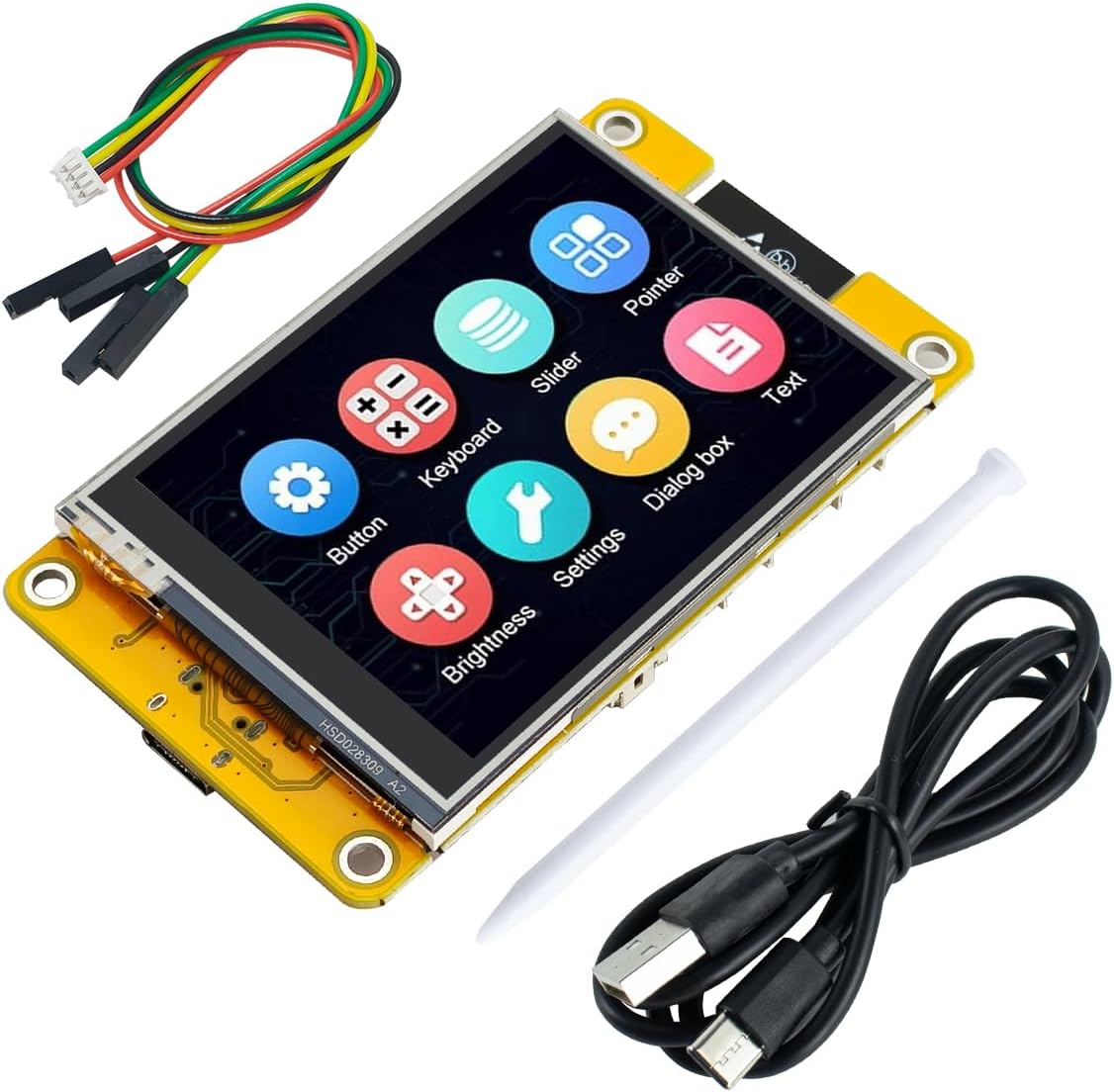
Wiring an ESP32 to a separate SPI display and touch controller works, but it’s fiddly and takes up a breadboard. Integrated display boards put the ESP32, the screen, the touch controller and usually an SD card slot, a speaker output and USB on one PCB, so you can flash a demo and have a working touchscreen in minutes. The community favourite is the ESP32-2432S028R, better known as the Cheap Yellow Display (CYD) after its yellow PCB, with a huge library of open-source projects.
This guide covers 11 boards in three groups: the classic CYD family (original ESP32, resistive touch, 2.8 to 3.5 inches), ESP32-S3 capacitive upgrades with more memory and faster graphics, and large and round HMI panels for wall dashboards and rotary controllers. If you’d rather wire your own screen to a separate board, see our displays for ESP32 guide.
💡 Before you buy: Resistive touch (classic CYD) needs a firm press and supports a single touch point, but works with a stylus or gloves. Capacitive touch (most ESP32-S3 boards) feels like a phone and supports multi-touch. For smooth LVGL interfaces, an ESP32-S3 with PSRAM makes a big difference, and the large 5- and 7-inch RGB-parallel panels need it. Those big panels also use most of the chip’s GPIOs, leaving few free for sensors.
⚡ Quick Comparison: All 11 Boards
| Board | Chip | Screen / Touch | Best For | Buy |
|---|
| 🥇 ESP32-2432S028R (CYD) | ESP32 | 2.8″ 240×320, resistive | Best Overall | Buy Here → |
| 🏅 Hosyond ESP32-S3 2.8″ IPS | ESP32-S3 | 2.8″ 240×320 IPS, capacitive | Best CYD Upgrade | Buy Here → |
| 📦 ELEGOO 2.8″ 2-Pack | ESP32 | 2.8″ ILI9341, resistive | Two-Board Value | Buy Here → |
| 🟦 Hosyond 2.8″ ESP32 | ESP32 | 2.8″ ILI9341, resistive | Most Reviewed CYD Clone | Buy Here → |
| 📱 Hosyond 3.5″ ESP32 | ESP32-32E | 3.5″ 320×480 ST7796U, resistive | Bigger Classic Screen | Buy Here → |
| 🌊 Waveshare ESP32-S3 2.8″ | ESP32-S3 | 2.8″, 5-point capacitive | Best Documented Small Panel | Buy Here → |
| 🖥️ ELECROW 5″ HMI | ESP32-S3 (N4R8) | 5″ 800×480 RGB, touch, case | Mid-Size Dashboards | Buy Here → |
| 📺 ELECROW 7″ HMI | ESP32-S3 (N4R8) | 7″ 800×480 RGB, touch, case | Wall Panels | Buy Here → |
| 🔲 Waveshare ESP32-S3 7″ | ESP32-S3 | 7″ 800×480, 5-point capacitive | Capacitive 7-Inch | Buy Here → |
| 🎛️ ELECROW 2.1″ Rotary | ESP32-S3 | 2.1″ 480×480 round IPS, knob + touch | Rotary Controllers | Buy Here → |
| ⚫ Waveshare 1.75″ AMOLED Round | ESP32-S3 | 1.75″ 466×466 AMOLED, touch | Best Picture Quality | Buy Here → |
Specs come from the live Amazon listings. Elecrow lists one combined review count across its display sizes.
🏆 Detailed Reviews: The CYD Family
🥇 BEST OVERALL
ESP32-2432S028R “Cheap Yellow Display”
⭐ 4.5/5 · The Original CYD
Buy on Amazon →

The ESP32-2432S028R (about 4.5 stars from 114 ratings) is the board that started the trend. It combines a classic dual-core ESP32, a 2.8-inch 240×320 TFT with resistive touch, an SD card slot, an RGB LED, a light sensor and a speaker connector on one yellow PCB. Its real strength is the community: the open-source “CYD” project collection has pinouts, sample code and ready-made firmware for weather stations, Home Assistant dashboards, crypto tickers, games and more, in Arduino, ESP-IDF, LVGL and ESPHome. It’s the cheapest way to get a working ESP32 touchscreen, though the original ESP32 has no PSRAM on this board, so keep LVGL interfaces simple. 19 were in stock when we checked.
✅ Pros- Everything on one board
- Massive project library
- SD, speaker, RGB LED
- Very affordable
❌ Cons- Resistive, single touch
- No PSRAM
- Few free GPIOs
🎯 Verdict: The ESP32 touchscreen every maker should own.
👉 Check Price on Amazon →
🏅 BEST CYD UPGRADE
Hosyond ESP32-S3 2.8″ IPS Capacitive Touchscreen
⭐ 4.2/5 · Capacitive Touch, 16 MB Flash
Capacitive
PHONE-LIKE TOUCH
If you like the CYD idea but want a nicer screen, this ESP32-S3 version (about 4.2 stars from 90 ratings) keeps the 2.8-inch, 240×320 size and upgrades almost everything else: an IPS panel with wide viewing angles and 262K colours, capacitive touch that responds to a light tap, and 16 MB of flash on the faster LX7 cores. The ESP32-S3 also adds native USB and vector instructions that help with graphics. Note that libraries and pinouts written for the original CYD won’t work unchanged, so use the vendor’s examples as your starting point.
✅ Pros- IPS + capacitive touch
- ESP32-S3, 16 MB flash
- Same compact size
- Native USB
❌ Cons- Not CYD code compatible
- Smaller community
- Still a small screen
🎯 Verdict: The CYD form factor with a modern chip and capacitive touch.
👉 Check Price on Amazon →
📦 BEST TWO-BOARD VALUE · ⭐ 4.3/53. ELEGOO 2-Pack ESP32 2.8-Inch Touch Displays
ESP32 · 240×320 ILI9341 · resistive touch · USB-C · two boards
Buy Here →
ELEGOO’s 2-pack (about 4.3 stars from 95 ratings) gives you two CYD-style ESP32 boards with a 2.8-inch ILI9341 screen, resistive touch and USB-C. Two boards make sense for touchscreen projects: one for a permanent dashboard and one for experiments, or a pair for a two-room setup. ELEGOO’s tutorials are aimed at beginners, which helps if this is your first display project.
✅ Pros: Two boards; USB-C; beginner tutorials.
❌ Cons: Resistive touch; no PSRAM.
🎯 Verdict: The best value if you want two CYD-style boards.
🟦 MOST REVIEWED CYD CLONE · ⭐ 4.1/54. Hosyond 2.8″ ESP32 Resistive Touch Display
ESP32 · 240×320 ILI9341 · resistive touch · Wi-Fi + Bluetooth
Buy Here →
Hosyond’s 2.8-inch ESP32 board (about 4.1 stars from 256 ratings, shared with its 3.5-inch sibling) follows the same CYD recipe of an ESP32, an ILI9341 screen and resistive touch, and it’s one of the most widely sold versions on Amazon. It’s a good alternative when the original listing is out of stock. CYD clones can differ in small details such as the display driver or touch pins between batches, so if a CYD example shows a blank or mirrored screen, check the vendor’s pin and driver settings first. Only 10 were in stock when we checked.
✅ Pros: Widely sold; CYD-style; affordable.
❌ Cons: Batch variations; low stock.
🎯 Verdict: A solid CYD alternative with a big review base.
📱 BIGGER CLASSIC SCREEN · ⭐ 4.1/55. Hosyond 3.5″ ESP32 Touch Screen Display
ESP32-32E · 3.5″ 320×480 · ST7796U driver · resistive touch · 4 MB flash
Buy Here →
For more screen area without changing chips, this 3.5-inch, 320×480 board pairs an ESP32-32E module with an ST7796U display and resistive touch. The extra space makes room for bigger buttons and more data on one page, which is better for wall controls and status screens. The trade-off is that the original ESP32 is driving twice as many pixels as a 2.8-inch CYD, so full-screen redraws are slower; design interfaces that update only the changing areas. 16 were in stock when we checked.
✅ Pros: 3.5″ screen; classic ESP32 support; affordable.
❌ Cons: Slower full redraws; resistive touch.
🎯 Verdict: The bigger classic ESP32 touchscreen for simple dashboards.
🖥️ Detailed Reviews: ESP32-S3 HMI Panels
🌊 BEST DOCUMENTED SMALL PANEL · ⭐ 4.2/56. Waveshare ESP32-S3 2.8″ Capacitive Touch Display
ESP32-S3 · 2.8″ · 5-point capacitive touch · multiple peripheral interfaces
Buy Here →
Waveshare’s ESP32-S3 2.8-inch board (about 4.2 stars from 66 ratings) has 5-point capacitive touch and broken-out peripheral interfaces, and its biggest advantage is Waveshare’s wiki: schematics, pin tables and working Arduino, ESP-IDF and LVGL examples for each board. That documentation saves hours compared with no-name displays. It’s a strong choice for a compact capacitive controller you’ll actually program yourself. 17 were in stock when we checked.
✅ Pros: Multi-touch; excellent wiki and examples.
❌ Cons: Costs more than CYD clones.
🎯 Verdict: The best-documented small ESP32-S3 touchscreen.
🖥️ BEST MID-SIZE DASHBOARD · ⭐ 3.7/57. ELECROW 5″ ESP32-S3 HMI Display
ESP32-S3-WROOM-1-N4R8 · 5″ 800×480 RGB TFT · touch · acrylic case
Buy Here →
Elecrow’s CrowPanel HMI displays are built for dashboards. The 5-inch, 800×480 model uses an ESP32-S3-WROOM-1-N4R8 with 8 MB of PSRAM to drive an RGB-parallel panel, and it ships in an acrylic case so it’s presentable straight away. Elecrow supports LVGL with SquareLine Studio examples, and it’s popular for Home Assistant control panels. Elecrow’s 3.7-star average is shared across its range and reflects mixed experiences with documentation and touch calibration, so plan some setup time. 12 were in stock when we checked.
✅ Pros: 800×480; PSRAM; case included.
❌ Cons: Mixed reviews; few free GPIOs.
🎯 Verdict: A cased 5-inch ESP32-S3 panel for dashboards.
📺 BEST WALL PANEL · ⭐ 3.7/58. ELECROW 7″ ESP32-S3 HMI Display
ESP32-S3-WROOM-1-N4R8 · 7″ 800×480 RGB TFT · touch · acrylic case
Buy Here →
The 7-inch CrowPanel has the same ESP32-S3 N4R8 and 800×480 resolution as the 5-inch, on a larger panel that reads well from across a room. That makes it the natural choice for a wall-mounted smart home panel, a 3D printer monitor or a workshop status board. At 800×480 the pixels are larger than on the 5-inch, so text looks slightly softer up close. Use LVGL with partial refresh for smooth animation. Only 5 were in stock when we checked.
✅ Pros: Big 7″ panel; PSRAM; case included.
❌ Cons: Low stock; mixed reviews.
🎯 Verdict: The ESP32-S3 panel for wall-mounted dashboards.
🔲 BEST CAPACITIVE 7-INCH · ⭐ 3.8/59. Waveshare ESP32-S3 7″ Capacitive Touch LCD
ESP32-S3 · 7″ 800×480 · 5-point capacitive touch · up to 240 MHz
Buy Here →
Waveshare’s 7-inch ESP32-S3 board (about 3.8 stars from 179 ratings) is the most reviewed large panel here, with an 800×480 screen and 5-point capacitive touch. Like the Elecrow, it’s a bare board rather than a cased unit, but it comes with Waveshare’s detailed wiki and examples. It’s well suited to developers building LVGL interfaces who want capacitive multi-touch on a big screen. Only 3 were in stock when we checked, so check availability first. If you need even more graphics power, our ESP32-P4 guide covers MIPI-DSI HMI boards.
✅ Pros: Capacitive multi-touch; good docs; most reviews.
❌ Cons: Very low stock; no case.
🎯 Verdict: The developer’s 7-inch capacitive ESP32-S3 panel.
🎛️ Detailed Reviews: Round Displays
🎛️ BEST ROTARY CONTROLLER · ⭐ 4.0/510. ELECROW 2.1″ ESP32-S3 Rotary Knob Display
ESP32-S3 · 2.1″ 480×480 round IPS · capacitive touch + rotary knob with press
Buy Here →
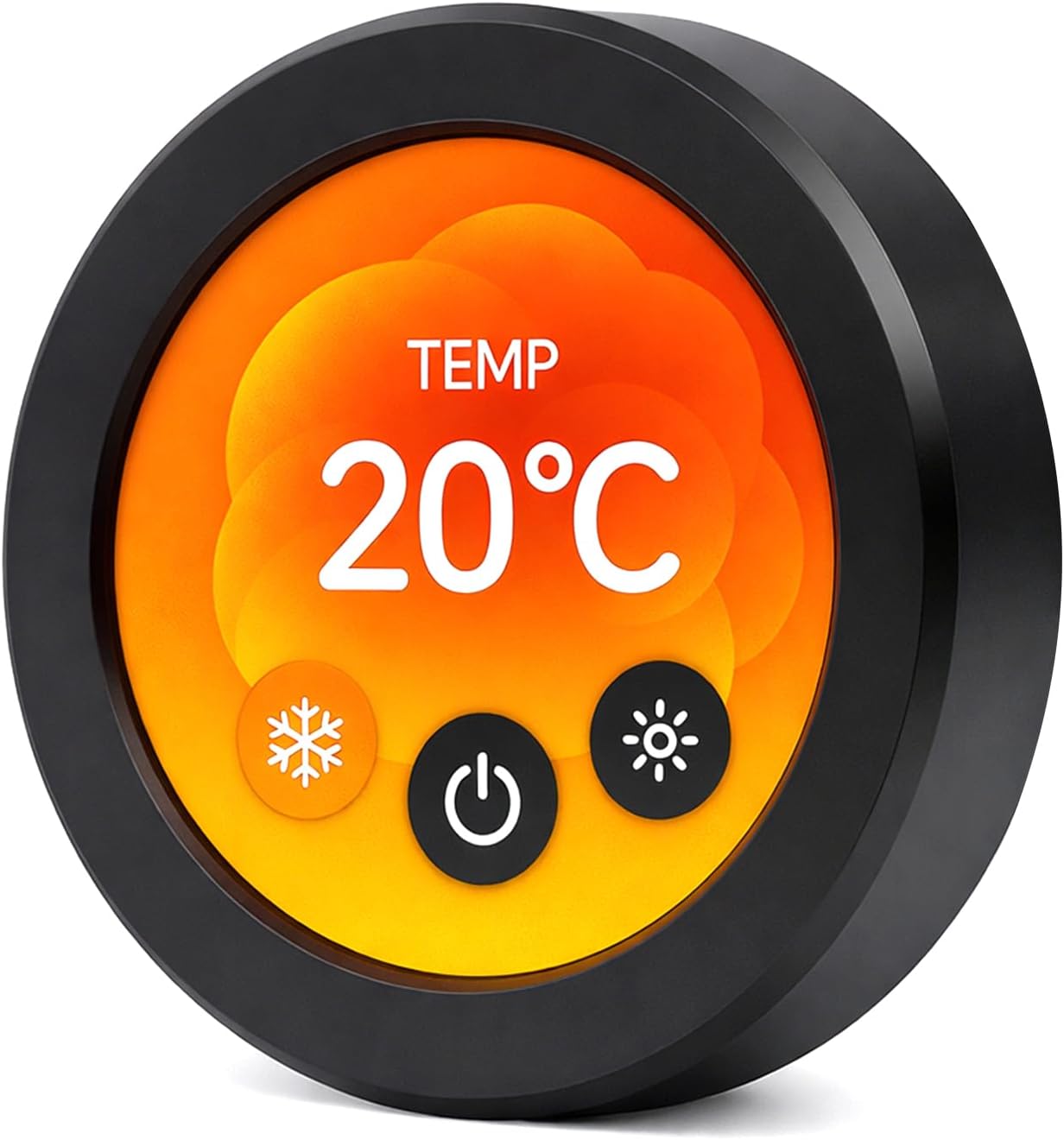
Rotary-knob displays are ideal for thermostats, dimmers, volume controls and smart home “one-knob” remotes. Elecrow’s 2.1-inch, 480×480 round IPS display (about 4.0 stars from 100 ratings) is surrounded by a rotating knob that also presses, and it adds capacitive touch on the screen, all driven by an ESP32-S3. Turning to adjust and pressing to confirm is faster and more satisfying than tapping a small screen. M5Stack’s Dial is a similar idea; see our pocket and wearable kits guide.
✅ Pros: Knob + touch; sharp round IPS; ESP32-S3.
❌ Cons: Round UI design takes effort.
🎯 Verdict: The ESP32-S3 rotary display for knob-style controllers.
⚫ BEST PICTURE QUALITY · ⭐ 4.9/511. Waveshare ESP32-S3 1.75″ AMOLED Round Touch Display
ESP32-S3 · 1.75″ 466×466 AMOLED · QSPI · touch · dual digital microphones
Buy Here →
The highest-rated board in this guide (about 4.9 stars from 53 ratings), Waveshare’s 1.75-inch round AMOLED has a sharp 466×466 resolution with true blacks and vivid colour that TFTs can’t match. It runs on an ESP32-S3 over a fast QSPI interface, adds touch, and includes dual digital microphones for voice projects. It’s perfect for smartwatch-style faces, desk gadgets, AI voice assistants with an animated face, or a premium status display. AMOLED’s black background also saves power when most of the screen is dark.
✅ Pros: AMOLED quality; top rating; dual mics.
❌ Cons: Small; AMOLED can burn in with static images.
🎯 Verdict: The most beautiful small ESP32 display you can buy.
🛒 Which Display Board Should You Buy?
🎓
First touchscreen project
The original CYD, or the ELEGOO 2-pack.
👆
Phone-like touch, small size
Hosyond ESP32-S3 2.8″ or Waveshare 2.8″.
🏠
Wall-mounted smart home panel
ELECROW 7″ (cased) or Waveshare 7″ (capacitive).
🎛️
Thermostat or dimmer knob
The ELECROW 2.1″ Rotary.
⌚
Watch faces and desk gadgets
The Waveshare 1.75″ AMOLED.
❓ Frequently Asked Questions
What is the Cheap Yellow Display?
“Cheap Yellow Display” (CYD) is the community nickname for the ESP32-2432S028R, an ESP32 board with a 2.8-inch resistive touchscreen on a yellow PCB. A large open-source community maintains pinouts, examples and projects for it, which is why it’s so popular.
My CYD shows a white or mirrored screen. What’s wrong?
This is almost always a driver or configuration mismatch. CYD clones sometimes use a different display driver variant or touch pin mapping, so check the vendor’s settings and try the alternative driver or rotation options in your graphics library configuration.
Can I use these with ESPHome and Home Assistant?
Yes. ESPHome supports common display drivers, touchscreens and LVGL, and the CYD has well-known community configurations. The large ESP32-S3 panels are popular as Home Assistant wall controllers, though RGB-parallel panels need more careful configuration.
Why does PSRAM matter for displays?
A full 800×480 frame buffer in 16-bit colour is about 750 KB, which is more than the ESP32-S3’s internal RAM. PSRAM holds the frame buffers that large RGB panels and smooth LVGL animations need. Small SPI screens like the CYD can work without it by drawing in smaller chunks.
How do I mount one on a wall?
Cased panels like the Elecrow can sit on a stand or be screwed to a wall plate. For bare boards, use a 3D-printed frame or a project box with a cut-out window; our enclosures guide covers options. Powering from USB-C behind the wall plate keeps it tidy.
🏁 Final Verdict: Best ESP32 Touchscreen Display Boards
Our top recommendations:
🏅 Best CYD Upgrade: Hosyond ESP32-S3 2.8″ IPS
Buy Here →🎛️ Best Rotary: ELECROW 2.1″ Rotary Knob
Buy Here →⚫ Best Picture Quality: Waveshare 1.75″ AMOLED
Buy Here →Start with the original Cheap Yellow Display: it’s cheap, it works, and the community projects will keep you busy for months. When you want a better screen and touch, step up to an ESP32-S3 capacitive board like the Hosyond or Waveshare 2.8-inch. For a wall-mounted dashboard, the 7-inch Elecrow or Waveshare panels are the ESP32-S3’s sweet spot, and for knobs and watch-style faces, the round rotary and AMOLED displays look fantastic. Then connect your display to live data with our ESP32 MQTT tutorial, explore more ESP32-S3 boards in our ESP32-S3 guide, and compare chips in our ESP32 chip comparison hub.
💬 Built something with a CYD? Tell us about your project in the comments below, and we’ll feature the best ones in this guide.
All Amazon links above use our affiliate tag (esp32tutorials-20). Purchasing through them supports esp32tutorials.com at no extra cost to you. Prices and availability change frequently, so always confirm the current price on Amazon before buying.
We are a team of experienced Embedded Software Developers with skills in developing Embedded Linux, RTOS, and IoT products from scratch to deployment with a demonstrated history of working in the embedded software industry. Contact us for your projects: admin@esp32tutorials.com