⚠️ Affiliate Disclosure: This post contains Amazon affiliate links. If you purchase through our links, we may earn a small commission at no extra cost to you. Every product below was checked against its live Amazon listing before publishing. Prices change often, so we don’t list them here. Tap any Buy Here button to see the current price on Amazon.
Ultimate Buying Guide
⌚ Best ESP32 Pocket and Wearable Dev Kits
Finished, enclosed ESP32 devices you can carry, wear or stick on the fridge: a pocket computer with a keyboard, a voice-ready stick, a 5-inch tablet, tiny Atom cubes, a smart rotary knob and two programmable smartwatches. 10 verified picks for makers who want a polished device without designing a case.
✅ 10 Devices Compared
✅ Verified Amazon ASINs
✅ Arduino, UiFlow2 & ESP-IDF
✅ Honest Pros & Cons
🧭
Comparing ESP32 chips? Our
ESP32 chip comparison hub compares every ESP32 chip side by side and links to all of our ESP32 buying guides.
Bare dev boards are great on a breadboard, but they’re not something you’d hand to a friend, wear on your wrist or leave on a desk. A growing family of enclosed ESP32 devices fills that gap: they arrive in a finished case with a screen, buttons, battery and sensors already inside, and they’re still fully programmable in Arduino, ESP-IDF, MicroPython or M5Stack’s block-based UiFlow2.
This guide compares 10 of them: M5Stack’s pocket computer, stick, tablet, Atom cubes, rotary knob and starter kit, and two ESP32-S3 smartwatch development boards from LILYGO and Waveshare. They’re ideal for remote controls, Home Assistant panels, wearable sensors, portable tools and teaching.
💡 Before you buy: These are development devices, not consumer gadgets. The watch boards in particular don’t come with finished smartwatch software; you write or flash the firmware yourself. M5Stack devices share the Grove (HY2.0-4P) connector for plug-in sensor units, which makes expansion easy. Check whether a battery is included: some listings, like Waveshare’s watch board, ship without one.
⚡ Quick Comparison: All 10 Devices
| Device | Chip | Key Feature | Best For | Buy |
|---|
| 🥇 M5Stack Cardputer Adv | ESP32-S3 | Keyboard + screen, card-sized | Best Overall | Buy Here → |
| 🏅 M5Stack StickS3 | ESP32-S3 (8 MB PSRAM) | Mic, speaker, IR, magnetic | Pocket Remote & Voice | Buy Here → |
| 📱 M5Stack Tab5 | ESP32-P4 + C6 | 5″ 1280×720 touch, camera, battery | Wall Panels & Edge AI | Buy Here → |
| 🧊 M5Stack AtomS3 Lite | ESP32-S3 | 24 × 24 mm, Grove, IR | Tiny S3 Node | Buy Here → |
| 🟦 M5Stack Atom Lite | ESP32 | 24 × 24 mm, Grove, IR, RGB | Budget ESPHome Node | Buy Here → |
| 🦋 M5Stack NanoC6 | ESP32-C6 | Wi-Fi 6, Thread, Zigbee, IR | Tiny Matter Node | Buy Here → |
| 🎛️ M5Stack Dial v1.1 | ESP32-S3 | Rotary knob, 1.28″ round touch | Smart Home Knob | Buy Here → |
| ⌚ LILYGO T-Watch-S3 Plus | ESP32-S3 | GPS, IMU, mic, 940 mAh battery | Programmable Watch | Buy Here → |
| ✨ Waveshare ESP32-S3 2.06″ AMOLED Watch | ESP32-S3 | 410×502 AMOLED touch, dual mics | Watch UI Projects | Buy Here → |
| 🎒 M5Stack M5GO IoT Starter Kit v2.7 | ESP32 | Core + 6 sensor/actuator units | Classrooms | Buy Here → |
Specs come from the live Amazon listings and manufacturer pages. Several M5Stack items had low stock when we checked, so availability may change.
🔍 What to Look for
🖥️
Screen and Input
Do you need a keyboard (Cardputer), a touch display (Tab5, watches, Dial), a rotary knob (Dial) or just a button (Atom)? Input decides what kind of device you can build.
🔋
Battery
Portable devices need a built-in battery and charging. Check the listing: some include a battery, others (like the Waveshare watch board) need you to add one.
🧩
Expansion
M5Stack’s Grove ports accept hundreds of plug-in sensor and actuator units with no soldering. Hat and stamp connectors add more on some models.
💻
Software
M5Stack supports Arduino, ESP-IDF, PlatformIO, MicroPython and its block-based UiFlow2, which is great for beginners and teaching. Most M5Stack devices also have ESPHome configurations.
📡
Chip and Radio
ESP32-S3 models suit displays and voice; the ESP32-C6 NanoC6 adds Thread and Zigbee for Matter; the ESP32-P4 Tab5 handles high-resolution touch UIs and cameras.
🏆 Detailed Reviews: ESP32 Pocket and Wearable Devices
🥇 BEST OVERALL
M5Stack Cardputer Adv (ESP32-S3)
⭐ 4.6/5 · A Programmable Computer for Your Pocket
Stamp-S3A
ESP32-S3FN8 CORE
Keyboard
FULL QWERTY-STYLE
Screen
BUILT-IN COLOUR TFT

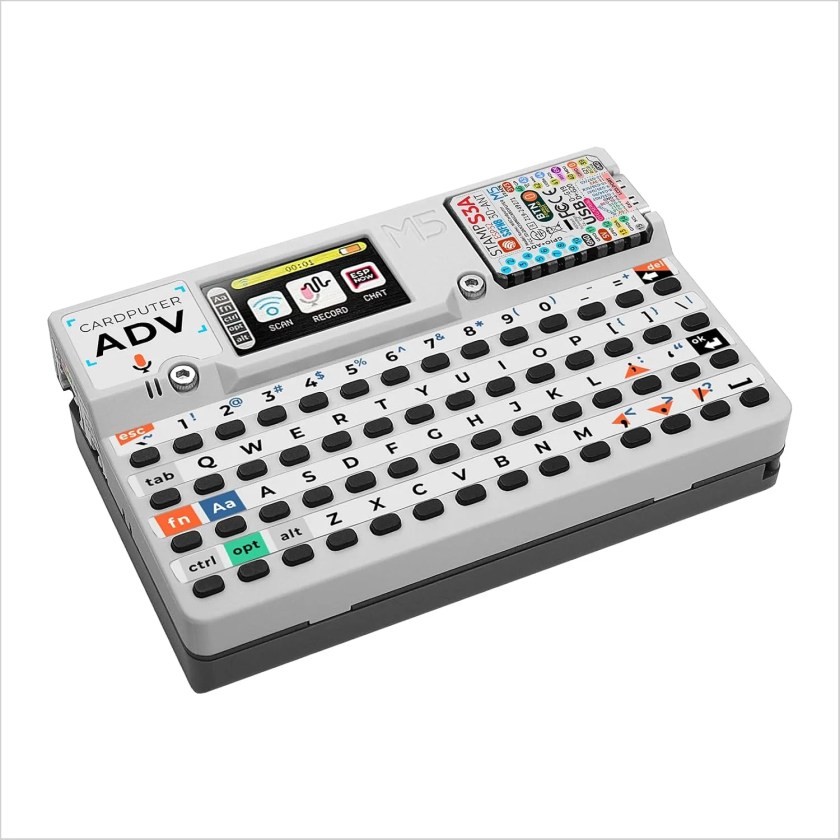
The Cardputer is the most fun ESP32 device you can buy: a credit-card-sized computer with a built-in keyboard and colour screen, powered by M5Stack’s Stamp-S3A module (an ESP32-S3FN8). This Adv version is the best-reviewed device in this guide (about 4.6 stars from 104 ratings). Because you can type on it, it’s perfect for things no other ESP32 board can do well: a pocket Wi-Fi scanner for your own network, a portable serial terminal, a MicroPython REPL you can use away from a PC, a notes app, a BLE remote or a retro game. It supports Arduino, ESP-IDF and UiFlow2, has a Grove port for sensors, and a community of open-source firmware and apps. Accessory caps, such as M5Stack’s LoRa cap, expand it further.
✅ Pros- Keyboard + screen + battery
- Truly pocketable
- Big open-source community
- Best-reviewed device here
❌ Cons- Small screen
- Tiny keys
- No PSRAM on the core module
🎯 Verdict: The most versatile and enjoyable pocket ESP32 device.
👉 Check Price on Amazon →
🏅 BEST POCKET REMOTE AND VOICE STICK
M5Stack StickS3 (ESP32-S3)
⭐ 4.2/5 · The New-Generation M5Stick
Buy on Amazon →
The M5Stick has long been the go-to “ESP32 in a candy bar”, and the StickS3 brings it up to date with an ESP32-S3, 8 MB flash and 8 MB PSRAM (about 4.2 stars from 24 ratings). It adds an ES8311 audio codec, a sensitive MEMS microphone and an AW8737 amplifier for voice-assistant projects, plus a built-in IR transmitter and receiver that can learn and replay remote-control codes for your TV or air conditioner. Its magnetic body sticks to the fridge or a metal desk, and a Hat2 bus and Grove port add expansion. It supports Arduino, UiFlow2, ESP-IDF and PlatformIO. M5Stack’s older StickC Plus2 wasn’t sold on Amazon when we checked, so this is the stick to buy. Only 5 were in stock.
✅ Pros- ESP32-S3 with 8 MB PSRAM
- Voice-ready audio
- IR learn and send
- Magnetic, pocket sized
❌ Cons- Small screen
- New, fewer reviews
- Low stock
🎯 Verdict: The best pocket ESP32 for remotes, voice and quick IoT gadgets.
👉 Check Price on Amazon →
📱 BEST TABLET-STYLE PANEL · ⭐ 4.6/53. M5Stack Tab5 (ESP32-P4) with Battery
ESP32-P4 dual-core 360 MHz · 16 MB flash · 32 MB PSRAM · ESP32-C6 Wi-Fi 6 · 5″ 1280×720 IPS touch · 2 MP MIPI-CSI camera
Buy Here →
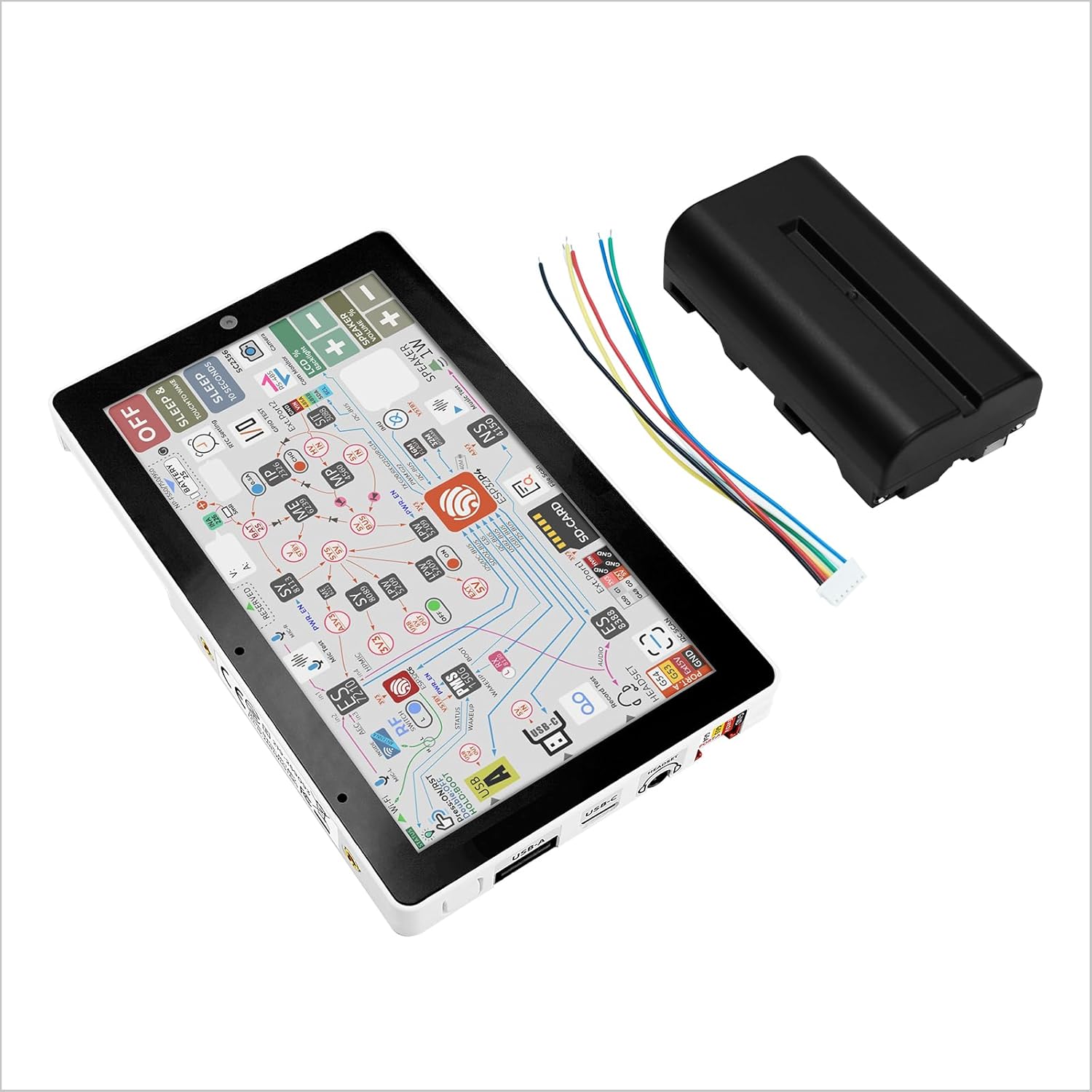
The Tab5 is an ESP32 tablet: a 5-inch 1280×720 IPS touchscreen driven by the high-performance ESP32-P4 with 32 MB PSRAM, an ESP32-C6 co-processor for Wi-Fi 6, a 2 MP camera and a battery (this listing includes it). That makes it a ready-made Home Assistant wall panel, a factory HMI, a video-doorbell display or an edge-AI demo device with face recognition. It has about 4.6 stars from 29 ratings, but only 2 were in stock when we checked. For more P4 hardware, see our ESP32-P4 buying guide.
✅ Pros: 5″ HD touch; P4 power; camera; battery included.
❌ Cons: Pricier; P4 ecosystem still maturing; low stock.
🎯 Verdict: The most capable finished ESP32 touch panel.
🧊 BEST TINY ESP32-S3 NODE · ⭐ 4.8/54. M5Stack AtomS3 Lite
ESP32-S3FN8 · 8 MB flash · 3D antenna · 24 × 24 × 9.5 mm · M2 mounting hole · Grove port
Buy Here →
At just 24 × 24 × 9.5 mm, the AtomS3 Lite is a finished ESP32-S3 node smaller than a sugar cube, and the best-rated device in this guide (about 4.8 stars from 28 ratings). It has an ESP32-S3FN8 with 8 MB flash, a 3D antenna, a programmable button and RGB LED, and a Grove port, plus an M2 screw hole for mounting. Plug in a sensor unit, flash ESPHome, and you have a tidy Home Assistant node in minutes. Only 5 were in stock when we checked.
✅ Pros: Tiny; ESP32-S3; Grove; excellent rating.
❌ Cons: No screen or PSRAM; few GPIOs; low stock.
🎯 Verdict: The neatest tiny ESP32-S3 for plug-in sensor nodes.
🟦 BEST BUDGET ESPHOME NODE · ⭐ 4.4/55. M5Stack Atom Lite
ESP32 · 24 × 24 mm · programmable button · RGB LED · IR LED · Grove port
Buy Here →
The original Atom Lite uses the classic ESP32 in the same 24 × 24 mm case, and it has the largest review base of M5Stack’s tiny devices here (about 4.4 stars from 72 ratings). It’s a favorite ESPHome Bluetooth proxy, because the original ESP32 supports Bluetooth Classic and has a strong BLE radio, and its IR LED makes it a simple Wi-Fi-to-IR blaster for TVs and air conditioners. Add sensors through the Grove port. Only 5 were in stock when we checked; M5Stack also sells a separate Atom Lite listing (B0FB94ZFXY).
✅ Pros: Cheap; tiny; great Bluetooth proxy; IR LED.
❌ Cons: Older chip; no screen; low stock.
🎯 Verdict: The budget pick for ESPHome Bluetooth proxies and IR blasters.
🦋 BEST TINY MATTER NODE · ⭐ 4.7/56. M5Stack NanoC6
ESP32-C6 RISC-V · Wi-Fi 6, Zigbee, Thread and Matter · IR emitter · RGB LED · Grove port · ceramic antenna
Buy Here →
M5Stack calls the NanoC6 its smallest ESP32 RISC-V kit, and it brings the ESP32-C6‘s Wi-Fi 6, Thread and Zigbee radios to an enclosed device you can stick anywhere (about 4.7 stars from 30 ratings). That makes it an easy way to build a Matter-over-Thread sensor or a Zigbee end device: add a sensor via the Grove port, and use the built-in IR emitter and RGB LED for status or remote control. Only 6 were in stock when we checked. Our ESP32-C6 buying guide and Matter overview explain the protocols.
✅ Pros: Thread + Zigbee + Wi-Fi 6; tiny; Grove; IR.
❌ Cons: No screen; limited I/O; low stock.
🎯 Verdict: The tiny enclosed device for Matter, Thread and Zigbee experiments.
🎛️ BEST SMART HOME KNOB · ⭐ 3.9/57. M5Stack Dial v1.1
Stamp-S3A ESP32-S3 · 8 MB flash · 1.28″ 240×240 round GC9A01 touch screen · rotary encoder · Wi-Fi
Buy Here →
The Dial is a smart rotary knob: turn the ring to dim lights, set a thermostat or scroll a volume level, and tap the 1.28″ round touch screen to switch modes. Inside is a Stamp-S3A ESP32-S3 with 8 MB flash, and the screen uses the familiar GC9A01 driver. It’s a popular base for Home Assistant knobs and industrial setpoint controls, and the round UI works well with LVGL. It has about 3.9 stars from 9 ratings, with 11 in stock. Our displays guide covers round GC9A01 screens in more depth.
✅ Pros: Knob + round touch; ESP32-S3; finished case.
❌ Cons: Few reviews; small screen.
🎯 Verdict: The ready-made ESP32 knob for smart home and setpoint control.
⌚ BEST PROGRAMMABLE WATCH · ⭐ 4.3/58. LILYGO T-Watch-S3 Plus
ESP32-S3 · Wi-Fi + BLE 5 · GPS · BMA423 accelerometer · RTC · microphone · MAX98357A audio · 940 mAh battery
Buy Here →
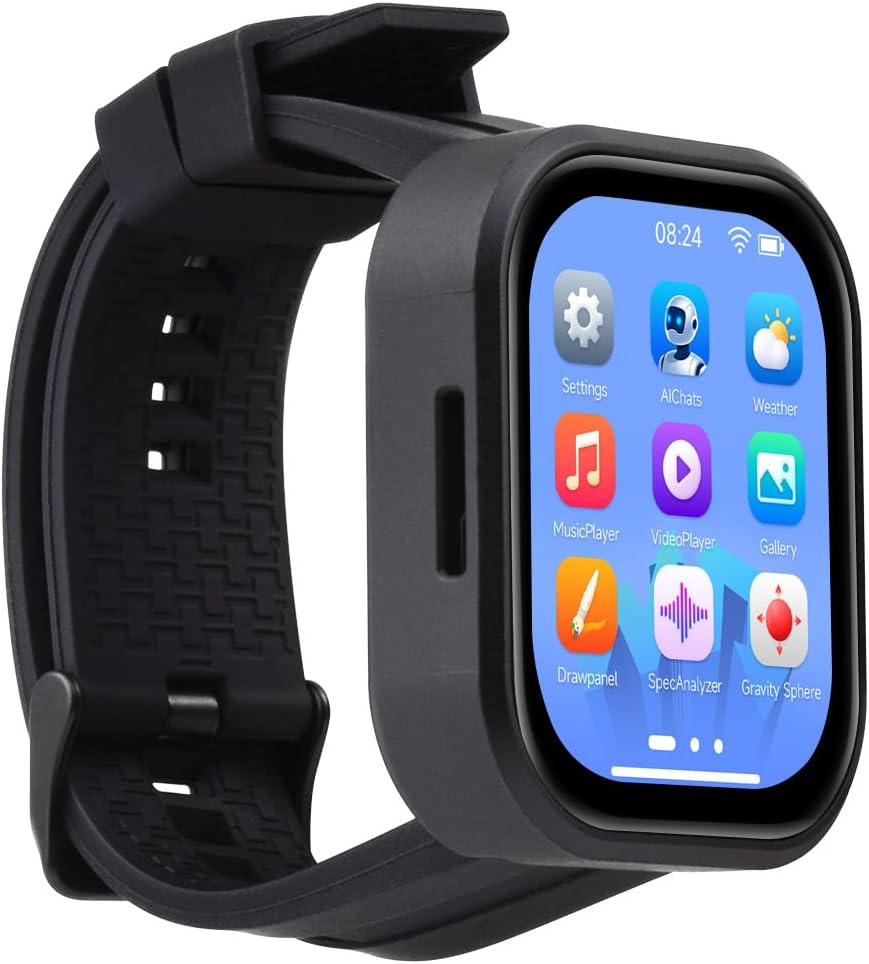
LILYGO’s T-Watch-S3 Plus is a genuinely wearable ESP32-S3 watch you program yourself. The Plus version adds GPS to the T-Watch-S3’s BMA423 accelerometer (for step counting and wrist gestures), RTC, microphone, MAX98357A audio amplifier, power monitoring and a 940 mAh battery. It works with Arduino, ESP-IDF, VS Code and MicroPython, and LILYGO’s GitHub library includes example watch faces and sensor demos. Build a GPS run tracker, a BLE notification display or a wrist-mounted Home Assistant remote. It has about 4.3 stars from only 4 ratings, with 18 in stock. LILYGO also sells a LoRa version (B0H4KZWJGQ).
✅ Pros: GPS + IMU + audio; battery included; open source.
❌ Cons: Very few reviews; you build the software.
🎯 Verdict: The most fully featured programmable ESP32 watch.
✨ BEST AMOLED WATCH BOARD · ⭐ 4.7/59. Waveshare ESP32-S3 2.06″ AMOLED Touch Watch Board
ESP32-S3 dual-core LX7 · 2.06″ 410×502 AMOLED touch (QSPI) · dual digital microphone array · battery not included
Buy Here →
If the watch face is the point, Waveshare’s board has the best screen here: a 2.06-inch 410×502 AMOLED touch display with deep blacks and vivid colour, driven over QSPI by an ESP32-S3. A dual digital microphone array supports voice commands. It’s about 4.7 stars from 10 ratings. Waveshare is clear that this is a DIY watch module, not a pre-configured smartwatch, and that this version doesn’t include a battery, so add a small LiPo and plan to write or flash your own firmware. It’s an excellent platform for LVGL watch UIs and wearable dashboards; Waveshare also sells versions with different accessories (for example B0FJQZ7SBG).
✅ Pros: Beautiful AMOLED; dual mics; strong rating.
❌ Cons: No battery; DIY software; few reviews.
🎯 Verdict: The ESP32 watch board to choose for the best-looking screen.
🎒 BEST FOR CLASSROOMS · ⭐ 4.2/510. M5Stack M5GO IoT Starter Kit v2.7
M5GO ESP32 core controller with screen · six plug-in expansion units (sensors, actuators, hub) · Grove connectors
Buy Here →
For teaching, the M5GO starter kit pairs M5Stack’s M5GO core controller (an ESP32 with a screen, buttons and battery in a finished case) with six plug-in expansion units, including sensors, actuators and a hub, all connected by Grove cables with no soldering or breadboards. Students can start in the block-based UiFlow2 editor and move on to MicroPython or Arduino on the same hardware. It has about 4.2 stars from 10 ratings, with 12 in stock. For a breadboard-style kit with more components, see our ESP32 starter kits guide.
✅ Pros: No wiring; finished controller; UiFlow2 for beginners.
❌ Cons: Original ESP32; fewer parts than breadboard kits.
🎯 Verdict: The tidiest no-wiring ESP32 kit for classrooms.
🛒 Which Device Should You Get?
⌨️
A gadget you can type on?
The Cardputer Adv.
📺
IR remote or voice gadget?
The StickS3, or an Atom Lite as a fixed IR blaster.
🏠
Home Assistant wall panel?
The Tab5, or the Dial for a knob-style control.
📍
Tiny sensor node?
AtomS3 Lite for Wi-Fi, NanoC6 for Thread, Zigbee and Matter.
⌚
Something to wear?
T-Watch-S3 Plus for features, Waveshare AMOLED for the screen.
🎓
Teaching a class?
The M5GO starter kit with UiFlow2.
❓ Frequently Asked Questions
Can I program M5Stack devices with ESP-IDF instead of UiFlow?
Yes. M5Stack devices are standard ESP32 hardware, so they work with ESP-IDF, Arduino (via M5Stack’s board package and M5Unified library), PlatformIO and MicroPython. UiFlow2 is optional and handy for beginners. M5Stack publishes pin maps and schematics for each device. See our ESP-IDF getting started tutorial.
Can these work with Home Assistant?
Yes. ESPHome has configurations for most M5Stack devices, including the Atom series, StickS3 and Dial, so you can turn them into buttons, knobs, IR blasters, Bluetooth proxies or sensor nodes. The Tab5 and watch boards are typically programmed with LVGL to show Home Assistant data from its API or MQTT.
Are the ESP32 watches ready to use like a smartwatch?
No. They’re development boards shaped like watches. LILYGO and Waveshare provide example firmware and libraries, but notifications, watch faces and apps are things you build or flash from open-source projects. Battery life is also shorter than commercial smartwatches unless you use deep sleep carefully.
What is the Grove connector?
Grove (HY2.0-4P on M5Stack) is a 4-pin plug carrying power, ground and two signals, usually I2C. M5Stack and Seeed sell hundreds of sensor, relay, motor and display units with matching connectors, so you can expand a device without soldering.
Which of these has the best audio for a voice assistant?
The StickS3 has a proper audio codec, mic and amplifier, making it the best voice pick here. For dedicated voice satellites and far-field microphones, see our ESP32 audio and voice assistant guide, which also covers the M5Stack CoreS3.
🏁 Final Verdict: Best ESP32 Pocket and Wearable Devices
The right finished ESP32 device for your idea:
🏅 Best Pocket Remote & Voice: M5Stack StickS3
Buy Here →⌚ Best Programmable Watch: LILYGO T-Watch-S3 Plus
Buy Here →For sheer versatility and fun, the M5Stack Cardputer Adv is the pocket ESP32 to buy, and the StickS3 is the best small gadget for IR remotes and voice. For finished smart-home controls, the Tab5 and Dial save you designing a case, while the AtomS3 Lite and NanoC6 are the tidiest tiny nodes. If you want something on your wrist, the T-Watch-S3 Plus is the most complete, and the Waveshare AMOLED board has the nicest screen. Start coding with our ESP-IDF installation guide, add connectivity with our MQTT tutorial, and compare chips in our ESP32 chip comparison hub.
💬 Building a pocket tool, a wall panel or a watch? Tell us what you have in mind in the comments below, and we’ll suggest the right ESP32 device.
All Amazon links above use our affiliate tag (esp32tutorials-20). Purchasing through them supports esp32tutorials.com at no extra cost to you. Prices and availability change frequently, so always confirm the current price on Amazon before buying.
We are a team of experienced Embedded Software Developers with skills in developing Embedded Linux, RTOS, and IoT products from scratch to deployment with a demonstrated history of working in the embedded software industry. Contact us for your projects: admin@esp32tutorials.com