⚠️ Affiliate Disclosure: This post contains Amazon affiliate links. If you purchase through our links, we may earn a small commission at no extra cost to you. Every product below was checked against its live Amazon listing before publishing. Prices change often, so we don’t list them here. Tap any Buy Here button to see the current price on Amazon.
🧭
Comparing ESP32 chips? Our
ESP32 chip comparison hub compares every ESP32 chip side by side and links to all of our ESP32 buying guides.
Ultimate Buying Guide
🖼️ Best Displays for ESP32
12 display modules that work well with ESP32 boards: tiny OLEDs, color TFTs, SPI touchscreens, a round display, e-paper panels, a character LCD, a dot matrix and an RGB LED matrix, with wiring and library tips for each. Verified Amazon links and honest verdicts throughout.
✅ 12 Displays Compared
✅ Verified Amazon ASINs
✅ Driver & Library Tips
✅ Honest Pros & Cons
Adding a display is usually the moment an ESP32 project starts to feel like a real device. A tiny OLED can show an IP address and a sensor reading, a color TFT can draw graphs and icons with LVGL, a touchscreen turns your board into a control panel, and an e-paper panel can show a weather forecast for months on a battery.
The challenge is choosing between dozens of near-identical modules with different driver chips, interfaces and voltages. This guide picks 12 well-reviewed displays that pair well with ESP32 boards, explains which driver chip and interface each uses, and gives you the library and wiring tips that save hours of debugging. If you’d rather have the screen built in, our board guides cover integrated display boards too.
💡 Before you buy: Check the driver chip (SSD1306, SH1106, ST7789, ILI9341, GC9A01 and so on), because it decides which library you use. I2C displays need only two data pins but are slow; SPI displays need four or more pins but refresh far faster, which matters for color TFTs. ESP32 GPIOs are 3.3 V: most modules here accept 3.3 V, but a few 5 V modules (LCD1602 backpacks, MAX7219, RGB matrices) need care with logic levels and power. For large color screens and LVGL, an ESP32 with PSRAM (such as an ESP32-S3 N16R8) gives you room for frame buffers.
⚡ Quick Comparison: All 12 Displays
| Display | Type / Size | Driver · Interface | Resolution | Best For | Buy |
|---|
| 🥇 Hosyond 0.96″ OLED (5-Pack) | Mono OLED, 0.96″ | SSD1306 · I2C | 128 × 64 | Best Overall | Buy Here → |
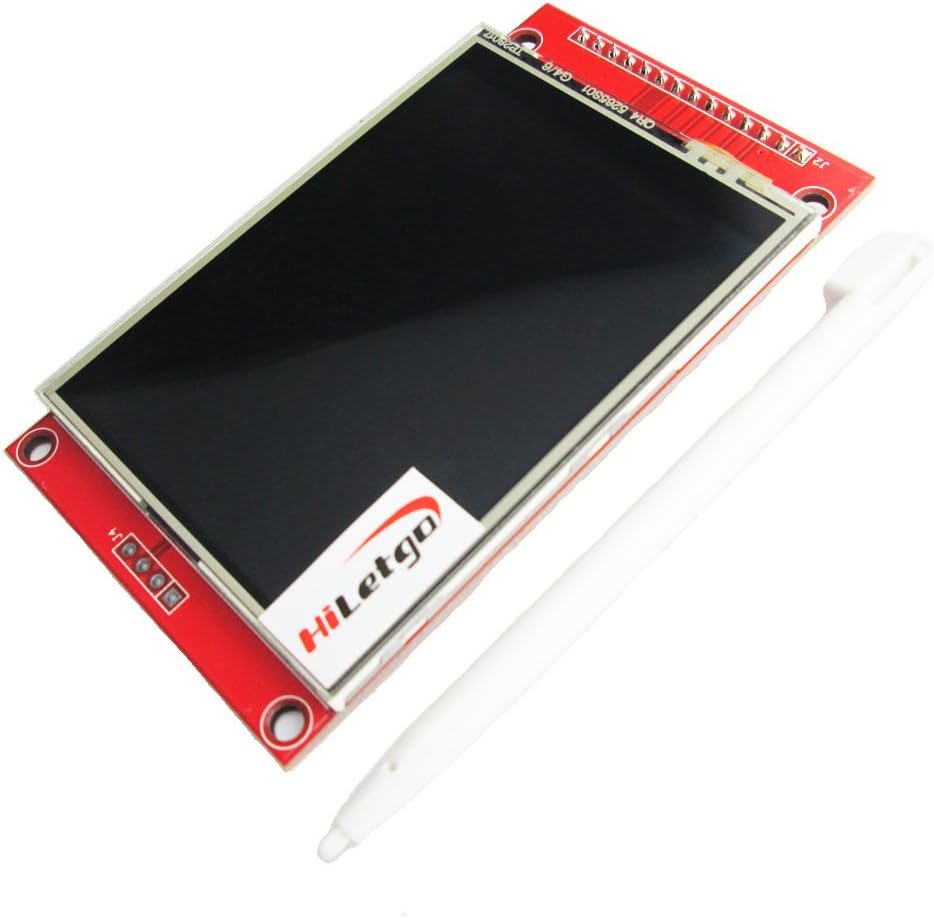
| 🏅 HiLetgo ILI9341 2.8″ Touch | Color TFT, 2.8″ | ILI9341 · SPI | 240 × 320 | Best Touchscreen | Buy Here → |
| 🔎 Hosyond 1.3″ OLED (5-Pack) | Mono OLED, 1.3″ | SH1106 · I2C | 128 × 64 | Larger OLED Readout | Buy Here → |
| 📏 HiLetgo 2.42″ OLED | Mono OLED, 2.42″ | SSD1309 · I2C or SPI | 128 × 64 | Readable From Afar | Buy Here → |
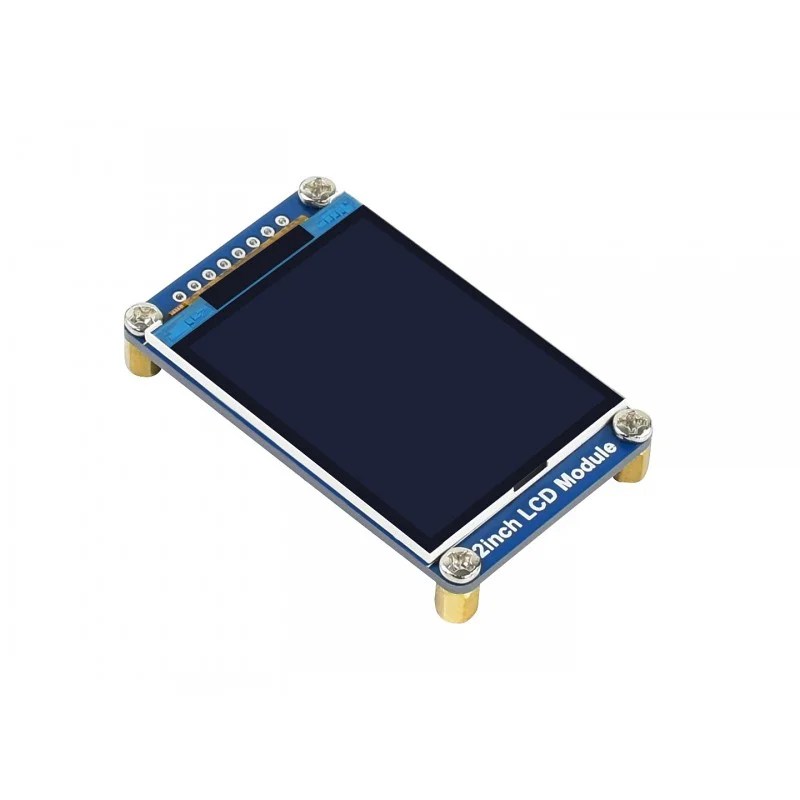
| 🎨 Waveshare 2″ IPS LCD | Color IPS TFT, 2″ | ST7789 · SPI | 240 × 320 | Small Color UI | Buy Here → |
| 🖐️ Hosyond 3.5″ Touch TFT | Color TFT, 3.5″ | ILI9488 · SPI | 480 × 320 | Larger Touch Panel | Buy Here → |
| ⭕ Teyleten 1.28″ Round (3-Pack) | Round IPS TFT, 1.28″ | GC9A01 · SPI | 240 × 240 | Gauges & Watches | Buy Here → |
| 📄 Waveshare 2.9″ E-Paper | E-ink, 2.9″ | SPI | 296 × 128 | Battery Labels & Badges | Buy Here → |
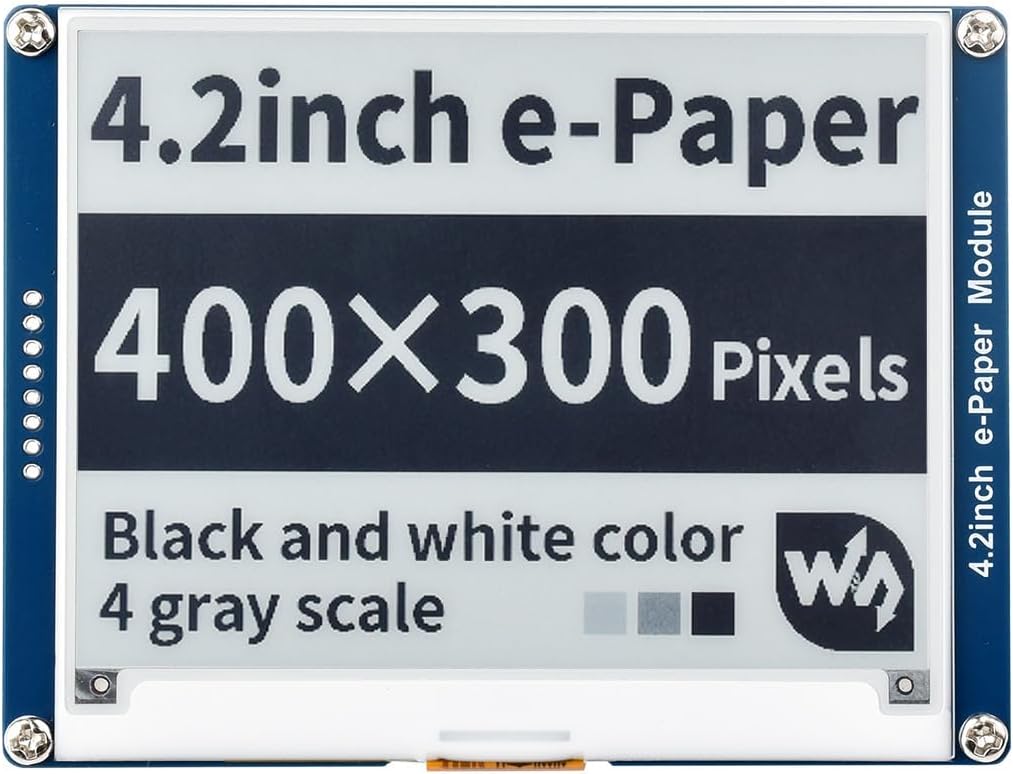
| 🌤️ Waveshare 4.2″ E-Paper | E-ink, 4.2″ | SPI | 400 × 300 | Weather Stations | Buy Here → |
| 🔤 SunFounder I2C LCD1602 | Character LCD, 16 × 2 | HD44780 + I2C backpack | 16 × 2 chars | Simple Text | Buy Here → |
| 🔴 MAX7219 4-in-1 Dot Matrix | LED matrix, 32 × 8 | MAX7219 · SPI | 32 × 8 dots | Scrolling Text & Clocks | Buy Here → |
| 🌈 Waveshare 64×32 RGB LED Matrix | RGB LED panel, 3 mm pitch | HUB75 | 64 × 32 | Bright Signs & Art | Buy Here → |
Specs come from the live Amazon listings and manufacturer pages. Tap Buy Here to see the live price and stock on Amazon.
🔍 What to Look for in an ESP32 Display
🧩
Driver Chip
The driver decides your library. U8g2 and Adafruit SSD1306 handle mono OLEDs; TFT_eSPI, LovyanGFX and ESP-IDF’s esp_lcd handle ST7789, ILI9341, ILI9488 and GC9A01; GxEPD2 handles most e-paper panels.
🔌
I2C or SPI
I2C (two wires) is perfect for small mono OLEDs and character LCDs. Color TFTs need SPI for usable refresh rates; the ESP32’s hardware SPI at 40 MHz or more gives smooth graphics.
🔋
Power and Visibility
OLEDs have perfect blacks and draw little power but can burn in. TFTs are bright but need a backlight. E-paper uses power only when it refreshes and stays readable in sunlight, which is ideal for battery devices.
⚡
Voltage
ESP32 pins are 3.3 V and not officially 5 V tolerant. Prefer modules that run at 3.3 V logic, and use a level shifter for 5 V-only modules whose I2C pull-ups or outputs sit at 5 V.
🧠
Memory for Graphics
A full 320 × 480 color frame buffer is about 300 KB, more than an ESP32’s internal RAM can spare. LVGL works with partial buffers, but an ESP32-S3 with PSRAM makes large color UIs much easier.
🏆 Detailed Reviews: OLED and TFT Displays
🥇 BEST OVERALL
Hosyond 0.96″ SSD1306 OLED (5-Pack)
⭐ 4.7/5 · Every ESP32 Maker Should Own a Few
Buy on Amazon →

The 0.96-inch SSD1306 OLED is the display most ESP32 projects start with, and Hosyond’s 5-pack has the strongest review base of any display here (about 4.6 stars from 670+ ratings). The 128 × 64 self-lit screen has deep blacks, a viewing angle above 160°, and draws only about 0.04 W in normal use, so it suits battery projects. It talks I2C, needing just SDA and SCL plus power, and runs from 3.3 V to 5 V, so it wires straight to any ESP32. Use it with the Adafruit SSD1306 or U8g2 library to show sensor values, IP addresses, icons and small graphs. Five per pack means you can put one on every project.
✅ Pros- Two-wire I2C wiring
- Runs at 3.3 V
- Very low power
- Five per pack, huge review base
❌ Cons- Small screen
- Monochrome
- Can burn in with static content
🎯 Verdict: The default first display for any ESP32 project.
👉 Check Price on Amazon →
🏅 BEST TOUCHSCREEN
HiLetgo ILI9341 2.8″ SPI Touch TFT
⭐ 4.5/5 · The Classic ESP32 Touch Display
Buy on Amazon →

HiLetgo’s 2.8-inch ILI9341 touch display is the most popular way to add a color touchscreen to an ESP32 (about 4.4 stars from 320+ ratings). The 240 × 320 TFT runs over SPI, and the module’s PCB adds a power regulator, a touch panel and an SD card slot, so you can load images or log data on the same board. It’s supported out of the box by TFT_eSPI and LovyanGFX, both with touch support, and it’s an excellent first LVGL screen for thermostats, Home Assistant dashboards and control panels. The touch panel is resistive, so a fingernail or stylus works best for small buttons. Stock was 16 when we checked.
✅ Pros- Touch + SD card on one module
- Excellent library support
- Huge community
- 3.3 V and 5 V compatible
❌ Cons- Resistive touch
- Not IPS, narrower viewing angle
- Uses many GPIOs
🎯 Verdict: The best-supported touchscreen for ESP32 dashboards and LVGL projects.
👉 Check Price on Amazon →
🔎 LARGER OLED READOUT · ⭐ 4.4/53. Hosyond 1.3″ SH1106 OLED (5-Pack)
1.3″ mono OLED · 128 × 64 · SH1106 · I2C · about 0.06 W · viewing angle above 160°
Buy Here →

If the 0.96-inch OLED is too small to read across a desk, the 1.3-inch version has the same 128 × 64 resolution on a noticeably larger panel, still over two-wire I2C and still very low power (about 0.06 W). The one catch: these modules use the SH1106 driver, not the SSD1306, so use U8g2 or an SH1106 library; the SSD1306 library will show a shifted or garbled image. Hosyond’s 5-pack has about 4.4 stars from 120 ratings.
✅ Pros: Bigger, easier to read; I2C; five per pack.
❌ Cons: SH1106 needs the right library; same resolution as 0.96″.
🎯 Verdict: The easy upgrade when the 0.96-inch OLED is too small.
📏 READABLE FROM ACROSS THE ROOM · ⭐ 4.4/54. HiLetgo 2.42″ SSD1309 OLED
2.42″ mono OLED · 128 × 64 · SSD1309 · I2C (4-pin) or SPI (7-pin) · several color options
Buy Here →

For a desk clock, a CO₂ monitor or a workshop readout you want to see from across the room, HiLetgo’s 2.42-inch OLED gives you large, crisp, high-contrast text. It’s still 128 × 64 pixels, so each pixel is simply bigger, and it uses the SSD1309 driver (supported by U8g2). You can order it in I2C (4-pin) or SPI (7-pin) versions and several colors; choose SPI if you’ll update the screen quickly. It has about 4.5 stars from 98 ratings.
✅ Pros: Large, readable OLED; I2C or SPI options; color choices.
❌ Cons: Low resolution for its size; pick the right variant.
🎯 Verdict: The OLED for clocks and monitors you read from a distance.
🎨 BEST SMALL COLOR SCREEN · ⭐ 4.4/55. Waveshare 2″ IPS LCD Module
2″ IPS TFT · 240 × 320 · ST7789 · SPI · 262K colors · documentation and examples
Buy Here →

Waveshare’s 2-inch IPS LCD is the color upgrade from an OLED: 240 × 320 pixels on an IPS panel with wide viewing angles and 262K colors, driven by the well-supported ST7789 over SPI. It’s big enough for icons, small charts and a clean LVGL interface, yet small enough for handheld devices. Waveshare provides a manual and example code, and TFT_eSPI and LovyanGFX both support the ST7789. It has about 4.3 stars from 147 ratings, but only 1 was left when we checked.
✅ Pros: IPS color panel; ST7789 support everywhere; Waveshare docs.
❌ Cons: No touch; very low stock.
🎯 Verdict: The best small color screen for handheld ESP32 projects.
🖐️ BEST LARGER TOUCH PANEL · ⭐ 4.2/56. Hosyond 3.5″ ILI9488 SPI Touch TFT
3.5″ TFT · 480 × 320 · ILI9488 · SPI · touch with stylus · SD card slot
Buy Here →

When 2.8 inches feels cramped, Hosyond’s 3.5-inch ILI9488 module doubles the pixel count to 480 × 320 while staying on SPI, with touch, a stylus and an SD card slot (about 4.2 stars from 232 ratings). It’s a good size for a wall-mounted thermostat, a 3D printer monitor or a home automation panel. Two things to know: the ILI9488 uses 18-bit color over SPI, so it refreshes more slowly than an ILI9341 at the same clock, and a full-screen LVGL buffer is large, so pair it with an ESP32-S3 with PSRAM for the smoothest results. TFT_eSPI and LovyanGFX both support it.
✅ Pros: Large 480 × 320 screen; touch + SD; good reviews.
❌ Cons: Slower SPI refresh; needs PSRAM for rich UIs.
🎯 Verdict: The best larger SPI touch panel for ESP32-S3 control screens.
⭕ BEST ROUND DISPLAY · ⭐ 4.6/57. Teyleten Robot 1.28″ Round GC9A01 Display (3-Pack)
1.28″ round IPS · 240 × 240 · GC9A01 · 4-wire SPI · 3–5 V
Buy Here →

Round screens make ESP32 projects look like finished products: smartwatch faces, car-style gauges, animated eyes for robots, or a compact thermostat dial. Teyleten’s 3-pack of 1.28-inch round GC9A01 displays is the best-rated option (about 4.7 stars from 123 ratings). Each 240 × 240 IPS panel runs over 4-wire SPI from 3 to 5 V, and the GC9A01 is supported by TFT_eSPI, LovyanGFX and LVGL. Three screens per pack is perfect for a pair of robot eyes with a spare.
✅ Pros: Round IPS panel; excellent rating; three per pack.
❌ Cons: No touch; round UI design takes extra work.
🎯 Verdict: The best round display for gauges, watches and robot eyes.
📄 Detailed Reviews: E-Paper, Text and LED Displays
📄 BEST SMALL E-PAPER · ⭐ 4.3/58. Waveshare 2.9″ E-Paper Module
2.9″ two-color e-ink · 296 × 128 · SPI · onboard voltage translator · 3.3 V / 5 V
Buy Here →

E-paper only uses power when the image changes, and it stays readable in direct sunlight, so it’s the ideal partner for an ESP32 in deep sleep: wake up, fetch data, refresh the screen, sleep again. Waveshare’s 2.9-inch module has a 296 × 128 black-and-white panel, an SPI interface and an onboard voltage translator, so it works with 3.3 V and 5 V boards. Use it for shelf labels, name badges, to-do lists or a battery weather tile, with the GxEPD2 library. A full refresh takes a couple of seconds and flashes, which is normal for e-ink. It has about 4.3 stars from 36 ratings.
✅ Pros: Near-zero power when static; sunlight readable; module with cable.
❌ Cons: Slow, flashing full refresh; no animation.
🎯 Verdict: The best small e-paper display for battery-powered ESP32 devices.
🌤️ BEST WEATHER STATION SCREEN · ⭐ 4.2/59. Waveshare 4.2″ E-Paper Module Kit
4.2″ e-ink · 400 × 300 · embedded controller · SPI · 3.3 V / 5 V · online manual with Arduino examples
Buy Here →

The 4.2-inch Waveshare e-paper module is the classic screen for ESP32 weather stations and calendars (about 4.2 stars from 132 ratings). Its 400 × 300 panel has room for a forecast with icons, a day’s calendar or a family to-do list, and it runs over SPI at 3.3 V or 5 V. Waveshare’s online manual includes Arduino examples, and GxEPD2 supports it well. Paired with an ESP32 that wakes every 30 minutes, a small LiPo can last weeks or months. Only 4 were in stock when we checked.
✅ Pros: Large readable e-ink; huge project community; very low power.
❌ Cons: Slow refresh; low stock.
🎯 Verdict: The go-to screen for ESP32 weather stations and e-ink dashboards.
🔤 BEST SIMPLE TEXT DISPLAY · ⭐ 4.4/510. SunFounder I2C LCD1602 Display
16 × 2 character LCD · I2C backpack · 4 wires (VCC, GND, SDA, SCL) · library provided
Buy Here →

The LCD1602 is the classic two-line, 16-character backlit display, and SunFounder’s I2C version is one of the most-reviewed display modules on Amazon (about 4.6 stars from 490+ ratings). The I2C backpack cuts wiring to four wires, and it’s ideal for simple status text, menus and readings. ESP32 note: these modules are designed for 5 V. They need 5 V for good contrast, and the backpack’s I2C pull-ups then sit at 5 V, which is above the ESP32’s 3.3 V rating. For a robust build, power the module from 5 V and use an I2C level shifter (or remove the backpack’s pull-up resistors).
✅ Pros: Simple text; huge review base; easy library.
❌ Cons: 5 V logic needs care; text only; bulky.
🎯 Verdict: The simplest text display, as long as you handle its 5 V I2C correctly.
🔴 BEST SCROLLING TEXT DISPLAY · ⭐ 4.3/511. MAX7219 4-in-1 Dot Matrix Display
4 × 8×8 LED matrices (32 × 8) · MAX7219 drivers · 3-wire serial (SPI-style) · 5 V
Buy Here →

For a bright, retro scrolling message board, a YouTube subscriber counter or a Wi-Fi clock, the MAX7219 4-in-1 module chains four 8×8 red LED matrices into a 32 × 8 display driven over a 3-wire serial link (about 4.4 stars from 64 ratings). The MD_Parola library makes scrolling text and effects easy, and you can chain several modules for longer signs. ESP32 note: the module runs on 5 V, and the MAX7219’s logic-high threshold is slightly above 3.3 V, so many modules work directly from ESP32 pins but some are unreliable; a level shifter on DIN, CLK and CS fixes it.
✅ Pros: Very bright; chainable; great scrolling-text library.
❌ Cons: Red only; 5 V logic may need a level shifter.
🎯 Verdict: The easiest way to build an ESP32 scrolling sign or LED clock.
🌈 BEST BRIGHT COLOR SIGN · ⭐ 4.5/512. Waveshare 64×32 RGB LED Matrix Panel
2048 RGB LEDs · 64 × 32 · 3 mm pitch · HUB75 input · adjustable brightness · bare panel
Buy Here →

For something eye-catching, Waveshare’s 64 × 32 RGB LED matrix packs 2,048 full-color LEDs at a 3 mm pitch into a panel about 19 cm wide. It’s bright enough to read across a room, and it’s great for pixel art, notification boards, stock tickers and scoreboards (about 4.6 stars from 24 ratings). Waveshare says it’s a bare panel that needs a controller such as an ESP32; the popular ESP32-HUB75-MatrixPanel-DMA library drives these HUB75 panels very efficiently. Plan for a dedicated 5 V supply rated for several amps, because a full-white panel draws far more than USB can provide. Only 6 were in stock when we checked.
✅ Pros: Full color; very bright; excellent ESP32 library.
❌ Cons: Needs a strong 5 V supply; uses many GPIOs; low stock.
🎯 Verdict: The display for bright, colorful ESP32 signs and pixel art.
🛒 How to Choose a Display for Your ESP32
🔢
Show a few readings?
A 0.96″ or 1.3″ OLED over I2C.
👆
Touch control panel?
The 2.8″ ILI9341, or the 3.5″ ILI9488 with an ESP32-S3.
🔋
Battery-powered?
E-paper: 2.9″ for labels, 4.2″ for weather and calendars.
⌚
Gauge, watch or robot eyes?
The 1.28″ round GC9A01 3-pack.
📢
Sign or clock?
MAX7219 for scrolling red text, the RGB matrix for full color.
🧩
Prefer the screen built in?
See the display boards in our ESP32-S3 guide.
⚙️ Driver and Library Cheat Sheet
| Driver | Displays Here | Arduino Libraries | Logic Level |
|---|
| SSD1306 / SSD1309 | 0.96″ and 2.42″ OLEDs | U8g2, Adafruit SSD1306 | 3.3 V OK |
| SH1106 | 1.3″ OLED | U8g2 | 3.3 V OK |
| ST7789 / ILI9341 / ILI9488 / GC9A01 | 2″, 2.8″, 3.5″ TFTs and round display | TFT_eSPI, LovyanGFX, LVGL | 3.3 V OK |
| Waveshare e-paper | 2.9″ and 4.2″ e-ink | GxEPD2 | 3.3 V OK (onboard translator) |
| HD44780 + PCF8574 | LCD1602 I2C | LiquidCrystal_I2C | 5 V, level shift I2C |
| MAX7219 | 4-in-1 dot matrix | MD_Parola, MD_MAX72XX | 5 V, level shifter advised |
| HUB75 | 64 × 32 RGB matrix | ESP32-HUB75-MatrixPanel-DMA | Usually works at 3.3 V; needs high-current 5 V power |
In ESP-IDF, use the esp_lcd component for SPI TFTs and esp_lvgl_port for LVGL. Always check your exact module’s documentation for pin labels and voltage.
❓ Frequently Asked Questions
Which ESP32 pins should I use for an I2C OLED?
On the original ESP32, the default I2C pins are GPIO21 (SDA) and GPIO22 (SCL), but the ESP32 can route I2C to almost any GPIO, and other chips (S3, C3, C6) use different defaults. Check your board’s pinout, then set the pins explicitly in code. Most of these OLEDs use address 0x3C.
My 1.3″ OLED shows garbage. What’s wrong?
Most 1.3-inch OLEDs use the SH1106 driver, not the SSD1306. With an SSD1306 library the image is shifted by two columns or scrambled. Switch to U8g2 and select the SH1106 128×64 constructor.
Can the ESP32 run LVGL on these TFTs?
Yes. LVGL runs well on the 2″, 2.8″ and round displays with the original ESP32 using partial frame buffers. For the 3.5″ ILI9488 and smooth animations, an ESP32-S3 with 8 MB PSRAM is strongly recommended. Our ESP32-S3 buying guide lists good N16R8 boards.
How long can an ESP32 with e-paper run on a battery?
It depends on how often it wakes. An ESP32 that wakes every 30 to 60 minutes, connects to Wi-Fi for a few seconds, refreshes the e-paper and goes back to deep sleep can run for weeks to months on a LiPo, especially on a board with a low quiescent-current regulator. See our deep sleep tutorial.
Should I buy a separate display or a board with one built in?
Separate modules give you freedom to choose size, type and placement, and they’re cheap to replace. Integrated boards (like the LILYGO T-Display or Cheap Yellow Display) save wiring and enclosure work. Our ESP32 and ESP32-S3 guides cover the best integrated display boards.
🏁 Final Verdict: Best Display for Every ESP32 Project
The right screen for your build:
🥇 Best Overall: Hosyond 0.96″ SSD1306 OLED 5-pack
Buy Here →🏅 Best Touchscreen: HiLetgo ILI9341 2.8″ touch
Buy Here →🎨 Best Small Color Screen: Waveshare 2″ IPS LCD
Buy Here →⭕ Best Round Display: Teyleten 1.28″ GC9A01 3-pack
Buy Here →🌤️ Best E-Paper: Waveshare 4.2″ e-paper module
Buy Here →🌈 Best Bright Color Sign: Waveshare 64×32 RGB LED matrix
Buy Here →For most ESP32 projects, start with a pack of 0.96-inch SSD1306 OLEDs: they’re cheap, run at 3.3 V and need only two data wires. Move to the 2.8-inch ILI9341 when you need touch, a Waveshare e-paper panel for battery devices, or the round GC9A01 when you want your project to look like a finished product. To put your display to work, set up the toolchain with our ESP-IDF installation guide, then show live data from our MQTT client or web server tutorials. Need a board to drive it? Start with our ESP32 chip comparison hub or the ESP32 starter kits guide.
💬 Not sure which display fits your project? Tell us what it should show, how it’s powered and which ESP32 board you’re using in the comments below, and we’ll recommend a screen.
All Amazon links above use our affiliate tag (esp32tutorials-20). Purchasing through them supports esp32tutorials.com at no extra cost to you. Prices and availability change frequently, so always confirm the current price on Amazon before buying.
We are a team of experienced Embedded Software Developers with skills in developing Embedded Linux, RTOS, and IoT products from scratch to deployment with a demonstrated history of working in the embedded software industry. Contact us for your projects: admin@esp32tutorials.com