⚠️ Affiliate Disclosure: This post contains Amazon affiliate links. If you purchase through our links, we may earn a small commission at no extra cost to you. Every board below was checked against its live Amazon listing before publishing. Prices change often, so we don’t list them here. Tap any Buy Here button to see the current price on Amazon.
Ultimate Buying Guide
🔧 Best ESP32 Development Boards
12 boards built on the original ESP32, from USB-C DevKitC multi-packs and WROOM-32E boards to WROVER camera boards, T-Display and Cheap Yellow Display screens, a LoRa GPS tracker, a wired Ethernet board and a tiny ESPHome node, with verified Amazon links and honest verdicts.
✅ 12 Boards Reviewed
✅ Verified Amazon ASINs
✅ Bluetooth Classic Ready
✅ Honest Pros & Cons
Newer chips get the headlines, but the original ESP32 is still the most widely used Espressif chip and the one most tutorials, libraries and forum answers are written for. Its dual-core Xtensa LX6 CPU runs at up to 240 MHz with 520 KB of SRAM, and it remains the only common ESP32 with Bluetooth Classic (for A2DP audio and SPP serial apps), a built-in Ethernet MAC, and two true 8-bit DAC outputs. Boards are cheap, every sensor library supports it, and ESP-IDF, Arduino, MicroPython and ESPHome all treat it as a first-class target.
The catch is that “ESP32 board” covers hundreds of near-identical listings with different USB chips, pin counts, module revisions and quality. This guide picks 12 original-ESP32 boards you can buy on Amazon today: general-purpose DevKitC style boards for learning and prototyping, specialist boards for cameras, displays, LoRa and Ethernet, and a tiny enclosed node for Home Assistant. If you need Wi-Fi 6, Thread or more RAM, see our ESP32-S3 and ESP32-C6 guides linked at the end.
💡 Reality check before you buy: The original ESP32 has no native USB, so every board relies on a USB-to-UART bridge (CP2102, CH340 or CH9102) and you may need to install its driver. Its radio is Wi-Fi 4 at 2.4 GHz and Bluetooth 4.2, with no Thread, Zigbee or Wi-Fi 6. ADC2 pins can’t be used while Wi-Fi is on, GPIO6 to GPIO11 are reserved for flash, and GPIO34 to GPIO39 are input-only. For new designs, prefer boards with the ESP32-WROOM-32E module, which uses the newer chip revision; older WROOM-32 boards still work fine for learning. Pin counts (30-pin vs 38-pin) and pin order differ between sellers, so always check the pinout image on the listing before wiring. Most generic boards are third-party builds rather than Espressif’s own DevKitC.
⚡ Quick Comparison: All 12 ESP32 Boards
| Board | Type | Module / Chip | Key Feature | Best For | Buy |
|---|
| 🥇 ELEGOO ESP-32 USB-C (3-Pack) | DevKit style | ESP-WROOM-32 | USB-C, CP2102 | Best Overall | Buy Here → |
| 🏅 ESP32-DevKitC-32E (2-Pack) | DevKitC, 38-pin | WROOM-32E, 8 MB | Current module revision | Best for New Designs | Buy Here → |
| 📚 HiLetgo ESP-WROOM-32 | DevKit style | ESP-WROOM-32 | 1,600+ reviews | Most Proven Classic | Buy Here → |
| 💰 Hosyond ESP-WROOM-32 (3-Pack) | 30-pin DevKit | ESP-WROOM-32 | CP2102, micro-USB | Best Budget 30-Pin | Buy Here → |
| 🏫 ESP32-DevKitC-32 USB-C (6-Pack) | 38-pin, narrow | ESP32 WROOM | Breadboard-friendly width | Best for Classrooms | Buy Here → |
| 📡 HiLetgo DevKitC ESP32-32U (2-Pack) | DevKitC V4 | ESP32-WROOM-32U | U.FL external antenna | Best for Range | Buy Here → |
| 📷 Freenove ESP32-WROVER CAM Board | Camera board | WROVER, 8 MB PSRAM | Camera, SD, USB uploader | Best Camera Board | Buy Here → |
| 🖥️ LILYGO T-Display ESP32 | 1.14″ LCD board | ESP32, 16 MB flash | IPS LCD, USB-C, battery JST | Best Compact Display | Buy Here → |
| 🟨 ESP32-2432S028R “Cheap Yellow Display” | 2.8″ touch display | ESP32-D0WDQ6 | Touchscreen, SD, RGB LED | Best Value Touchscreen | Buy Here → |
| 🛰️ LILYGO T-Beam (915 MHz) | LoRa + GPS | ESP32, 8 MB PSRAM | SX1276 LoRa, NEO-6M GPS | Best for LoRa & Meshtastic | Buy Here → |
| 🌐 WT32-ETH01 | Ethernet module | ESP32, 4 MB flash | 10/100 RJ45 Ethernet | Best Wired Ethernet | Buy Here → |
| 🏠 M5Stack ATOM Lite | 24 × 24 mm node | ESP32-PICO-D4 | IR LED, RGB, Grove, case | Best for ESPHome | Buy Here → |
All boards use the original dual-core ESP32 with Wi-Fi 4 and Bluetooth 4.2 (Classic + BLE). Details come from the live Amazon listings and manufacturer pages. Tap Buy Here to see the live price and stock on Amazon.
🔍 What to Look for in an ESP32 Board
🧩
Module: WROOM-32E, WROOM-32 or WROVER
WROOM-32E uses the newer chip revision and is the right choice for new designs. Older WROOM-32 boards are fine for learning. WROVER modules add 4 to 8 MB of PSRAM, which you want for cameras, large web pages and audio buffers. A “U” suffix means a U.FL connector for an external antenna.
🔌
USB Chip and Connector
The CP2102, CH340 and CH9102 all work, but each needs the right driver on Windows and macOS. CP2102 and CH9102 boards tend to upload more reliably at high baud rates. USB-C saves you hunting for micro-USB cables; check that it’s a data cable, not charge-only.
📏
30-Pin vs 38-Pin
38-pin DevKitC boards expose every usable GPIO, including the flash pins you shouldn’t touch. 30-pin boards drop a few rarely used pins and are slightly smaller. Most are too wide to leave a free row on both sides of one breadboard, so use two breadboards or an expansion base.
🔁
Auto-Reset and Boot
Good boards wire the USB chip’s DTR and RTS lines to EN and GPIO0 so uploads start automatically. Cheap boards sometimes need you to hold BOOT while flashing. If uploads fail with “waiting for packet header,” try holding BOOT or adding a 10 µF capacitor between EN and GND.
🔋
Power and Sleep Current
The ESP32 chip itself sleeps at microamps, but the regulator, USB bridge and power LED on most dev boards draw far more. For battery projects, choose a board with a published low sleep current or plan your own board around a bare module.
🏆 Detailed Reviews: All 12 ESP32 Boards
🥇 BEST OVERALL
ELEGOO ESP-32 Development Boards, USB-C (3-Pack)
⭐ 4.7/5 · The ESP32 Board Most Beginners and Pros Should Start With
WROOM-32
DUAL-CORE 240 MHz

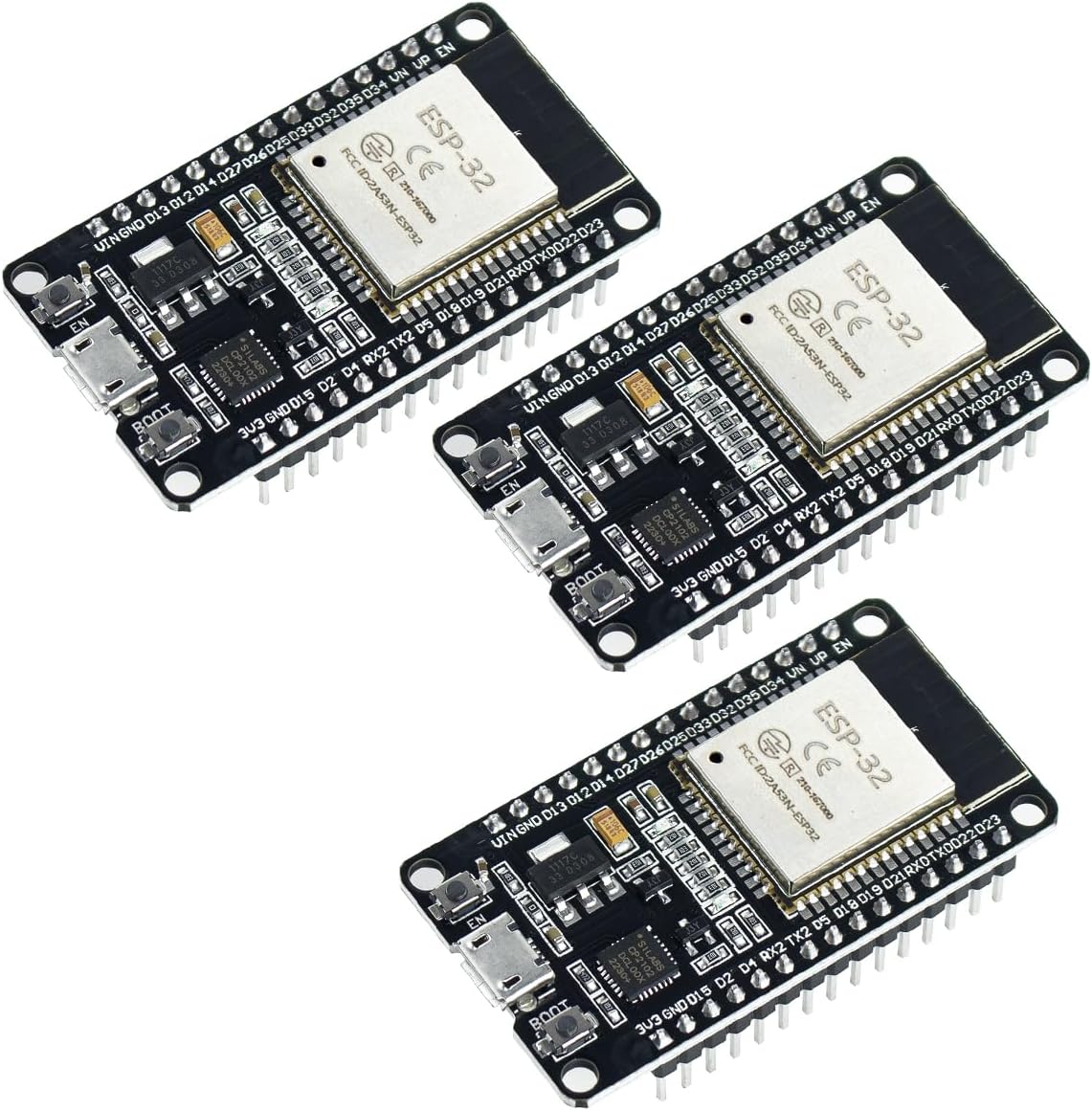
ELEGOO’s USB-C ESP-32 3-pack is the best combination of quality, convenience and track record in the generic ESP32 market, with about 4.7 stars from 530+ ratings. Each board carries an ESP-WROOM-32 module with the full dual-core ESP32, Wi-Fi 4 and Bluetooth 4.2 Classic plus BLE, and it programs through a CP2102 USB-to-UART bridge on a USB-C connector, which is easier to live with than the micro-USB on older boards. ELEGOO is a well-known brand in the maker space, the boards work out of the box with ESP-IDF, the Arduino ESP32 core and MicroPython, and three boards let you try ESP-NOW, master/slave I2C and SPI, or Bluetooth links between boards straight away. Every example on this site runs on it without changes.
✅ Pros- USB-C with reliable CP2102
- Large, positive review base
- Bluetooth Classic and BLE
- Three boards per pack
❌ Cons- Older WROOM-32 module
- Wide for one breadboard
- No PSRAM
🎯 Verdict: The safest all-round ESP32 buy: modern USB-C, a dependable USB chip and a brand with a long record.
👉 Check Price on Amazon →
🏅 BEST FOR NEW DESIGNS
ESP32-DevKitC-32E Development Board (2-Pack)
⭐ 4.6/5 · The Current WROOM-32E Module With Extra Flash
WROOM-32E
ESPRESSIF-CERTIFIED MODULE

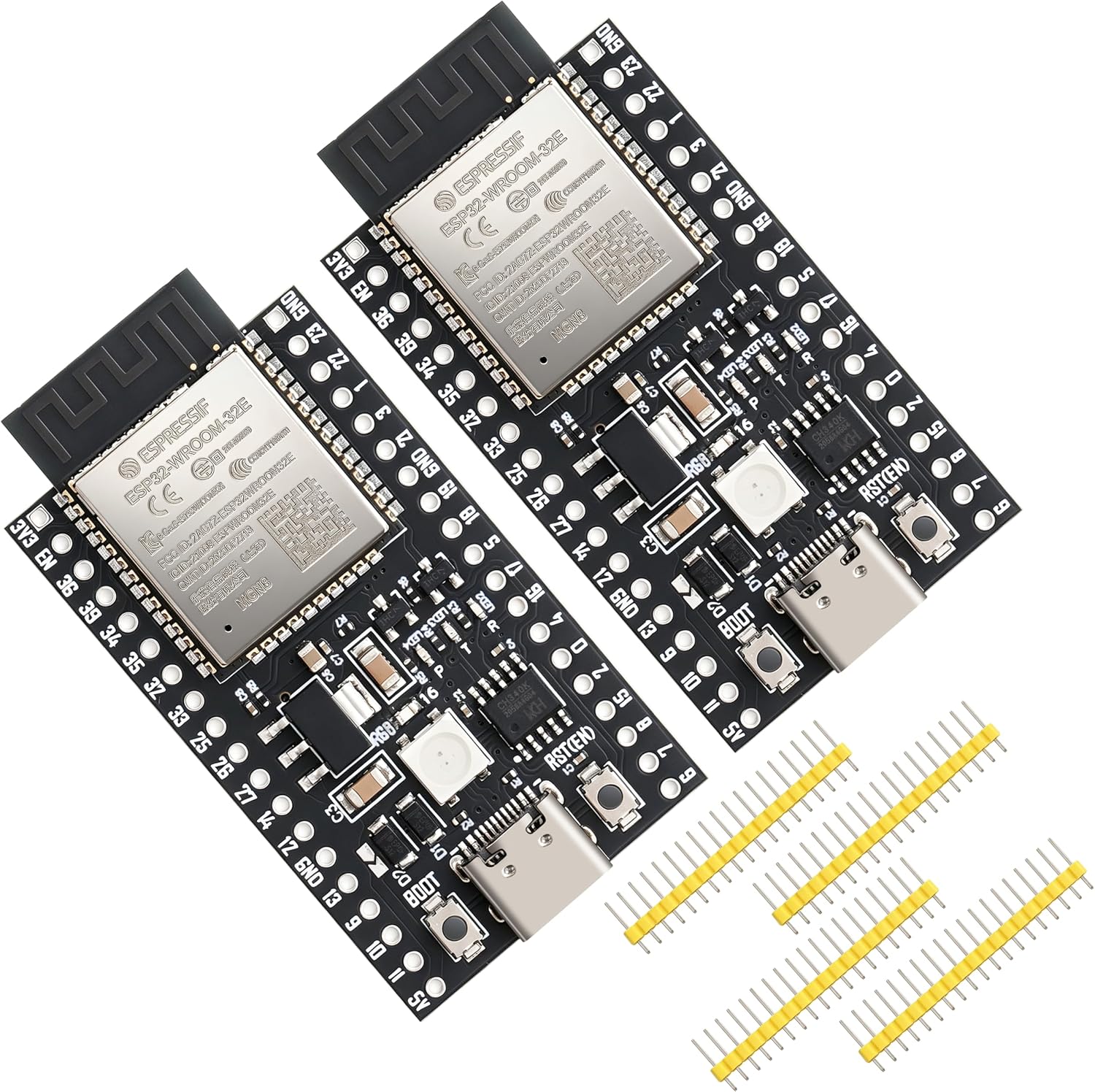
If you’re prototyping something that may become a product, start on the module you’d actually ship. This ESP32-DevKitC-32E 2-pack uses the ESP32-WROOM-32E, Espressif’s current module for the original ESP32, built on the newer chip revision with its silicon fixes and improved security features. The listing specifies 8 MB of flash, double the usual 4 MB, which gives room for OTA partitions, SPIFFS or LittleFS and larger web interfaces. The 38-pin DevKitC layout exposes every usable GPIO, and the board follows Espressif’s DevKitC pinout so official examples apply. It’s a newer listing from a lesser-known brand (about 4.8 stars from 24 ratings), so check the module marking when it arrives.
✅ Pros- Current WROOM-32E module
- 8 MB flash for OTA and files
- Full 38-pin DevKitC layout
- Strong early ratings
❌ Cons- Small review base
- Lesser-known brand
- No PSRAM
🎯 Verdict: The ESP32 board to prototype on when your design will ship on a WROOM-32E module.
👉 Check Price on Amazon →
📚 MOST PROVEN CLASSIC · ⭐ 4.4/53. HiLetgo ESP-WROOM-32 ESP32 Development Board
ESP-WROOM-32 · dual-core 240 MHz · Wi-Fi + Bluetooth dual mode · 1,600+ Amazon ratings
Buy Here →

With 1,650+ ratings (about 4.4 stars), HiLetgo’s ESP-WROOM-32 board is one of the most-bought ESP32 boards on Amazon, and that history matters: pinout diagrams, YouTube tutorials and forum fixes for this exact board are everywhere. It’s the classic DevKit-style design with the WROOM-32 module, a USB-to-UART bridge, BOOT and EN buttons and a power LED, and it supports AP, STA and AP+STA Wi-Fi modes plus dual-mode Bluetooth. It uses micro-USB rather than USB-C and the older module revision, so treat it as a learning and hobby board. Stock was low (6 left) when we checked.
✅ Pros: Huge review base; widely documented pinout; cheap.
❌ Cons: Micro-USB; older module; single board; low stock.
🎯 Verdict: The ESP32 board with the most real-world proof behind it, ideal for following older tutorials exactly.
💰 BEST BUDGET 30-PIN · ⭐ 4.4/54. Hosyond ESP32 ESP-WROOM-32 Development Board (3-Pack)
ESP-WROOM-32 · 30-pin · CP2102 · micro-USB · AP, STA and AP+STA · power indicator
Buy Here →

Hosyond’s 30-pin ESP-WROOM-32 3-pack is the budget pick for people who want several boards for sensor nodes, ESP-NOW networks or student kits (about 4.6 stars from 165 ratings). It uses the reliable CP2102 USB-to-UART chip on micro-USB, so drivers are easy on every OS. The 30-pin layout is the one many beginner tutorials and pinout diagrams are drawn for, and it’s slightly smaller than 38-pin DevKitC boards. You give up USB-C and a few rarely used pins, and pin order varies between 30-pin board makers, so match your wiring to Hosyond’s pinout image.
✅ Pros: Low cost per board; CP2102; good ratings; compact 30-pin.
❌ Cons: Micro-USB; fewer pins; older module.
🎯 Verdict: The best value pack of 30-pin ESP32 boards for multi-node projects and kits.
🏫 BEST FOR CLASSROOMS · ⭐ 4.3/55. ESP32-DevKitC-32 Development Board, USB-C, 38-Pin (6-Pack)
ESP32 WROOM · 38 pins · narrower body · USB-C · CP2102 · 6 boards
Buy Here →

For a class, a workshop or a home with lots of automation nodes, this 6-pack of 38-pin ESP32 boards keeps the per-board cost down while still giving you USB-C and a CP2102 bridge (about 4.4 stars from 73 ratings). The seller highlights a narrower body than standard DevKitC boards, which makes it easier to fit on a breadboard with jumper space on both sides, a common pain point with ESP32 boards. You get all 38 pins, so the full GPIO set is available for sensors, displays and relays. As with any generic multi-pack, quality control varies, so test each board with a blink sketch before handing them out.
✅ Pros: Six boards; USB-C; breadboard-friendlier width; 38 pins.
❌ Cons: Generic brand; QC varies; older module.
🎯 Verdict: The best bulk pack for classrooms, workshops and multi-node home automation.
📡 BEST FOR RANGE · ⭐ 4.3/56. HiLetgo ESP32-DevKitC ESP32-32U Core Board (2-Pack)
ESP32-WROOM-32U · U.FL external antenna connector · DevKitC V4 layout · I/O broken out on both sides
Buy Here →

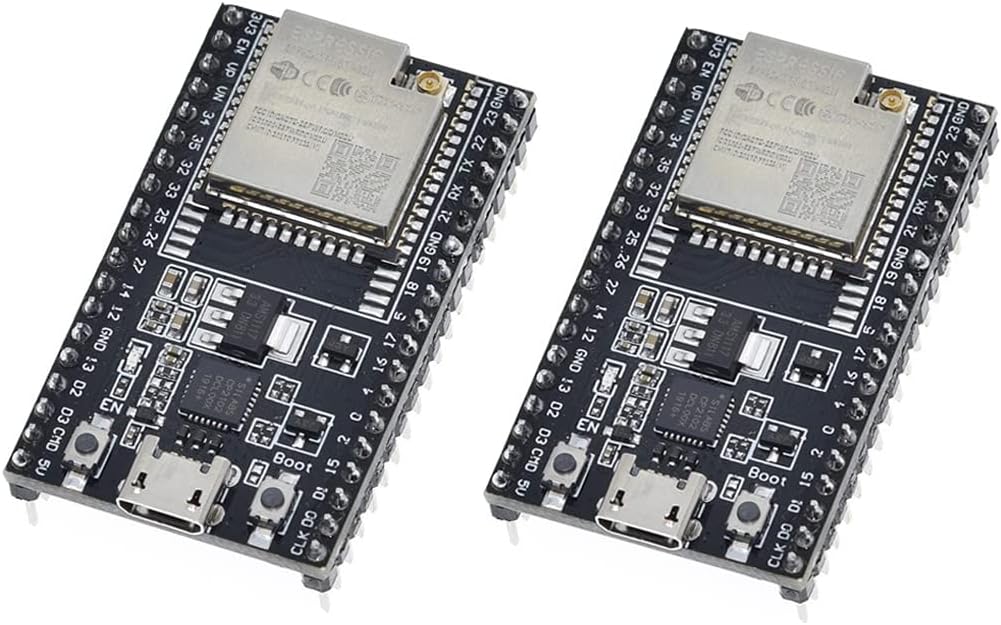
When an ESP32 has to live in a metal box, a garage, a greenhouse or the far end of your yard, the PCB antenna is often the weak link. HiLetgo’s DevKitC V4 with the ESP32-WROOM-32U swaps the PCB antenna for a U.FL connector, so you can fit a 2.4 GHz antenna on a pigtail and mount it outside the enclosure. Everything else matches the standard DevKitC, with I/O broken out on both sides. It holds about 4.4 stars from 116 ratings. Antennas are usually not included in the listing, and running the board without an antenna attached can give very poor Wi-Fi, so order a U.FL antenna or pigtail with it.
✅ Pros: External antenna option; standard DevKitC layout; 2 boards.
❌ Cons: Antenna usually sold separately; micro-USB; older revision.
🎯 Verdict: The ESP32 dev board to use inside enclosures or wherever Wi-Fi range is a problem.
📷 BEST CAMERA BOARD · ⭐ 4.3/57. Freenove ESP32-WROVER Camera Development Board Kit
ESP32-WROVER · 4 MB flash + 8 MB PSRAM · camera · microSD with 1 GB card · USB code uploader
Buy Here →

The classic AI-Thinker ESP32-CAM works, but it has no USB port and needs a separate programmer. Freenove’s ESP32-WROVER camera board fixes that with a full-size board that has a USB code uploader, the camera connector and a microSD slot on one PCB. The WROVER module adds 8 MB of PSRAM on top of 4 MB of flash, which the esp32-camera driver needs for higher resolutions and frame buffers. The kit includes a 1 GB card and card reader plus downloadable tutorials (about 4.2 stars from 200+ ratings). It’s the easiest way to run our ESP32-CAM tutorials on a board that plugs straight into USB. Stock was limited when we checked.
✅ Pros: USB uploader; 8 MB PSRAM; microSD and card included; good tutorials.
❌ Cons: Bigger than an ESP32-CAM; camera pins differ from AI-Thinker; 4 MB flash.
🎯 Verdict: The friendliest original-ESP32 camera board for streaming and photo projects.
🖥️ BEST COMPACT DISPLAY · ⭐ 4.5/58. LILYGO T-Display ESP32
ESP32 · 16 MB flash · 1.14″ ST7789V IPS 135 × 240 · USB-C · CH9102F · battery JST · ~350 µA sleep
Buy Here →

The original LILYGO T-Display is still one of the most useful ESP32 boards ever made. It puts a 1.14 inch 135 × 240 ST7789V IPS LCD right on the board, adds two user buttons, USB-C through a CH9102F bridge, a JST connector for a LiPo battery with voltage sensing, and 16 MB of flash per the Amazon listing. LILYGO quotes about 67 mA while running and around 350 µA in sleep. That makes it a ready-made weather display, crypto or stock ticker, Wi-Fi scanner or ESPHome status screen, and the TFT_eSPI library supports it out of the box (about 4.6 stars from 225 ratings). If you want a bigger, faster screen and more RAM, see the T-Display-S3 in our ESP32-S3 guide.
✅ Pros: Built-in IPS screen; USB-C; battery support; 16 MB flash.
❌ Cons: Small screen; limited free GPIOs; no PSRAM.
🎯 Verdict: The best little ESP32 board with a built-in screen for dashboards and tickers.
🟨 BEST VALUE TOUCHSCREEN · ⭐ 4.4/59. ESP32-2432S028R 2.8 inch “Cheap Yellow Display”
ESP32-D0WDQ6 · 2.8″ 240 × 320 resistive touch LCD · microSD · RGB LED · light sensor · speaker connector
Buy Here →

The ESP32-2432S028R, nicknamed the Cheap Yellow Display (CYD) for its yellow PCB, is the cheapest way to get an ESP32 with a real touchscreen. The board pairs an ESP32-D0WDQ6 with a 2.8 inch 240 × 320 LCD and resistive touch panel, plus a microSD slot, an RGB LED, a light sensor and a speaker connector. A large community project on GitHub documents its pins and provides LVGL, TFT_eSPI and ESPHome examples, which is why it’s become a favorite for Home Assistant control panels, smart thermostats and game projects. This DIYmall listing has about 4.5 stars from 110+ ratings. Resistive touch needs a firmer press than capacitive, free GPIOs are scarce, and display driver variants differ between batches, so check the CYD community notes for your revision.
✅ Pros: Very low cost touchscreen; SD, LED, sensor; big community.
❌ Cons: Resistive touch; few free pins; driver variants between batches.
🎯 Verdict: The best-value ESP32 touchscreen for Home Assistant panels and hobby UIs.
🛰️ BEST FOR LORA & MESHTASTIC · ⭐ 4.4/510. LILYGO T-Beam Meshtastic LoRa32 (915 MHz)
ESP32 · 4 MB flash + 8 MB PSRAM · SX1276 LoRa 915 MHz · NEO-6M GPS · Wi-Fi + BLE 4.2
Buy Here →

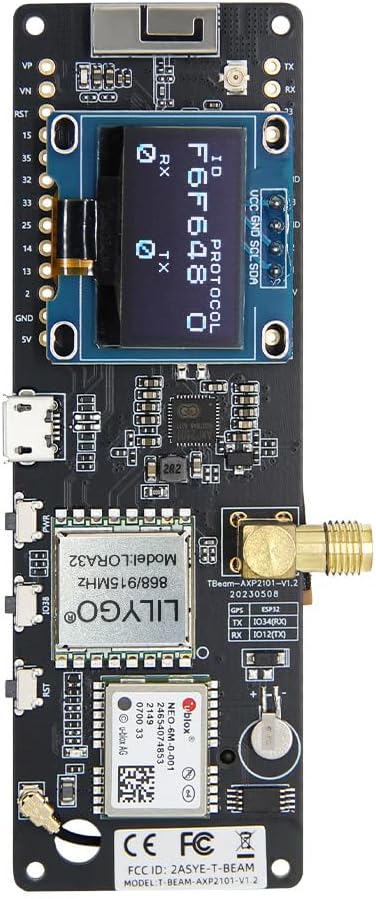
The LILYGO T-Beam turns an ESP32 into a long-range tracker. Alongside the ESP32 with 4 MB flash and 8 MB PSRAM, it carries a Semtech SX1276 LoRa radio at 915 MHz and a u-blox NEO-6M GPS module, which together make it one of the most popular boards for Meshtastic off-grid messaging, LoRaWAN asset trackers and GPS loggers (about 4.5 stars from 190+ ratings). The ESP32’s Wi-Fi and Bluetooth stay available, so you can pair a phone over BLE while LoRa handles the long-distance link. Make sure you buy the frequency that’s legal in your country (915 MHz is for the Americas and parts of Asia-Pacific; Europe uses 868 MHz), always connect the antenna before powering the radio, and note that LILYGO’s newer T-Beam Supreme moves to the ESP32-S3.
✅ Pros: LoRa + GPS + ESP32 in one; 8 MB PSRAM; Meshtastic support.
❌ Cons: Region-specific frequency; older NEO-6M GPS; larger board.
🎯 Verdict: The go-to original-ESP32 board for Meshtastic, LoRa trackers and off-grid messaging.
🌐 BEST WIRED ETHERNET · ⭐ 4.2/511. WT32-ETH01 ESP32 Ethernet Development Board
ESP32 (dual-core LX6) · 4 MB flash · 10/100 RJ45 Ethernet · Wi-Fi + Bluetooth · TCP/UDP server and client modes
Buy Here →

Wi-Fi isn’t always the right answer. The WT32-ETH01 uses the original ESP32’s built-in Ethernet MAC with an onboard PHY and an RJ45 jack, giving you a stable 10/100 Mbps wired connection for network gateways, Modbus TCP bridges, Bluetooth proxies for Home Assistant, or devices in places with poor Wi-Fi. It has 4 MB of flash, keeps Wi-Fi and Bluetooth available, and is well supported by ESPHome, Tasmota and ESP-IDF’s Ethernet driver (about 4.4 stars from 55 ratings). The important catch: there is no USB port, so you need a 3.3 V USB-to-UART adapter to flash it, and you must pull IO0 low to enter boot mode. The board also has no Power over Ethernet, so plan a 5 V or 3.3 V supply.
✅ Pros: Wired Ethernet; cheap; ESPHome and Tasmota support; Wi-Fi + BLE still available.
❌ Cons: No USB, needs a UART adapter; no PoE; few free GPIOs.
🎯 Verdict: The cheapest reliable way to give an ESP32 project a wired network connection.
🏠 BEST FOR ESPHOME · ⭐ 4.3/512. M5Stack ATOM Lite ESP32 IoT Development Kit
ESP32-PICO-D4 · 24 × 24 mm · IR transmitter · RGB LED · button · Grove port · USB-C · enclosed
Buy Here →

The M5Stack ATOM Lite is a finished 24 × 24 mm ESP32 device built on the ESP32-PICO-D4 system-in-package, with an IR transmitter, an RGB LED, a programmable button, a Grove port and USB-C, all in a plastic case. It has become a Home Assistant favorite: flash ESPHome and it makes a tidy Bluetooth proxy that extends BLE sensor coverage around your home, an IR blaster for air conditioners, or a one-sensor node using M5Stack’s Grove units (about 4.4 stars from 70+ ratings). Because the ESP32 is original silicon, it also supports Bluetooth Classic. Only a handful of GPIOs are exposed, so it’s best for single-purpose devices, and stock was low when we checked.
✅ Pros: Tiny finished case; IR, RGB, Grove; ESPHome favorite.
❌ Cons: Few GPIOs; no PSRAM; low stock.
🎯 Verdict: The neatest ESP32 for ESPHome Bluetooth proxies, IR blasters and single-sensor nodes.
🛒 How to Choose the Right ESP32 Board
🥇
Learning ESP32 or ESP-IDF?
Get the ELEGOO USB-C 3-pack. If the project may become a product, prototype on the DevKitC-32E instead.
🏫
Need many boards cheaply?
The Hosyond 30-pin 3-pack or the 38-pin USB-C 6-pack for classrooms and multi-node homes.
📡
Poor Wi-Fi or a metal enclosure?
The DevKitC ESP32-32U with an external antenna, or the WT32-ETH01 for a wired connection.
📷
Camera project?
The Freenove WROVER camera board for a USB-friendly ESP32-CAM alternative with 8 MB PSRAM.
🖥️
Need a screen?
T-Display for small status screens, the Cheap Yellow Display for a low-cost touchscreen panel.
🛰️
Long range or Home Assistant?
T-Beam for LoRa, GPS and Meshtastic; ATOM Lite for ESPHome Bluetooth proxies and IR.
⚙️ Key Specs Compared: Top 5 General-Purpose Boards
| Spec | ELEGOO USB-C 3-Pack | DevKitC-32E 2-Pack | HiLetgo WROOM-32 | Hosyond 30-Pin 3-Pack | DevKitC-32 6-Pack |
|---|
| Module | ESP-WROOM-32 | WROOM-32E ⭐ | ESP-WROOM-32 | ESP-WROOM-32 | ESP32 WROOM |
| Flash | See listing | 8 MB ⭐ | See listing | See listing | See listing |
| USB | USB-C, CP2102 ⭐ | See listing | Micro-USB | Micro-USB, CP2102 | USB-C, CP2102 ⭐ |
| Pins | DevKit layout | 38 | DevKit layout | 30 | 38, narrower body ⭐ |
| Boards per Pack | 3 | 2 | 1 | 3 | 6 ⭐ |
| Bluetooth | 4.2 Classic + BLE | 4.2 Classic + BLE | 4.2 Classic + BLE | 4.2 Classic + BLE | 4.2 Classic + BLE |
| Amazon Rating | 4.7★ (530+) ⭐ | 4.8★ (24) | 4.4★ (1,650+) | 4.6★ (165) | 4.4★ (73) |
“See listing” means the seller doesn’t state the value clearly on Amazon; WROOM-32 modules normally ship with 4 MB of flash. Specs and ratings come from the live listings and can change between batches. Always confirm details before buying.
❓ Frequently Asked Questions
Is the original ESP32 still worth buying?
Yes, for many projects. It’s the cheapest, best-documented ESP32, and it’s the only common one with Bluetooth Classic, a built-in Ethernet MAC and true DAC outputs. Choose an ESP32-S3 instead if you need native USB, lots of RAM, displays or cameras with good performance, or AI; choose an ESP32-C6 for Matter, Thread, Zigbee or Wi-Fi 6.
What’s the difference between WROOM-32, WROOM-32E and WROVER?
All three contain the same dual-core ESP32 family. WROOM-32 is the original module; WROOM-32E uses the newer chip revision and is Espressif’s choice for new designs. WROVER modules add external PSRAM (typically 8 MB), which helps with cameras, audio and large buffers but uses GPIO16 and GPIO17. A “U” version of any module replaces the PCB antenna with a U.FL connector.
Why won’t my computer detect my ESP32 board?
The three usual causes are a charge-only USB cable, a missing USB-to-UART driver (install the CP210x, CH340 or CH9102 driver that matches your board), or a faulty USB port or hub. If the board is detected but uploads fail, hold the BOOT button while the upload starts. Our ESP-IDF install guide for Windows walks through drivers and port selection.
Which ESP32 pins should I avoid?
Don’t use GPIO6 to GPIO11, which connect to the flash chip. GPIO34 to GPIO39 are input-only with no internal pull-ups. GPIO0, GPIO2, GPIO5, GPIO12 and GPIO15 are strapping pins that affect boot, so avoid pulling them the wrong way at reset. ADC2 channels stop working while Wi-Fi is active, so use ADC1 pins for analog readings, as shown in our ESP32 ADC tutorial.
Can I use Bluetooth Classic and BLE on these boards?
Yes. Every board in this guide uses the original ESP32, which supports Bluetooth 4.2 Classic (SPP serial, A2DP audio) and Bluetooth Low Energy. Follow our ESP-IDF Bluetooth Classic tutorial to control an LED from an Android phone.
🏁 Final Verdict: Best ESP32 Board for Every Project
The right original-ESP32 board for every build and budget:
🥇 Best Overall: ELEGOO ESP-32 USB-C 3-Pack with CP2102
Buy Here →🏅 Best for New Designs: ESP32-DevKitC-32E 2-Pack with 8 MB flash
Buy Here →💰 Best Budget: Hosyond ESP-WROOM-32 30-Pin 3-Pack
Buy Here →📷 Best Camera Board: Freenove ESP32-WROVER CAM with 8 MB PSRAM
Buy Here →🖥️ Best Compact Display: LILYGO T-Display ESP32
Buy Here →🟨 Best Value Touchscreen: ESP32-2432S028R Cheap Yellow Display
Buy Here →🛰️ Best for LoRa: LILYGO T-Beam with LoRa and GPS
Buy Here →For most people, the ELEGOO USB-C 3-pack is the ESP32 board to buy first, and the DevKitC-32E is the better base if your prototype might become a product. Specialist boards cover the rest: the Freenove WROVER camera board for video, the T-Display and Cheap Yellow Display for screens, the T-Beam for LoRa, the WT32-ETH01 for wired networks and the ATOM Lite for ESPHome. Once your board arrives, start with our ESP-IDF installation guide for Windows and VS Code (or the Linux Ubuntu version), then Getting Started with ESP32 using ESP-IDF, the GPIO LED blinking example and the ESP-IDF web server. Camera owners can jump to our live streaming web server, and sensor builders can try the BME280 web server or DHT22 MQTT with Node-RED. Need more RAM, native USB or Matter? See our ESP32-S3 buying guide and ESP32-C6 buying guide.
💬 Not sure which ESP32 board fits? Tell us what you’re building and whether you use ESP-IDF, Arduino, MicroPython or ESPHome in the comments below, and we’ll point you to the right board.
All Amazon links above use our affiliate tag (esp32tutorials-20). Purchasing through them supports esp32tutorials.com at no extra cost to you. Prices and availability change frequently, so always confirm the current price on Amazon before buying.
We are a team of experienced Embedded Software Developers with skills in developing Embedded Linux, RTOS, and IoT products from scratch to deployment with a demonstrated history of working in the embedded software industry. Contact us for your projects: admin@esp32tutorials.com