⚠️ Affiliate Disclosure: This post contains Amazon affiliate links. If you purchase through our links, we may earn a small commission at no extra cost to you. Every product below was checked against its live Amazon listing before publishing. Prices change often, so we don’t list them here. Tap any Buy Here button to see the current price on Amazon.
Ultimate Buying Guide
🍓 Best Raspberry Pi Pico, RP2040 and RP2350 Boards
The Raspberry Pi microcontroller family is the perfect companion to your ESP32 bench. Here are 10 boards compared, from the Wi-Fi Pico 2 W to thumb-sized XIAO and Zero boards, battery-ready Feathers and PSRAM-packed powerhouses.
✅ 10 Boards Compared
✅ Verified Amazon ASINs
✅ RP2040 vs RP2350 Explained
✅ Honest Pros & Cons
The ESP32 is the go-to chip for Wi-Fi and Bluetooth projects, but many ESP32 developers keep a few RP2040 and RP2350 boards in the drawer too. Their PIO (programmable I/O) state machines generate precise signals like WS2812 LED data, VGA, DVI or custom protocols without loading the CPU, their native USB makes them ideal for keyboards, MIDI and HID gadgets, and they are cheap enough to use as a dedicated co-processor beside an ESP32 over UART, I2C or SPI.
This guide compares 10 boards built on Raspberry Pi silicon: the official Pico 2 and Pico 2 W, plus boards from Adafruit, Arduino, Seeed Studio, Waveshare, Pimoroni and SparkFun. Each review notes the chip, memory, connector and the job it does best, so you can pick the right one for your next project.
💡 Before you buy: Decide whether you need wireless. Only the Pico 2 W and the Arduino Nano RP2040 Connect in this list have Wi-Fi and Bluetooth; everything else is a USB microcontroller. If your project is mainly a Wi-Fi sensor node, an ESP32 is still the better fit. Choose an RP2350 board (Pico 2, XIAO RP2350, Pico Plus 2, Pro Micro RP2350) over an older RP2040 when you can: it has twice the SRAM, faster Cortex-M33 cores, a floating point unit and security features.
⚡ Quick Comparison: All 10 Boards
| Board | Chip | Memory | Wireless / USB | Best For | Buy |
|---|
| 🥇 Raspberry Pi Pico 2 W | RP2350 | 520 KB SRAM, 4 MB flash | Wi-Fi 4 + BT 5.2, Micro USB | Best Overall | Buy Here → |
| 🔋 Adafruit Feather RP2040 | RP2040 | 264 KB SRAM, 8 MB flash | USB-C, LiPo charger | Best for Battery Projects | Buy Here → |
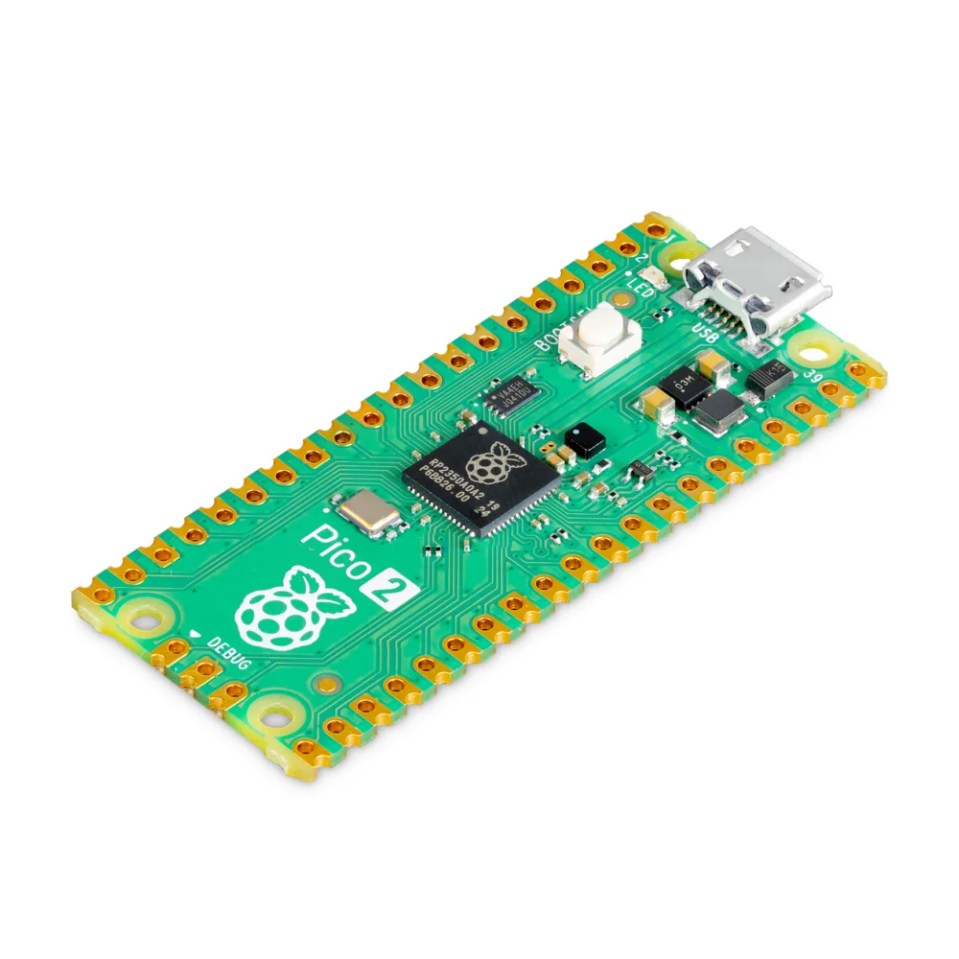
| 💰 Raspberry Pi Pico 2 | RP2350 | 520 KB SRAM, 4 MB flash | Micro USB | Best Budget | Buy Here → |
| 🧭 Arduino Nano RP2040 Connect | RP2040 | 264 KB SRAM, 16 MB flash | Wi-Fi + BLE (NINA-W102), Micro USB | Best for Arduino and Sensors | Buy Here → |
| 🤏 Seeed XIAO RP2350 | RP2350 | 520 KB SRAM, 2 MB flash | USB-C | Best Tiny RP2350 | Buy Here → |
| 🪙 Waveshare RP2040-Zero | RP2040 | 264 KB SRAM, 2 MB flash | USB-C | Best Mini Co-Processor | Buy Here → |
| 🧠 Pimoroni Pico Plus 2 | RP2350B | 16 MB flash, 8 MB PSRAM | USB-C, Qw/ST | Best for Big Memory | Buy Here → |
| 🔌 SparkFun Pro Micro RP2350 | RP2350 | 16 MB flash, 8 MB PSRAM | USB-C, Qwiic | Best for Qwiic Sensors | Buy Here → |
| 🧩 Seeed XIAO RP2040 | RP2040 | 264 KB SRAM, 2 MB flash | USB-C | Best XIAO Ecosystem Starter | Buy Here → |
| ✨ Adafruit QT Py RP2040 | RP2040 | 264 KB SRAM, 8 MB flash | USB-C, STEMMA QT | Best Tiny Plug-and-Play | Buy Here → |
Specs come from the manufacturers and the live Amazon listings. Star scores below are our ratings.
🔍 What Matters in a Pico or RP2040 Board
🧠
RP2040 or RP2350
RP2350 brings 520 KB SRAM, 150 MHz Cortex-M33 or RISC-V cores, an FPU and secure boot. RP2040 boards are older but very well supported.
📶
Wireless
Only W and Connect boards have Wi-Fi and Bluetooth. For a USB gadget or an ESP32 co-processor, you don’t need it.
💾
Flash and PSRAM
2 MB is fine for C code; CircuitPython libraries, fonts, audio and display buffers love 8 to 16 MB flash and extra PSRAM.
📐
Size and Form Factor
Pico boards suit breadboards; XIAO, Zero and QT Py boards hide inside wearables and enclosures; castellated pads let you solder them onto a carrier PCB.
🔌
Connectors and Extras
USB-C, a Qwiic or STEMMA QT port, an RGB LED, a LiPo charger and pre-soldered headers all save time on the bench.
🏆 Detailed Reviews: The Top Two
🥇 BEST OVERALL
Raspberry Pi Pico 2 W
⭐ 4.8/5 · Our Rating · The New Default Pico
Buy on Amazon →

The Pico 2 W is the board to start with. Its RP2350 runs two Arm Cortex-M33 cores (or two Hazard3 RISC-V cores) at 150 MHz with 520 KB of SRAM and 4 MB of flash, and the on-board wireless module adds 2.4 GHz Wi-Fi 4 and Bluetooth 5.2. It keeps the classic Pico pinout, so existing Pico add-on boards and tutorials still work, and it programs by drag-and-drop over USB with C/C++, MicroPython, CircuitPython or the Arduino IDE. Twelve PIO state machines let it drive LED strips, extra UARTs or custom protocols with exact timing. This listing comes with the headers already soldered, ready for a breadboard. The only dated detail is the Micro USB connector.
✅ Pros- Wi-Fi and Bluetooth built in
- Twice the RAM of RP2040
- Huge tutorial ecosystem
- Headers pre-soldered
❌ Cons- Micro USB, not USB-C
- No battery charger
- Wi-Fi stack less mature than ESP-IDF
🎯 Verdict: The best all-round Raspberry Pi microcontroller, and the easiest to learn on.
👉 Check Price on Amazon →
🔋 BEST FOR BATTERY PROJECTS
Adafruit Feather RP2040
⭐ 4.7/5 · Our Rating · Feather Ecosystem
Buy on Amazon →
If your project runs from a battery, the Feather RP2040 saves you a pile of extra parts. It plugs a 3.7 V LiPo straight into its JST connector and charges it over USB-C, then switches between USB and battery power automatically. The RP2040 gets a generous 8 MB of flash, so CircuitPython libraries, fonts and sound files fit easily, and a STEMMA QT port connects I2C sensors and displays without soldering. You also get an RGB NeoPixel, a boot button and 21 GPIO in the Feather layout, which means it stacks with the huge range of FeatherWings, many of which also fit ESP32 Feathers. It has no wireless of its own.
✅ Pros- LiPo charging built in
- 8 MB flash for CircuitPython
- STEMMA QT and NeoPixel
- Excellent Adafruit guides
❌ Cons- No Wi-Fi or Bluetooth
- Older RP2040 chip
- Headers sold separately
🎯 Verdict: The best RP2040 board for portable, battery-powered builds.
👉 Check Price on Amazon →
🧩 Detailed Reviews: More Great Boards
💰 BEST BUDGET · ⭐ 4.7/53. Raspberry Pi Pico 2
RP2350 · 150 MHz · 520 KB SRAM · 4 MB flash · 12 PIO state machines · color-coded pre-soldered headers
Buy Here →
The Pico 2 is the same RP2350 board as the Pico 2 W without the wireless module, and it is one of the cheapest powerful microcontrollers you can buy. It is the right choice for USB gadgets, LED and motor controllers, test fixtures and as a co-processor beside an ESP32, where the ESP32 handles Wi-Fi and the Pico handles PIO timing work. This Waveshare listing ships the genuine board with color-coded headers already soldered, which makes wiring on a breadboard faster and less error-prone.
✅ Pros: Very low cost; RP2350 performance; color-coded headers.
❌ Cons: No wireless; Micro USB.
🎯 Verdict: The best value board for wired projects and ESP32 co-processor jobs.
🧭 BEST FOR ARDUINO AND SENSORS · ⭐ 4.5/54. Arduino Nano RP2040 Connect (with Headers)
RP2040 · 16 MB flash · u-blox NINA-W102 Wi-Fi and BLE · 6-axis IMU · microphone · Nano footprint
Buy Here →
Arduino’s take on the RP2040 packs a lot into the classic Nano footprint. Wireless comes from a u-blox NINA-W102 module (which is itself built on an ESP32), giving Wi-Fi and Bluetooth LE, and the board adds a 6-axis IMU, a digital microphone, an RGB LED and 16 MB of flash. That makes it a strong choice for gesture recognition, sound-reactive projects and TinyML experiments, all with official Arduino IDE and Arduino Cloud support. It uses Micro USB and costs more than a Pico 2 W.
✅ Pros: IMU and mic on board; official Arduino support; 16 MB flash.
❌ Cons: Pricier; older RP2040; Micro USB.
🎯 Verdict: The best pick for Arduino users who want wireless plus motion and sound sensing.
🤏 BEST TINY RP2350 · ⭐ 4.6/55. Seeed Studio XIAO RP2350
RP2350 · 150 MHz Cortex-M33 or RISC-V · 520 KB SRAM · 2 MB flash · 19 GPIO · RGB LED · thumb-sized
Buy Here →
The XIAO RP2350 puts the full RP2350 into Seeed’s tiny XIAO format, with 19 GPIO broken out (some on pads underneath), an RGB LED, secure boot and Arm TrustZone. Because it shares the XIAO pinout with the XIAO ESP32-C3, ESP32-S3 and ESP32-C6, the same expansion boards, round displays and Grove shields work across all of them, so you can move a project between Raspberry Pi and Espressif silicon with minimal rewiring. Its 2 MB of flash is on the small side for CircuitPython projects with many libraries.
✅ Pros: Tiny; RP2350 power; shares XIAO ESP32 accessories.
❌ Cons: Only 2 MB flash; some pins on bottom pads.
🎯 Verdict: The best small RP2350 board, especially if you already use XIAO ESP32 boards.
🪙 BEST MINI CO-PROCESSOR · ⭐ 4.5/56. Waveshare RP2040-Zero (Pre-Soldered Header)
RP2040 · 133 MHz · 264 KB SRAM · 2 MB flash · USB-C · 29 GPIO · WS2812 RGB LED · castellated pads
Buy Here →
The RP2040-Zero is a stamp-sized RP2040 board with a USB-C port, an on-board WS2812 RGB LED and castellated edges, so you can plug it into a breadboard with this pre-soldered version or solder a bare one flat onto your own PCB. It exposes 29 GPIO in total (some on pads underneath) with 2 SPI, 2 I2C, 2 UART, 4 ADC inputs and 16 PWM channels. It is a favourite for macro keypads, USB adapters and small helper boards that offload LED or PIO work from an ESP32. There is no battery support and no wireless.
✅ Pros: Tiny and cheap; USB-C; castellated for PCB mounting.
❌ Cons: Only 2 MB flash; bottom pads need soldering.
🎯 Verdict: The best low-cost mini board for USB gadgets and ESP32 helper tasks.
🧠 BEST FOR BIG MEMORY · ⭐ 4.6/57. Pimoroni Pico Plus 2 (PIM724)
RP2350B · 150 MHz · 16 MB flash · 8 MB PSRAM · USB-C · Qw/ST and SP/CE connectors · debug header
Buy Here →
The Pico Plus 2 is a Pico-shaped board built around the larger RP2350B, which has more GPIO than the standard RP2350, and it adds 16 MB of flash and 8 MB of PSRAM. That extra memory is what you want for big display frame buffers, audio, emulators, large MicroPython programs and data logging. A USB-C port, a Qw/ST (Qwiic/STEMMA QT) connector, an SP/CE connector for Pimoroni breakouts and a debug connector round it out. Pimoroni notes current stock uses the A2 chip revision, which is affected by the RP2350-E9 erratum on GPIO input pull-downs, so check it if your design relies on internal pull-downs.
✅ Pros: 8 MB PSRAM; 16 MB flash; RP2350B with extra GPIO.
❌ Cons: No wireless; A2 erratum to note.
🎯 Verdict: The best Pico-format board when memory is the bottleneck.
🔌 BEST FOR QWIIC SENSORS · ⭐ 4.5/58. SparkFun Pro Micro RP2350
RP2350 · Arm or RISC-V cores · 16 MB flash · 8 MB PSRAM · USB-C · Qwiic · castellated pads
Buy Here →
SparkFun squeezes an RP2350 with 16 MB of flash and 8 MB of PSRAM into the compact Pro Micro footprint, about 1.3 x 0.7 inches. A Qwiic connector plugs in SparkFun’s large range of I2C sensors and displays with no soldering, USB-C handles power and programming, and castellated pads allow surface mounting. It fits keyboard PCBs and other designs made for the Pro Micro layout, making it a popular upgrade for custom mechanical keyboards. The trade-off is fewer exposed pins than a full Pico.
✅ Pros: PSRAM in a tiny board; Qwiic; Pro Micro compatible.
❌ Cons: Fewer GPIO; no wireless.
🎯 Verdict: The best compact board for Qwiic sensor builds and keyboard projects.
🧩 BEST XIAO ECOSYSTEM STARTER · ⭐ 4.4/59. Seeed Studio XIAO RP2040
RP2040 · 133 MHz · 264 KB SRAM · 2 MB flash · USB-C · RGB LED · 11 digital and 4 analog pins
Buy Here →
The original XIAO RP2040 remains a handy, well-documented little board with USB-C, an RGB LED, reset and boot buttons and support for Arduino, MicroPython and CircuitPython. It has fewer pins than the newer XIAO RP2350 (11 digital, 4 analog) and the older RP2040 chip, but its long history means there are plenty of examples, and it works with the same XIAO expansion boards as the XIAO ESP32 range. Choose it for simple wearables, small HID devices and sensor nodes that connect to an ESP32 gateway.
✅ Pros: Tiny; USB-C; many tutorials and accessories.
❌ Cons: Older chip; limited pins; 2 MB flash.
🎯 Verdict: A solid, well-supported tiny board if the XIAO RP2350 is out of stock.
➕ Also Worth Considering
✨ BEST TINY PLUG-AND-PLAY · ⭐ 4.5/5
10. Adafruit QT Py RP2040
A XIAO-sized RP2040 board with a big advantage: 8 MB of flash plus a STEMMA QT connector, a NeoPixel and USB-C. Plug in an I2C sensor or OLED and you have a working gadget with no soldering, and the extra flash leaves room for CircuitPython libraries. It is one of the easiest ways to build a tiny USB device. Stock can be patchy, so check availability on the listing.
Buy Here →🛠️ Which Board for Which Job?
| Project | Best Pick | Why |
|---|
| Wi-Fi sensor node or web dashboard | Pico 2 W | Wi-Fi and Bluetooth with RP2350 performance |
| Co-processor beside an ESP32 | Pico 2 or RP2040-Zero | Cheap, 3.3 V logic, PIO for timing-critical I/O |
| Battery-powered portable gadget | Feather RP2040 | Built-in LiPo charging and power switching |
| Gesture or sound-reactive project | Nano RP2040 Connect | On-board IMU and microphone |
| Large display, audio or emulator | Pimoroni Pico Plus 2 | 8 MB PSRAM and 16 MB flash |
| Macro keypad or custom keyboard | Pro Micro RP2350 or RP2040-Zero | Native USB HID in a small footprint |
| Wearable or tiny enclosure | XIAO RP2350 | Thumb-sized, shares XIAO ESP32 accessories |
| No-solder I2C sensor gadget | QT Py RP2040 | STEMMA QT plus 8 MB flash |
🛒 Which One Should You Buy?
🎓
Your first Pico
The Raspberry Pi Pico 2 W: it does everything and every tutorial covers it.
🔋
Running on a battery
The Adafruit Feather RP2040 with its built-in LiPo charger.
🤝
Helper for an ESP32
The Pico 2 or RP2040-Zero, wired over UART or I2C.
🚀
Maximum memory
The Pimoroni Pico Plus 2 or SparkFun Pro Micro RP2350, both with 8 MB PSRAM.
❓ Frequently Asked Questions
Should I use a Pico 2 W or an ESP32 for Wi-Fi projects?
For Wi-Fi-first projects like MQTT sensors, web servers, ESPHome and Home Assistant devices, the ESP32 is still the stronger choice thanks to ESP-IDF, deep sleep modes and its huge library ecosystem. Pick the Pico 2 W when you want PIO, a simpler MicroPython experience or the Pico add-on ecosystem with some wireless on top.
Can I program these boards with ESP-IDF?
No. ESP-IDF is only for Espressif chips. Use the Raspberry Pi Pico SDK for C/C++, the Arduino IDE with an RP2040/RP2350 core, MicroPython or CircuitPython. Both the Pico SDK and ESP-IDF are CMake-based, so the workflow will feel familiar.
What is the difference between RP2040 and RP2350?
RP2040 has two Cortex-M0+ cores at 133 MHz and 264 KB of SRAM. RP2350 has two Cortex-M33 cores (or two RISC-V cores) at 150 MHz, 520 KB of SRAM, a floating point unit, more PIO state machines, secure boot and support for external PSRAM. For new projects, RP2350 is the better buy.
How do I connect a Pico to an ESP32?
Both run at 3.3 V logic, so you can wire them directly. UART is the simplest link (TX to RX, RX to TX and a shared ground); I2C or SPI work well when the ESP32 should read the Pico like a sensor. Power both from the same supply or at least share ground.
Are the GPIO pins 5 V tolerant?
RP2040 pins are 3.3 V only, so use a level shifter for 5 V signals. The RP2350’s digital inputs are 5 V tolerant while the chip is powered, but ADC pins are not, and treating 3.3 V as the safe level is still the best habit, just as on the ESP32.
🏁 Final Verdict: Best Raspberry Pi Pico and RP2040 Boards
The right board for each job:
🔋 Best for Battery Projects: Adafruit Feather RP2040
Buy Here →🧭 Best for Arduino and Sensors: Arduino Nano RP2040 Connect
Buy Here →🤏 Best Tiny RP2350: Seeed Studio XIAO RP2350
Buy Here →🧠 Best for Big Memory: Pimoroni Pico Plus 2
Buy Here →For most makers, the Raspberry Pi Pico 2 W is the one to buy first, with the plain Pico 2 as a low-cost helper for your ESP32 builds. Choose the Adafruit Feather RP2040 for battery projects, the Arduino Nano RP2040 Connect for motion and sound sensing, the Seeed XIAO RP2350 or RP2040-Zero when space is tight, and the Pimoroni Pico Plus 2 or SparkFun Pro Micro RP2350 when you need lots of memory. Still deciding between platforms? Compare them with our ESP32 development boards guide and ESP8266 boards guide, and stock up on breadboards and jumper wires with our prototyping supplies guide.
💬 Using a Pico alongside your ESP32? Tell us about your project in the comments below, and we’ll help you pick the right board.
All Amazon links above use our affiliate tag (esp32tutorials-20). Purchasing through them supports esp32tutorials.com at no extra cost to you. Prices and availability change frequently, so always confirm the current price on Amazon before buying.
We are a team of experienced Embedded Software Developers with skills in developing Embedded Linux, RTOS, and IoT products from scratch to deployment with a demonstrated history of working in the embedded software industry. Contact us for your projects: admin@esp32tutorials.com