⚠️ Affiliate Disclosure: This post contains Amazon affiliate links. If you purchase through our links, we may earn a small commission at no extra cost to you. Every product below was checked against its live Amazon listing before publishing. Prices change often, so we don’t list them here. Tap any Buy Here button to see the current price on Amazon.
Ultimate Buying Guide
🍓 Best Raspberry Pi and Single Board Computers for ESP32 Makers
An ESP32 is a brilliant sensor node, but the MQTT broker, Node-RED dashboard, database and OTA server behind it need a Linux computer. Here are 9 single board computers for that job, from the Raspberry Pi 5 to tiny Zero boards and an AI-ready Jetson.
✅ 9 Boards Compared
✅ Verified Amazon ASINs
✅ ESP32 Use Cases Mapped
✅ Honest Pros & Cons
Most ESP32 projects grow past a single board sooner or later. Once you have a few sensor nodes publishing over Wi-Fi, you need something that is always on to receive and store that data: a Mosquitto MQTT broker, Node-RED or Home Assistant, an InfluxDB and Grafana stack, or a small web server that hosts OTA firmware images. A single board computer does all of that on a few watts, sits next to your router and has GPIO pins of its own for UART bridges and quick tests.
This guide compares 9 boards that suit ESP32 work: the Raspberry Pi family, which has the best software support, plus Orange Pi, Libre Computer and NVIDIA Jetson alternatives for more speed, a lower budget or on-device AI. Each review focuses on what matters for an ESP32 bench: networking, storage, power draw and how easily it runs your broker and toolchain.
💡 Before you buy: Budget for the extras. A bare board needs a proper power supply (the Raspberry Pi 5 wants a 5V 5A USB-C supply to run USB peripherals at full current), a good microSD card or NVMe SSD, cooling and a case. For an always-on MQTT or Home Assistant server, an SSD is far more reliable than an SD card. And if you only need a broker, a Raspberry Pi Zero 2 W is plenty; you don’t need a Pi 5 for that.
⚡ Quick Comparison: All 9 Boards
| Board | CPU | Memory | Networking | Best For | Buy |
|---|
| 🥇 Raspberry Pi 5 (8GB) | Cortex-A76 ×4, 2.4 GHz | 8GB | GbE, Wi-Fi 5, BT 5.0 | Best Overall | Buy Here → |
| 🪶 Raspberry Pi Zero 2 W | Cortex-A53 ×4, 1 GHz | 512MB | 2.4 GHz Wi-Fi, BT 4.2 | Best Tiny MQTT Broker | Buy Here → |
| ⌨️ Raspberry Pi 500+ | Pi 5 in a keyboard | 16GB + 256GB SSD | GbE, Wi-Fi 5, BT 5.0 | Best Desktop Dev Station | Buy Here → |
| 🧠 NVIDIA Jetson Orin Nano Super | Cortex-A78AE ×6 + Ampere GPU | 8GB LPDDR5 | GbE, Wi-Fi module | Best for Edge AI | Buy Here → |
| 🚀 Orange Pi 5 (8GB) | RK3588S, 8 cores | 8GB | GbE | Best Raw Speed per Dollar | Buy Here → |
| 🍊 Orange Pi Zero 3 | Allwinner H618 ×4, 1.5 GHz | 1GB to 4GB | GbE, Wi-Fi 5, BT 5.0 | Best Budget Gateway | Buy Here → |
| 🍓 Raspberry Pi 4 Model B (4GB) | Cortex-A72 ×4, 1.5 GHz | 4GB | GbE, Wi-Fi 5, BT 5.0 | Best Value Pi | Buy Here → |
| 📦 CanaKit Raspberry Pi 5 Starter Kit PRO | Pi 5 8GB kit | 8GB + 128GB card | GbE, Wi-Fi 5, BT 5.0 | Best Complete Kit | Buy Here → |
| 🥔 Libre Computer Le Potato | Amlogic S905X ×4 | 2GB | 100 Mb Ethernet | Best Low-Cost Pi Alternative | Buy Here → |
Specs come from the manufacturers and the live Amazon listings. Star scores below are our ratings.
🔍 What Matters in a Single Board Computer for ESP32 Work
🧰
Software Support
Raspberry Pi OS gets years of updates and every MQTT, Node-RED and Home Assistant guide is written for it. Other boards often depend on community images.
💾
Storage
SD cards wear out under constant database writes. An M.2 NVMe slot (or a USB SSD) makes a 24/7 server far more dependable.
🌐
Networking
Wired Ethernet keeps your broker reachable. Built-in Wi-Fi and Bluetooth help for BLE gateways and quick setups.
🔋
Power and Heat
A Zero board idles at a fraction of a watt; a Pi 5 or RK3588 board needs a 5V 4A to 5A supply and a heatsink or fan.
📌
GPIO and UART
A 40-pin header gives you 3.3V UART, I2C and SPI for flashing, logging or bridging an ESP32 directly.
🏆 Detailed Reviews: The Top Two
🥇 BEST OVERALL
Raspberry Pi 5 (8GB)
⭐ 4.8/5 · Our Rating · The Default Choice
Buy on Amazon →

The Raspberry Pi 5 is the board most ESP32 makers should start with. Its Broadcom BCM2712 has four Cortex-A76 cores at 2.4 GHz, two to three times faster than a Pi 4, with 8GB of LPDDR4X, Gigabit Ethernet, dual-band Wi-Fi 5, Bluetooth 5.0, two USB 3.0 ports and a PCIe 2.0 connector that takes an M.2 NVMe SSD through an adapter HAT. It also adds a real-time clock and a power button. That is enough to run Mosquitto, Node-RED, InfluxDB, Grafana and Home Assistant side by side, or to compile ESP-IDF projects in a reasonable time. Raspberry Pi OS support is the best in the business. Plan for the official active cooler and a 5V 5A USB-C supply.
✅ Pros- Fastest Raspberry Pi
- NVMe via PCIe
- Excellent software support
- 40-pin GPIO with UART, I2C, SPI
❌ Cons- Needs cooling and a 5A supply
- SSD needs an extra HAT
🎯 Verdict: The best all-round home for your MQTT broker, dashboards and ESP32 toolchain.
👉 Check Price on Amazon →
🪶 BEST TINY MQTT BROKER
Raspberry Pi Zero 2 W
⭐ 4.7/5 · Our Rating · Small, Cheap and Frugal
Buy on Amazon →
If all you need is an always-on Mosquitto broker or a lightweight Node-RED flow for a handful of ESP32 nodes, the Zero 2 W does it on very little power. Its RP3A0 package holds a quad-core Cortex-A53 at 1 GHz and 512MB of RAM on a 65 × 30 mm board, with 2.4 GHz Wi-Fi, Bluetooth 4.2 and BLE, mini HDMI, a micro USB OTG port and a CSI camera connector. The 40-pin header footprint is there for HATs and for wiring an ESP32 UART straight to the Pi. The limits are memory and the lack of Ethernet: it is not a Home Assistant box, and it can be hard to find in stock.
✅ Pros- Very low power
- Tiny footprint
- Runs Mosquitto easily
- Full 40-pin GPIO footprint
❌ Cons- Only 512MB RAM
- No Ethernet; 2.4 GHz Wi-Fi only
- Header not soldered
🎯 Verdict: The cheapest dependable way to give your ESP32 nodes a local MQTT broker.
👉 Check Price on Amazon →
🔧 Detailed Reviews: Desktop, AI and Alternative Boards
⌨️ BEST DESKTOP DEV STATION · ⭐ 4.7/53. Raspberry Pi 500+
Pi 5 inside a mechanical keyboard · 16GB LPDDR4X · 256GB NVMe SSD · Gateron KS-33 Blue low-profile switches · RGB · dual 4K
Buy Here →
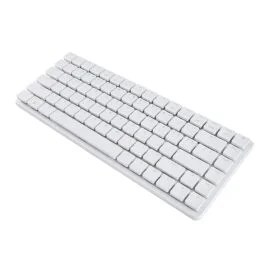
The Raspberry Pi 500+ builds a Raspberry Pi 5 into a low-profile mechanical keyboard with Gateron KS-33 Blue switches and per-key RGB lighting, and doubles the memory to 16GB with a 256GB NVMe SSD already fitted inside. Add a monitor and mouse and you have a complete Linux desktop for VS Code, ESP-IDF, PlatformIO and a serial monitor, with Gigabit Ethernet, Wi-Fi 5, Bluetooth 5.0 and the 40-pin GPIO header exposed at the back. This listing is the unit only, so you supply the power supply, mouse and display cables.
✅ Pros: Complete dev desktop; 16GB and SSD built in; great keyboard.
❌ Cons: Not a headless server; unit only, no PSU.
🎯 Verdict: The neatest way to turn a Raspberry Pi into your main ESP32 coding machine.
🧠 BEST FOR EDGE AI · ⭐ 4.6/54. NVIDIA Jetson Orin Nano Super Developer Kit
Up to 67 TOPS · 6-core Arm Cortex-A78AE · 1024-core Ampere GPU · 8GB LPDDR5 · 2× M.2 Key M · 2× MIPI CSI
Buy Here →
When your ESP32-CAM or ESP32-S3 camera nodes stream images that need real object detection, a Raspberry Pi runs out of steam. The Jetson Orin Nano Super pairs a six-core Cortex-A78AE CPU with a 1024-core Ampere GPU and 32 Tensor Cores for up to 67 TOPS of AI performance, with 8GB of LPDDR5, two M.2 Key M slots for NVMe, Gigabit Ethernet, DisplayPort, four USB 3.2 ports, two camera connectors and a 40-pin header. It runs NVIDIA JetPack (Ubuntu based) with CUDA and TensorRT. It costs much more than a Pi and is overkill for MQTT alone.
✅ Pros: Real GPU for vision models; NVMe; strong AI software stack.
❌ Cons: Expensive; bigger and hungrier than a Pi.
🎯 Verdict: Buy it when your ESP32 cameras need on-site AI inference.
🚀 BEST RAW SPEED PER DOLLAR · ⭐ 4.5/55. Orange Pi 5 (8GB)
Rockchip RK3588S · 4× Cortex-A76 at 2.4 GHz + 4× Cortex-A55 · 6 TOPS NPU · 8GB · M.2 NVMe · HDMI 2.1 · Gigabit Ethernet
Buy Here →
The Orange Pi 5 uses the eight-core RK3588S: four Cortex-A76 cores at up to 2.4 GHz plus four efficient Cortex-A55 cores, a built-in 6 TOPS NPU and 8GB of RAM. An M.2 slot on the back takes an NVMe SSD with no adapter, and you get Gigabit Ethernet, HDMI 2.1 and USB 3.0. That makes it a fast, roomy Docker host for brokers, databases and dashboards. The trade-offs are software and wireless: you rely on Orange Pi OS, Ubuntu or Armbian images rather than Raspberry Pi OS, it has a 26-pin header instead of 40 pins, and Wi-Fi is not built in.
✅ Pros: Eight cores; NPU; NVMe slot on board.
❌ Cons: Weaker software support; no onboard Wi-Fi; 26-pin header.
🎯 Verdict: The best value if you want Pi 5 class speed and NVMe without extras.
🍊 BEST BUDGET GATEWAY · ⭐ 4.4/56. Orange Pi Zero 3
Allwinner H618 · 4× Cortex-A53 at 1.5 GHz · 1GB to 4GB LPDDR4 · Gigabit Ethernet · Wi-Fi 5 + BT 5.0 · micro HDMI
Buy Here →
The Orange Pi Zero 3 is a palm-sized board that does something the Raspberry Pi Zero 2 W can’t: it has Gigabit Ethernet on board, plus dual-band Wi-Fi 5 and Bluetooth 5.0. A quad-core Allwinner H618 at 1.5 GHz and up to 4GB of LPDDR4 handle Mosquitto, Node-RED and a small database comfortably, which makes it a neat wired MQTT gateway or BLE-to-MQTT bridge for ESP32 sensors. It boots Debian or Ubuntu images from Orange Pi, has a 26-pin header and a USB-C power input. Pick the memory size you need on the listing.
✅ Pros: Wired Ethernet plus Wi-Fi 5; up to 4GB; tiny.
❌ Cons: Community-level software; 26-pin header; several variants.
🎯 Verdict: A cheap, wired MQTT gateway that outclasses the Zero 2 W on paper.
➕ Also Worth Considering
🍓 BEST VALUE PI · ⭐ 4.6/5
7. Raspberry Pi 4 Model B (4GB)
Still a capable server for ESP32 projects. Four Cortex-A72 cores at 1.5 GHz, 4GB of RAM, Gigabit Ethernet, dual-band Wi-Fi, Bluetooth 5.0, two USB 3.0 ports and dual micro HDMI. It runs cooler than a Pi 5 on a standard 5V 3A supply and fits the huge range of existing Pi 4 cases and HATs. Use a USB 3.0 SSD for reliable 24/7 storage.
Buy Here →📦 BEST COMPLETE KIT · ⭐ 4.7/5
8. CanaKit Raspberry Pi 5 Starter Kit PRO
Everything you need in one box: a Raspberry Pi 5 with 8GB, a 128GB microSD card with the OS preloaded, CanaKit's case with a cooling fan, a 45W USB-C power supply, heatsinks and micro HDMI cables. It removes the guesswork about the 5A supply and cooling, so it's the easiest way to get a broker or Home Assistant running the same day.
Buy Here →🥔 BEST LOW-COST ALTERNATIVE · ⭐ 4.3/5
9. Libre Computer Le Potato (2GB)
A Raspberry Pi 3 sized board with the same 40-pin header layout and mounting holes, built on an Amlogic S905X with four Cortex-A53 cores, 2GB of RAM, four USB 2.0 ports, HDMI 2.0 and 100 Mb Ethernet. It runs Debian, Ubuntu and Raspbian-based images from Libre Computer. There's no Wi-Fi or Bluetooth, but for a wired Mosquitto broker it is a budget option.
Buy Here →🗺️ Which Board for Which ESP32 Job?
| ESP32 Job | Best Pick | Alternative |
|---|
| Local MQTT broker for a few ESP32 nodes | Raspberry Pi Zero 2 W | Orange Pi Zero 3 |
| Home Assistant, Node-RED, InfluxDB and Grafana | Raspberry Pi 5 (8GB) with NVMe | Orange Pi 5 |
| Wired BLE-to-MQTT gateway | Orange Pi Zero 3 | Raspberry Pi 4 |
| Compiling ESP-IDF and coding on a Linux desktop | Raspberry Pi 500+ | Raspberry Pi 5 |
| Object detection on ESP32-CAM streams | Jetson Orin Nano Super | Orange Pi 5 (NPU) |
| OTA firmware server and web dashboards | Raspberry Pi 4 (4GB) | Le Potato |
| First Linux board for a beginner | CanaKit Pi 5 Starter Kit PRO | Raspberry Pi 5 |
🛒 Which One Should You Buy?
🍓
You want one board that does it all
The Raspberry Pi 5 (8GB), ideally with an NVMe SSD.
🪶
You only need an MQTT broker
The Raspberry Pi Zero 2 W, or the Orange Pi Zero 3 for wired Ethernet.
📦
You want it working tonight
The CanaKit Pi 5 Starter Kit PRO with supply, case and card included.
⌨️
You want a Linux dev desktop
The Raspberry Pi 500+ with 16GB and a built-in SSD.
🧠
Your ESP32 cameras need AI
The Jetson Orin Nano Super.
💰
You want speed on a budget
The Orange Pi 5, if you are comfortable with community software.
❓ Frequently Asked Questions
Do I need a Raspberry Pi to use MQTT with an ESP32?
No. You can use a cloud broker or run Mosquitto on a PC. A Pi is popular because it is cheap, quiet and can stay on 24/7 next to your router, so your ESP32 nodes keep working even when your laptop is off.
Which Raspberry Pi is enough for Home Assistant?
A Raspberry Pi 4 with 4GB works, but a Raspberry Pi 5 with 8GB and an NVMe SSD is noticeably faster for add-ons, ESPHome builds and history databases. The Zero 2 W does not have enough memory for Home Assistant.
Can I flash an ESP32 from a Raspberry Pi?
Yes. Plug the ESP32 into a USB port and use esptool, the Arduino CLI, PlatformIO or ESP-IDF, all of which run on 64-bit Raspberry Pi OS. You can also wire the ESP32 UART to the Pi's GPIO header; both run at 3.3V logic, so no level shifter is needed.
Are Orange Pi boards a good replacement for a Raspberry Pi?
For raw speed per dollar, often yes. The catch is software: you depend on Orange Pi, Ubuntu or Armbian images, and some HATs and tutorials assume a Raspberry Pi. If you want things to just work, stay with Raspberry Pi.
Should I boot from an SD card or an SSD?
For an always-on broker or database, use an SSD. Constant small writes can wear out SD cards and corrupt the file system. The Pi 5 takes NVMe through a PCIe HAT, the Orange Pi 5 has an M.2 slot on board, and older boards can boot from a USB SSD.
🏁 Final Verdict: Best Single Board Computers for ESP32 Makers
The right board for each job:
🪶 Best Tiny MQTT Broker: Raspberry Pi Zero 2 W
Buy Here →⌨️ Best Desktop Dev Station: Raspberry Pi 500+
Buy Here →🧠 Best for Edge AI: NVIDIA Jetson Orin Nano Super
Buy Here →🚀 Best Speed per Dollar: Orange Pi 5 (8GB)
Buy Here →📦 Best Complete Kit: CanaKit Raspberry Pi 5 Starter Kit PRO
Buy Here →For most ESP32 makers, the Raspberry Pi 5 (8GB) is the board to buy: fast enough for Home Assistant, Node-RED and databases, with the best software support and an NVMe upgrade path. If you only need a broker, the Zero 2 W or Orange Pi Zero 3 costs far less, the Pi 500+ makes a tidy coding desktop, and the Jetson Orin Nano Super is the step up when your camera nodes need AI. Once your server is running, follow our ESP32 MQTT publish and subscribe tutorial, then see our Home Assistant servers guide, the Raspberry Pi Pico boards guide and our PoE switches guide.
💬 Running your ESP32 projects on a different board? Tell us your setup in the comments below, and we’ll help you pick the right one.
All Amazon links above use our affiliate tag (esp32tutorials-20). Purchasing through them supports esp32tutorials.com at no extra cost to you. Prices and availability change frequently, so always confirm the current price on Amazon before buying.
We are a team of experienced Embedded Software Developers with skills in developing Embedded Linux, RTOS, and IoT products from scratch to deployment with a demonstrated history of working in the embedded software industry. Contact us for your projects: admin@esp32tutorials.com