⚠️ Affiliate Disclosure: This post contains Amazon affiliate links. If you purchase through our links, we may earn a small commission at no extra cost to you. Every product below was checked against its live Amazon listing before publishing. Prices change often, so we don’t list them here. Tap any Buy Here button to see the current price on Amazon.
PCB Inspection Tools
🔬 Best Digital and USB Microscopes for PCB Inspection
See bridged pins, cold joints and cracked traces on ESP32 boards before they cost you hours of debugging. We compare 9 HDMI screen scopes, USB microscopes and a true optical stereo microscope.
✅ 9 Microscopes Compared
✅ Verified Amazon ASINs
✅ Working Distance Explained
✅ Honest Pros & Cons
An ESP32-S3 module has castellated pads on a 1.27 mm pitch, a USB-C connector has 0.5 mm pins, and the regulators and ESD diodes on a typical DevKit are 0402 or SOT-23 parts. At that scale your eyes simply cannot tell a good joint from a hairline bridge. A board that boots one day and resets the next, a USB port that only works at one angle, or an I2C sensor that drops out when warm is very often a soldering defect you could have spotted in seconds under magnification.
This guide compares 9 microscopes across three styles: HDMI screen microscopes with a built-in LCD and stand that you can solder under, USB microscopes that show the image on your PC for quick inspection and documentation, and an optical stereo microscope with true 3D depth for serious rework.
💡 Before you buy: Ignore the big “1000x” and “2000x” numbers on the box. For PCB work you rarely need more than 10x to 50x of real optical magnification. What matters far more is working distance (the gap between lens and board, which is the room you have for a soldering iron), a sturdy stand that doesn’t sag, and even lighting that doesn’t glare off shiny solder. A cheap scope at 1000x with 1 cm of clearance is useless for soldering.
⚡ Quick Comparison: All 9 Microscopes
| Product | Type | Key Spec | Best For | Buy |
|---|
| 🥇 Andonstar AD407 Pro | HDMI screen scope | 4 MP, 7 in LCD, metal stand | Best Overall for Soldering | Buy Here → |
| 🔭 AmScope SE400-Z | Optical stereo | 10x / 20x, 9 in working distance | Best True 3D View | Buy Here → |
| 📏 Dino-Lite AM4113T | USB handheld | 1.3 MP, 20x to 50x and 200x | Best for Measurement | Buy Here → |
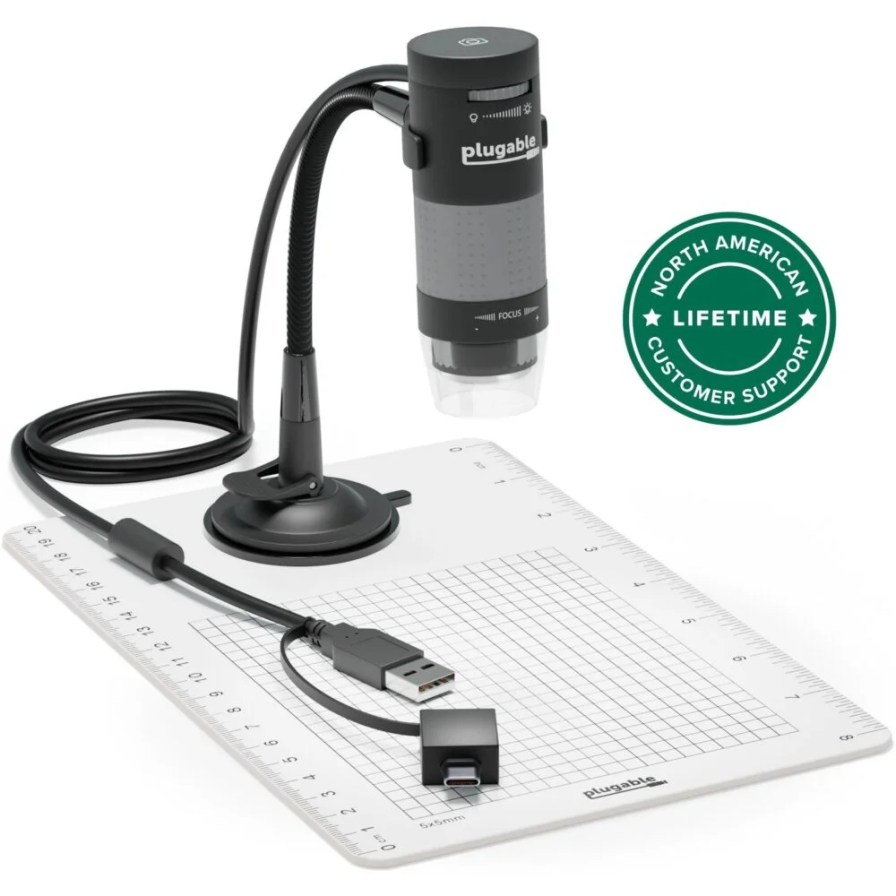
| 💻 Plugable USB2-MICRO-250X | USB with stand | 2 MP, 60x to 250x | Best Budget USB Scope | Buy Here → |
| 🪙 Jiusion 40-1000X | USB mini scope | 8 LEDs, 10 to 250 mm focus | Best Ultra-Budget Pick | Buy Here → |
| 🖥️ Andonstar AD249S-M | HDMI screen scope | 10.1 in screen, 3 lenses | Best Big-Screen Scope | Buy Here → |
| 🔦 TOMLOV DM602 Pro | HDMI screen scope | 10.1 in, 3 lenses, boom arm | Best Boom-Arm Alternative | Buy Here → |
| 📱 TOMLOV DM9 | LCD screen scope | 7 in, 12 MP, 1080P | Best Entry LCD Scope | Buy Here → |
| 🎮 Elikliv EDM9 | LCD screen scope | 7 in, 12 MP, wired remote | Best for Hands-Free Capture | Buy Here → |
Specs come from the manufacturers and the live Amazon listings. Star scores below are our ratings.
🔍 What Matters in a PCB Microscope
📐
Working Distance
The space between lens and board. You need several centimetres to fit an iron tip and tweezers underneath. Stereo microscopes and screen scopes on tall stands win here.
🔎
Real Magnification
Marketing figures assume a huge monitor. For ESP32 modules, 0402 parts and USB-C pins, 10x to 50x on a clear image beats 1000x of blur.
🏗️
Stand Rigidity
A wobbly plastic stand makes the image jump every time you touch the board. Metal stands and boom arms stay put while you work.
💡
Lighting and Glare
Ring LEDs or gooseneck lights that you can angle cut down glare on shiny solder and let you see whether a fillet has really wetted the pad.
🖥️
Screen, HDMI or PC
A built-in screen is fastest at the bench, HDMI lets you use a big monitor, and USB scopes are ideal for photos to share in bug reports or forum posts.
🏆 Detailed Reviews: The Top Two
🥇 BEST OVERALL FOR SOLDERING
Andonstar AD407 Pro HDMI Digital Microscope
⭐ 4.7/5 · Our Rating · The Bench Workhorse
Buy on Amazon →

The AD407 Pro is the screen microscope that electronics repair benches standardise on, and it suits ESP32 work perfectly. A 4 MP sensor feeds a 7 inch LCD on a tall metal stand, and the minimum focus distance of about 5 cm leaves room to slide an iron tip and tweezers under the lens while you watch the joint form on screen. That makes it ideal for drag soldering an ESP32-S3 module, checking the pins of a USB-C receptacle or fixing a bridged QFN regulator. An HDMI output lets you push the image to a large monitor (Andonstar quotes up to 270x on a 27 inch display), and two lamps on the stand light the board from the sides to reduce glare. Make sure the listing says Pro: it is the version with the taller metal stand.
✅ Pros- Room to solder under the lens
- Sharp 4 MP image
- Rigid metal stand
- HDMI to a big monitor
❌ Cons- Not a true 3D view
- Image capture is basic
- Stand takes desk space
🎯 Verdict: The best all-round microscope for soldering and inspecting ESP32 boards.
👉 Check Price on Amazon →
🔭 BEST TRUE 3D VIEW
AmScope SE400-Z Binocular Stereo Microscope
⭐ 4.6/5 · Our Rating · Real Depth Perception
Buy on Amazon →
A digital screen gives you a flat picture; a stereo microscope gives each eye its own view, so you see real depth. That makes a huge difference when you are placing an iron tip on a single module pad or judging whether a fillet has risen up a castellation. The SE400-Z uses a fixed 1X objective with two pairs of wide-field eyepieces for 10X and 20X, which is exactly the range most PCB rework needs. AmScope rates its working distance at a generous 9 inches, so there is plenty of space for tools and even a hot air nozzle, and the boom-arm stand swings over a full-size board. An LED gooseneck light lets you angle the light to kill reflections.
✅ Pros- Natural 3D depth
- Huge working distance
- No lag or screen latency
- Boom arm reaches large boards
❌ Cons- No photo or video capture
- Fixed 10x and 20x steps
- Bigger and heavier
🎯 Verdict: The pick if you do a lot of hand rework and want to see depth, not a flat image.
👉 Check Price on Amazon →
🔧 Detailed Reviews: USB Microscopes
📏 BEST FOR MEASUREMENT · ⭐ 4.6/53. Dino-Lite AM4113T USB Microscope
1.3 MP · 1280 x 1024 at 30 fps · 20x to 50x and 200x · 8 white LEDs · MicroTouch capture
Buy Here →
Dino-Lite is the name engineers know for USB microscopes, and the AM4113T from its Premier series shows why. A 1.3 MP sensor streams 1280 x 1024 at 30 fps over USB to Windows or macOS, with optics covering 20x to 50x plus a 200x setting. Its software includes measurement tools, so you can check pad spacing on a custom PCB or confirm a footprint matches the datasheet. The MicroTouch sensor on the body takes a snapshot without shaking the image. Note that working distance shrinks quickly at higher zoom (Dino-Lite lists about 48.7 mm at 20x but under 10 mm at 40x), and the base kit is handheld, so plan on a stand.
✅ Pros: Excellent optics; calibrated measurement; reliable software; compact.
❌ Cons: Stand sold separately; short working distance at high zoom; premium cost.
🎯 Verdict: The USB microscope to buy for documentation, measurement and PCB design checks.
💻 BEST BUDGET USB SCOPE · ⭐ 4.4/54. Plugable USB2-MICRO-250X Digital Microscope
2 MP · 60x to 250x · LED halo light · flexible arm stand · Windows, Mac, Linux, ChromeOS
Buy Here →
The Plugable 250x is a long-running favourite because it just works: plug it into USB and it appears as a standard webcam, with no special drivers on Windows, macOS, Linux or ChromeOS. A 2 MP sensor takes 1600 x 1200 stills, magnification runs from about 60x to 250x depending on focus distance, and a dimmable LED halo lights the board. The included flexible arm stand with observation stage holds it over an ESP32 DevKit while you check joints or photograph a bad solder bridge for a GitHub issue. Live video is 640 x 480, so it’s better for inspection than for soldering under.
✅ Pros: Driver-free on most systems; handy stand; good stills; great value.
❌ Cons: Low live video resolution; little room for an iron; plastic arm.
🎯 Verdict: An easy, affordable way to inspect and photograph ESP32 boards on your PC.
🪙 BEST ULTRA-BUDGET PICK · ⭐ 4.2/55. Jiusion 40-1000X USB Digital Microscope
40x to 1000x · 10 to 250 mm focus range · 8 adjustable LEDs · USB 2.0 with OTG adapter · up to 30 fps
Buy Here →
If you just want to check whether a header pin is soldered properly or read the tiny markings on an SOT-23 part, the Jiusion mini microscope is the cheapest useful option. It connects over USB 2.0 (with an OTG adapter for Android phones), focuses from 10 mm to 250 mm, and has 8 LEDs on a dimmer wheel. Ignore the 1000x claim; at sensible distances it gives a clear enough view of ESP32 module pads for quick go or no-go checks. Image quality and the stand are basic, but it’s a great first scope or a spare for a classroom kit.
✅ Pros: Very low cost; works with PC and Android; adjustable LEDs; tiny.
❌ Cons: Soft image; basic stand; magnification claims are inflated.
🎯 Verdict: A cheap, cheerful starter scope for quick visual checks.
➕ Also Worth Considering
🖥️ BEST BIG-SCREEN SCOPE · ⭐ 4.6/5
6. Andonstar AD249S-M 10.1 in HDMI Microscope
The big brother of the AD407. A 10.1 inch screen on a boom arm stand and three lenses (listing quotes up to 2000x and 2160P video recording) make it a versatile choice if you also inspect coins or slides. For ESP32 work the larger screen is easier on the eyes during long rework sessions.
Buy Here →🔦 BEST BOOM-ARM ALTERNATIVE · ⭐ 4.5/5
7. TOMLOV DM602 Pro 10.1 in HDMI Microscope
TOMLOV’s answer to the AD249S-M: a 10.1 inch HDMI screen scope with three lenses, a pro boom arm stand, a ring light and PC connection, per the listing. The boom arm swings clear of large boards such as ESP32-P4 HMI panels.
Buy Here →📱 BEST ENTRY LCD SCOPE · ⭐ 4.4/5
8. TOMLOV DM9 7 in LCD Microscope
One of the best-selling screen microscopes. It pairs a 7 inch LCD with a 12 MP camera, 1080P video and LED lights, and can also be viewed on a PC. Working distance is shorter than the AD407 Pro, so it’s better for inspection than for soldering under.
Buy Here →🎮 BEST FOR HANDS-FREE CAPTURE · ⭐ 4.3/5
9. Elikliv EDM9 7 in LCD Microscope
Similar to the DM9 with a 7 inch LCD, 12 MP sensor, 1080P video and 10 LED lights, plus a wired remote so you can grab photos without nudging the stand. Handy for documenting each step of a build or repair.
Buy Here →🛠️ Which Microscope for Which ESP32 Job?
| ESP32 Job | Best Pick | Alternative |
|---|
| Soldering an ESP32-S3 or C6 module onto a custom PCB | Andonstar AD407 Pro | AmScope SE400-Z |
| Clearing a bridge on a USB-C connector or QFN chip | AmScope SE400-Z | Andonstar AD407 Pro |
| Checking header pins and joints on a DevKit | Plugable USB2-MICRO-250X | TOMLOV DM9 |
| Measuring pad pitch and footprints on a new PCB | Dino-Lite AM4113T | Plugable USB2-MICRO-250X |
| Photos for bug reports, blog posts and forums | Dino-Lite AM4113T | Elikliv EDM9 |
| Long rework sessions on large HMI boards | Andonstar AD249S-M | TOMLOV DM602 Pro |
| Reading markings on tiny SMD parts on a tight budget | Jiusion 40-1000X | Plugable USB2-MICRO-250X |
🤔 Which One Should You Buy?
🥇
You solder SMD parts regularly
Get the Andonstar AD407 Pro. It has the working distance and stand to solder under, and the screen saves your neck.
Buy Here →🔭
You want the best rework view
The AmScope SE400-Z gives real depth and a 9 inch working distance, with no screen lag.
Buy Here →📏
You design your own PCBs
The Dino-Lite AM4113T measures pads and footprints and takes publication-quality photos.
Buy Here →💰
You just want to check joints
The Plugable 250x works on any computer, or grab the Jiusion if budget is tight.
Buy Here →❓ Frequently Asked Questions
What magnification do I need to inspect ESP32 solder joints?
For header pins and through-hole parts, 5x to 10x is plenty. For ESP32 module castellations, USB-C pins and 0402 passives, 20x to 50x of real optical magnification is ideal. Higher figures mostly make the field of view too small to work in.
Can I solder under a USB microscope?
Usually not comfortably. Most USB scopes need to sit close to the board to focus, which leaves no room for an iron, and the image on a PC screen can lag. Screen microscopes on tall stands, like the AD407 Pro, or a stereo microscope are much better for soldering.
Is a stereo microscope better than a digital one?
For hands-on rework, yes: the 3D view makes it far easier to place a tip precisely. Digital microscopes win for photos, video, sharing the view and measurement. Many benches end up with one of each.
Why does the image glare off solder joints?
Shiny solder reflects the LEDs straight back into the lens. Angle the light from the side, dim the LEDs, or use a scope with adjustable or gooseneck lighting. A matte silicone mat under the board also helps.
Do I need a microscope if I only use DevKit boards?
Not strictly, but even a budget USB scope is useful for checking header joints, reading chip markings to identify a clone module, and spotting a damaged USB port. If you plan to solder bare modules or make your own PCBs, it quickly becomes essential.
🏁 Final Verdict: Best Microscopes for PCB Inspection
The right microscope for each kind of bench:
🥇 Best Overall for Soldering: Andonstar AD407 Pro
Buy Here →📏 Best for Measurement: Dino-Lite AM4113T
Buy Here →💻 Best Budget USB Scope: Plugable USB2-MICRO-250X
Buy Here →🖥️ Best Big-Screen Scope: Andonstar AD249S-M
Buy Here →🪙 Best Ultra-Budget Pick: Jiusion 40-1000X
Buy Here →For most ESP32 makers who solder their own boards, the Andonstar AD407 Pro is the one to buy: it is tall enough to work under and sharp enough to catch bridges on module pads. Choose the AmScope SE400-Z if you want true depth for heavy rework, the Dino-Lite AM4113T for measurement and documentation, and the Plugable 250x or Jiusion if you mainly inspect. A microscope works best alongside good tools, so see our guides to soldering irons, hot air rework stations, soldering accessories and helping hands and PCB holders.
💬 Found a strange defect under the microscope on your ESP32 board? Describe it in the comments below and we’ll help you figure out what went wrong.
All Amazon links above use our affiliate tag (esp32tutorials-20). Purchasing through them supports esp32tutorials.com at no extra cost to you. Prices and availability change frequently, so always confirm the current price on Amazon before buying.
We are a team of experienced Embedded Software Developers with skills in developing Embedded Linux, RTOS, and IoT products from scratch to deployment with a demonstrated history of working in the embedded software industry. Contact us for your projects: admin@esp32tutorials.com