⚠️ Affiliate Disclosure: This post contains Amazon affiliate links. If you purchase through our links, we may earn a small commission at no extra cost to you. Every product below was checked against its live Amazon listing before publishing. Prices change often, so we don’t list them here. Tap any Buy Here button to see the current price on Amazon.
Bench Test Gear Guide
〰️ Best Function and Signal Generators for ESP32 Work
Feed clean, known signals into your ADC inputs, filters, sensor front ends and pulse counters. Here are 8 picks, from budget DDS boxes to benchtop arbitrary waveform generators.
✅ 8 Generators Compared
✅ Verified Amazon ASINs
✅ Bandwidth Explained
✅ Honest Pros & Cons
A function generator is the other half of your oscilloscope. The scope shows you what a circuit does; the generator gives it a known input to respond to. With one on the bench you can feed a precise sine wave into an ESP32 ADC pin to check linearity and noise, sweep an RC or op-amp filter to see where it rolls off, simulate a flow sensor or encoder with a clean pulse train for the PCNT peripheral, or inject a test tone into an I2S audio front end.
This guide compares 8 generators across three tiers: budget DDS units (Koolertron and Seesii) for learning and everyday MCU work, compact arbitrary waveform generators (UNI-T and OWON) with much more bandwidth, and benchtop instruments (Rigol and Siglent) with low jitter, deep memory and LAN or USB remote control.
💡 Before you buy: Most ESP32 work happens well below 1 MHz: audio, sensor signals, PWM and pulse counting. The headline MHz figure applies to sine waves only; square and pulse outputs top out far lower. Also remember the ESP32 runs at 3.3 V. Many generators can output 10 V or more peak to peak, so set amplitude and offset first and check them on a scope before you connect a GPIO or ADC pin. Plan on a couple of BNC leads too, since the benchtop models may ship without them.
⚡ Quick Comparison: All 8 Generators
| Generator | Type | Sine BW / Channels | Sample Rate | Best For | Buy |
|---|
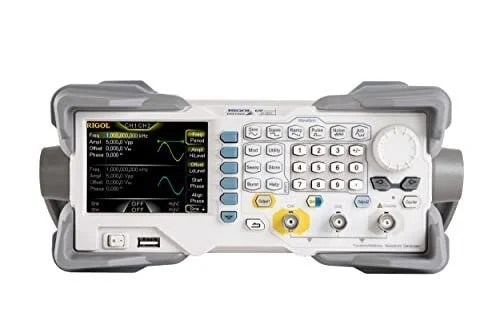
| 🥇 Rigol DG1022Z | Benchtop AWG | 25 MHz · 2 ch | 200 MSa/s · 14-bit | Best Overall | Buy Here → |
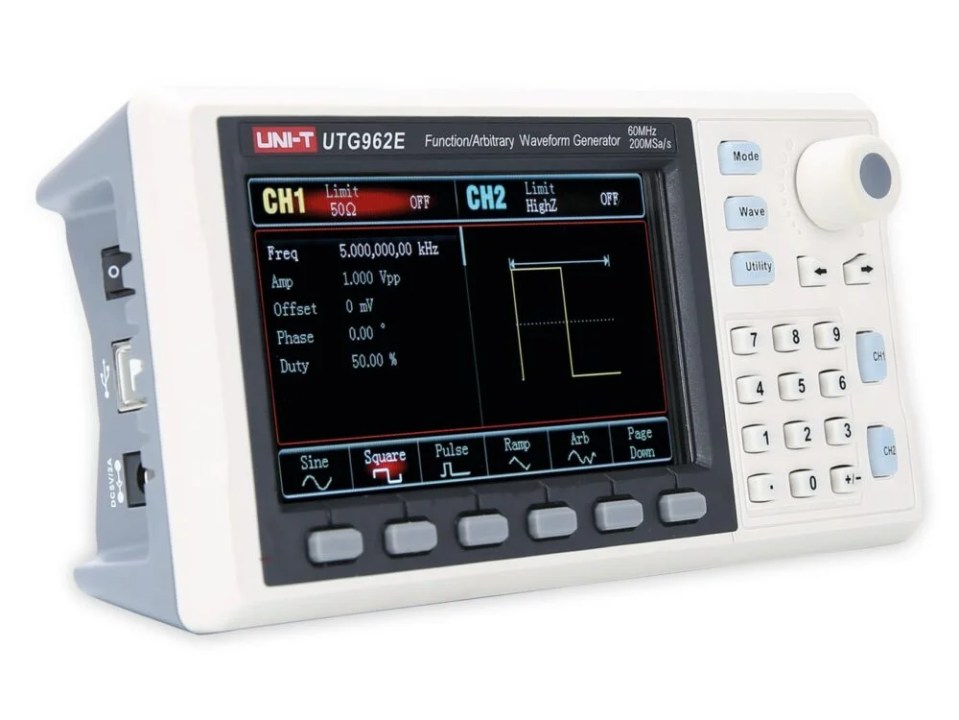
| 🏅 UNI-T UTG962E | Compact AWG | 60 MHz · 2 ch | 200 MSa/s · 14-bit | Best Compact High Bandwidth | Buy Here → |
| 💵 OWON DGE2070 | Compact AWG | 70 MHz · 2 ch | 300 MSa/s · 14-bit | Best Dual-Channel Value | Buy Here → |
| 📻 OWON DGE1060 | Compact AWG | 60 MHz · 1 ch | 300 MSa/s · 14-bit | Best Single Channel | Buy Here → |
| 🎓 Koolertron 15MHz DDS | DDS | 15 MHz · 2 ch | 200 MSa/s · 14-bit | Best for Beginners | Buy Here → |
| 🧰 Koolertron 30MHz DDS | DDS | 30 MHz · 2 ch | 200 MSa/s · 14-bit | Best Mid-Range DDS | Buy Here → |
| 💲 Seesii FG-615 | DDS | 15 MHz · 2 ch | 200 MSa/s | Best Budget | Buy Here → |
| 🏆 Siglent SDG2042X | Benchtop AWG | 40 MHz · 2 ch | 1.2 GSa/s · 16-bit | Best Professional | Buy Here → |
Specs come from the manufacturers and the live Amazon listings. Star scores below are our ratings.
🔍 What Matters in a Function Generator
📈
Bandwidth per Waveform
Sine bandwidth is the headline number. Square, pulse and ramp limits are lower, so check them if you need fast edges.
🔀
Two Channels
A second channel lets you generate I and Q, a clock plus data, or a stimulus plus trigger with adjustable phase.
🎚️
Sample Rate and Resolution
Higher sample rate and bit depth give cleaner sines and sharper arbitrary waveforms with less stepping.
🔁
Sweep, Burst and Modulation
Frequency sweep makes filter testing fast; burst and AM/FM/FSK help test receivers and pulse counters.
🖥️
Remote Control
USB or LAN with SCPI lets a Python script step through test points and log results automatically.
🏆 Detailed Reviews: The Top Two
🥇 BEST OVERALL

The Rigol DG1022Z is the generator to buy if you want a real bench instrument rather than a hobby box. Rigol’s SiFi (Signal Fidelity) design builds each waveform point by point for low jitter and clean edges, and you get two fully independent channels, a built-in harmonics generator, a 200 MHz frequency counter and a deep 8 Mpts arbitrary memory. For ESP32 work that means you can load a captured sensor signal, play it back into an ADC pin while channel 2 provides a trigger, and drive the whole test from a Python script over USB or LAN. Rigol’s documentation and long product life are a bonus.
✅ Pros- Clean, low-jitter output
- Deep 8 Mpts arbitrary memory
- Built-in counter and harmonics
- USB and LAN remote control
❌ Cons- Costs more than DDS boxes
- 25 MHz sine ceiling
- Test leads not included
🎯 Verdict: The best all-round generator. One instrument that will still satisfy you years from now.
👉 Check Price on Amazon →
🏅 BEST COMPACT HIGH BANDWIDTH
UNI-T UTG962E
⭐ 4.7/5 · Our Rating · Big Screen, Small Footprint
Buy on Amazon →
The UNI-T UTG962E fits a 60 MHz dual-channel arbitrary waveform generator into a small case with a bright 4.3-inch colour display that is easier to read than many larger units. You get 200 MSa/s, 14-bit resolution, 1 µHz frequency resolution, AM, FM, PM and FSK modulation and frequency sweep, and the kit ships with BNC cables. It is a strong pick if your bench is crowded and you want headroom for faster clock signals, IF stages or RF experiments alongside everyday ESP32 testing.
✅ Pros- True 60 MHz, two channels
- Large, clear display
- Compact and light
- Ships with BNC cables
❌ Cons- No built-in frequency counter
- Limited arbitrary waveform slots
- PC software is basic
🎯 Verdict: The most bandwidth per square inch of bench space in this guide.
👉 Check Price on Amazon →
⚡ Detailed Reviews: Compact AWGs, Budget DDS and Pro Picks
💵 BEST DUAL-CHANNEL VALUE · ⭐ 4.5/53. OWON DGE2070
70 MHz sine · 2 channels · 300 MSa/s · 14-bit · 8K arbitrary memory · SCPI and LabVIEW
Buy Here →
The OWON DGE2070 packs the highest sine bandwidth in this guide, 70 MHz, into a compact dual-channel unit with 300 MSa/s and 14-bit resolution. It supports SCPI and LabVIEW remote control, so you can automate a frequency-response sweep of an analog front end or step a test signal across your ESP32 ADC range from a script. When you order, make sure the 70 MHz DGE2070 option is selected, since the same listing also offers the 35 MHz DGE2035.
✅ Pros: Highest sine bandwidth here; two channels; SCPI automation; strong value.
❌ Cons: No built-in counter; smaller display; square wave limit far below 70 MHz.
🎯 Verdict: The best capability per dollar if you want two channels and PC automation.
📻 BEST SINGLE CHANNEL · ⭐ 4.4/54. OWON DGE1060
60 MHz sine · 1 channel · 300 MSa/s · 14-bit · built-in arbitrary waveforms · AM/FM/PM/FSK
Buy Here →
If you only need one clean output, the OWON DGE1060 gives you 60 MHz, 300 MSa/s and 14-bit resolution in a small single-channel box. That suits radio alignment, signal injection, checking a scope probe, or feeding one test signal into an ESP32 project at a time. It includes a library of built-in arbitrary waveforms plus AM, FM, PM and FSK modulation, and supports SCPI control. Skip it if you want a stimulus plus trigger, which needs two channels.
✅ Pros: High bandwidth for the class; 300 MSa/s; modulation and SCPI.
❌ Cons: Single channel only; no sync partner channel.
🎯 Verdict: The best pick when one accurate, high-bandwidth output is all you need.
🎓 BEST FOR BEGINNERS · ⭐ 4.4/55. Koolertron 15MHz DDS
15 MHz sine · 2 channels · 200 MSa/s · 14-bit · frequency counter · sweep · user waveform slots
Buy Here →
The Koolertron 15MHz DDS is one of the most popular budget generators on Amazon, and a very approachable first instrument. You get two independent channels, a built-in frequency counter, frequency sweep and storage for your own arbitrary waveforms. 15 MHz is far more than audio, sensor and most microcontroller work needs, and the counter doubles as a handy way to check an ESP32 LEDC or RMT output frequency.
✅ Pros: Huge owner community; two channels plus counter; great value.
❌ Cons: 15 MHz ceiling; menus take some learning.
🎯 Verdict: The safest first signal generator for students and new makers.
🧰 BEST MID-RANGE DDS · ⭐ 4.3/56. Koolertron 30MHz DDS
30 MHz sine · 2 channels · 200 MSa/s · 14-bit · frequency counter · sweep · arbitrary storage
Buy Here →
The Koolertron 30MHz DDS keeps the same friendly dual-channel layout, frequency counter and sweep as the 15 MHz model but doubles the sine bandwidth. That extra headroom is useful for IF stages, faster clock tests and entry-level RF experiments, while it remains just as good for audio and MCU work. It is a sensible choice if you think you will outgrow 15 MHz.
✅ Pros: 30 MHz on a budget; two channels plus counter; proven design.
❌ Cons: Square and pulse limits well below 30 MHz; small screen.
🎯 Verdict: More bandwidth for little extra over the beginner model.
💲 BEST BUDGET · ⭐ 4.2/57. Seesii FG-615
15 MHz sine · 2 channels · 200 MSa/s · frequency counter · sweep · 2.4 in LCD
Buy Here →
The Seesii FG-615 is the lowest-cost dual-channel generator here that we are comfortable recommending. It still gives you two independent outputs, 15 MHz sine, 200 MSa/s, a frequency counter and sweep on a compact 2.4-inch screen. It is a no-frills DDS design, but it handles the core job of driving test signals into audio, sensor and microcontroller circuits, which makes it a good second bench unit or classroom set.
✅ Pros: Lowest cost for two channels; counter and sweep; compact.
❌ Cons: Budget build; limited documentation.
🎯 Verdict: The most generator for the least money.
🏆 BEST PROFESSIONAL · ⭐ 4.7/58. Siglent SDG2042X
40 MHz sine · 2 channels · 1.2 GSa/s · 16-bit · 8 Mpts · TrueArb and EasyPulse
Buy Here →
When signal quality matters most, the Siglent SDG2042X is the upgrade. Its 1.2 GSa/s sample rate and 16-bit resolution, combined with Siglent’s TrueArb and EasyPulse technology, produce arbitrary waveforms and pulses with far lower jitter and distortion than DDS units. Add deep memory, harmonics, rich modulation and solid remote control, and it is an instrument for R&D, low-distortion audio and repeatable automated test rigs.
✅ Pros: Superb signal fidelity; 16-bit; excellent software and support.
❌ Cons: Most expensive here; overkill for casual hobby use.
🎯 Verdict: The best choice when signal fidelity is not negotiable.
🧪 Which Generator for Which ESP32 Job?
| ESP32 Job | Best Pick |
|---|
| Testing ESP32 ADC linearity and noise with a slow sine or ramp | Koolertron 15MHz or Rigol DG1022Z |
| Simulating a flow sensor, encoder or tachometer for PCNT | Koolertron 15MHz (counter helps verify) |
| Sweeping an RC, op-amp or anti-aliasing filter | OWON DGE2070 (sweep plus SCPI) |
| Injecting a test tone into an I2S microphone or audio ADC path | Siglent SDG2042X or Rigol DG1022Z |
| Generating a clock plus trigger or two phase-shifted signals | Rigol DG1022Z or UNI-T UTG962E |
| IF, RF or fast clock experiments | UNI-T UTG962E or OWON DGE1060 |
| Automated test rig scripted in Python | Rigol DG1022Z or Siglent SDG2042X |
| Classroom or second bench on a tight budget | Seesii FG-615 |
🛒 Which One Should You Buy?
🏆
One instrument for years
The Rigol DG1022Z.
📐
Lots of bandwidth, little space
The UNI-T UTG962E.
💵
Best value with automation
The OWON DGE2070.
📻
One clean output
The OWON DGE1060.
🎓
Your first generator
The Koolertron 15MHz DDS.
🧰
A bit more headroom
The Koolertron 30MHz DDS.
💲
Lowest cost
The Seesii FG-615.
🔬
Professional fidelity
The Siglent SDG2042X.
❓ Frequently Asked Questions
Do I need a function generator for ESP32 projects?
Not to get started, but it becomes valuable once you work with analog signals. It lets you test ADC readings, filters, pulse counters and audio paths against a known, repeatable input instead of guessing whether the sensor or the code is at fault.
Can I connect a generator output straight to an ESP32 pin?
Only after you set it safely. ESP32 GPIO and ADC pins must stay between 0 and 3.3 V. Set a low amplitude with a positive DC offset so the waveform never goes below 0 V or above 3.3 V, confirm it on a scope, and add a series resistor of about 1 kΩ for extra protection.
Function generator or arbitrary waveform generator?
A classic function generator outputs standard shapes such as sine, square, triangle and pulse. An arbitrary waveform generator can also replay any waveform you define point by point. Every unit in this guide can do both, so the terms are now used almost interchangeably.
How much bandwidth do I really need?
Less than you might think. Audio needs about 100 kHz, and most sensor and microcontroller signals sit under a few MHz. A 15 MHz DDS unit covers most hobby work. Go for 40 to 70 MHz only for RF, IF or fast clock and edge testing.
Can the ESP32 replace a function generator?
For simple jobs, partly. The LEDC, RMT and I2S peripherals can produce square waves, pulse trains and even sine waves. But a dedicated generator gives you precise frequency and amplitude control, a clean analog output, sweep and modulation, and it keeps working while you debug the board under test.
🏁 Final Verdict: Best Function and Signal Generators
The right generator for every bench and budget:
🏅 Best Compact High Bandwidth: UNI-T UTG962E
Buy Here →🎓 Best for Beginners: Koolertron 15MHz DDS
Buy Here →🧰 Best Mid-Range DDS: Koolertron 30MHz DDS
Buy Here →For most ESP32 makers, a Koolertron 15MHz DDS is the sensible first generator, and the Rigol DG1022Z is the one to buy if you want a real lab instrument that will last. Choose the UNI-T UTG962E or OWON DGE2070 for more bandwidth in a small box, the OWON DGE1060 for one clean output, the Seesii FG-615 for the lowest cost, and the Siglent SDG2042X when fidelity matters most. A generator pairs naturally with a scope, so see our oscilloscopes and logic analyzers guides, power your circuits from one of our bench power supply picks, and plan the rest of your bench with our ESP32 electronics lab guide.
💬 What signals are you trying to test on your ESP32 projects? Tell us in the comments below and we’ll help you pick the right generator.
All Amazon links above use our affiliate tag (esp32tutorials-20). Purchasing through them supports esp32tutorials.com at no extra cost to you. Prices and availability change frequently, so always confirm the current price on Amazon before buying.
We are a team of experienced Embedded Software Developers with skills in developing Embedded Linux, RTOS, and IoT products from scratch to deployment with a demonstrated history of working in the embedded software industry. Contact us for your projects: admin@esp32tutorials.com