⚠️ Affiliate Disclosure: This post contains Amazon affiliate links. If you purchase through our links, we may earn a small commission at no extra cost to you. Every product below was checked against its live Amazon listing before publishing. Prices change often, so we don’t list them here. Tap any Buy Here button to see the current price on Amazon.
Ultimate Buying Guide
🛠️ Best ESP32 Programmers and Debugging Tools
The tools that get firmware onto an ESP32 and find out why it isn’t working: USB-to-serial adapters, an auto-programmer, ESP-Prog JTAG, a module burning fixture, a logic analyzer, a multimeter, a pocket oscilloscope and a soldering station. 12 verified picks with practical flashing and debugging tips.
✅ 12 Tools Compared
✅ Verified Amazon ASINs
✅ Flashing & JTAG Tips
✅ Honest Pros & Cons
🧭
Comparing ESP32 chips? Our
ESP32 chip comparison hub compares every ESP32 chip side by side and links to all of our ESP32 buying guides.
Most ESP32 dev boards program over a single USB cable, so why buy tools at all? Because sooner or later you’ll meet a board with no USB port (an ESP32-CAM, a WT32-ETH01, a bare module on your own PCB), an I2C sensor that won’t answer, a brownout reset you can’t explain, or a crash that printf can’t pin down. That’s when a USB-to-serial adapter, a JTAG debugger, a logic analyzer and a multimeter pay for themselves many times over.
This guide covers 12 tools in three groups: programmers for boards and modules without built-in USB, debuggers for seeing inside the code and the signals, and bench tools for power, wiring and soldering.
💡 Before you buy: The ESP32-S3, C3, C5, C6, H2 and P4 have a built-in USB Serial/JTAG controller, so on boards that wire it to the USB port you can flash and step-debug with OpenOCD over one USB cable, with no extra hardware. You’ll mainly need the tools below for the original ESP32 and ESP32-S2, for boards without USB, and for production modules. Every serial adapter you use with an ESP32 must run at 3.3 V logic.
⚡ Quick Comparison: All 12 Tools
| Tool | Type | Key Feature | Best For | Buy |
|---|
| 🥇 DSD TECH SH-U09C (FTDI) | USB-to-serial | FT232RL, 3.3 V/5 V, DTR/RTS pins | Best Overall Programmer | Buy Here → |
| 🏅 HiLetgo USB Logic Analyzer | Debugger | 24 MHz, 8 channels, PulseView | Best Debugging Tool | Buy Here → |
| 🔵 HiLetgo CP2102 | USB-to-serial | Silicon Labs chip, jumper wires | Reliable Budget Adapter | Buy Here → |
| 💰 HiLetgo CH340 (5-Pack) | USB-to-serial | Five adapters, very cheap | One Per Project | Buy Here → |
| ⚙️ wESP32-Prog (CP2102N) | Auto-programmer | Auto-reset circuit, ESD protection | Hands-Free Flashing | Buy Here → |
| 🐞 ESP-Prog | JTAG debugger | JTAG + auto-program UART | Original ESP32 Debugging | Buy Here → |
| 📷 Aideepen ESP32-CAM-MB (2-Pack) | Programmer base | Plug-in USB for ESP32-CAM | ESP32-CAM Owners | Buy Here → |
| 🏭 HiLetgo ESP32 Burning Fixture | Module programmer | Clamp socket, one-click download | Bare Modules & Small Batches | Buy Here → |
| 🔩 ESP32 Screw-Terminal Breakout (2-Pack) | Breakout board | 3.5 mm terminals for DevKitC | Solid Wiring | Buy Here → |
| 📟 AstroAI Digital Multimeter | Bench tool | Voltage, current, continuity | Every Workbench | Buy Here → |
| 📈 FNIRSI 2C53T | Bench tool | 50 MHz 2-ch scope + meter + DDS | Power & Analog Signals | Buy Here → |
| 🔥 YIHUA 926 III Soldering Station | Bench tool | 60 W, digital, tips and helping hands | Headers & Repairs | Buy Here → |
Specs come from the live Amazon listings and manufacturer data.
🔍 How ESP32 Programming Works
🔌
Serial Bootloader
Every ESP32 has a ROM bootloader. Hold GPIO0 low while resetting (EN) and it waits for firmware over UART0. esptool, the Arduino IDE and idf.py flash all use this.
🔄
Auto-Reset Circuit
Dev boards use two transistors driven by the adapter’s DTR and RTS lines to toggle EN and GPIO0 automatically. Without it, you press BOOT and RESET by hand each time you flash.
🐞
JTAG Debugging
JTAG lets OpenOCD and GDB set breakpoints, step through code and inspect variables live. Newer chips have it built into USB; the original ESP32 needs an external probe like the ESP-Prog.
📡
OTA Updates
After the first flash, ESP-IDF, Arduino and ESPHome can update firmware over Wi-Fi. You still need a serial adapter for the first upload and for recovering a broken build.
🏆 Detailed Reviews: ESP32 Programmers and Debugging Tools
🥇 BEST OVERALL PROGRAMMER
DSD TECH SH-U09C USB-to-TTL Adapter (FTDI FT232RL)
⭐ 4.6/5 · Over 2,100 Ratings
3.3 / 5 V
SELECTABLE LOGIC

If you buy one serial adapter, make it DSD TECH’s SH-U09C (about 4.6 stars from 2,100+ ratings). It’s built on FTDI’s FT232RL, which is very stable and has well-supported drivers on Windows, macOS and Linux. It has a 3.3 V / 5 V logic jumper (always set it to 3.3 V for ESP32), TX, RX and power LEDs that show at a glance whether data is flowing, and breaks out CTS, RTS and DTR, so you can wire up an auto-reset circuit or flash manually with the BOOT button. It’s the tool for WT32-ETH01 Ethernet modules, ESP32-CAM boards without a base, custom PCBs and reading the boot log of a board that won’t start. One caution: power the ESP32 from the adapter’s 5 V pin into the board’s 5 V/VIN input, not from its 3.3 V pin, which can’t supply Wi-Fi current peaks.
✅ Pros- Genuine FTDI chip
- 3.3 V / 5 V selectable
- DTR/RTS broken out
- Huge review base
❌ Cons- Mini-USB on some versions
- No auto-reset circuit onboard
- 3.3 V pin is low current
🎯 Verdict: The most dependable USB-to-serial adapter for flashing and debugging ESP32 boards.
👉 Check Price on Amazon →
🏅 BEST DEBUGGING TOOL
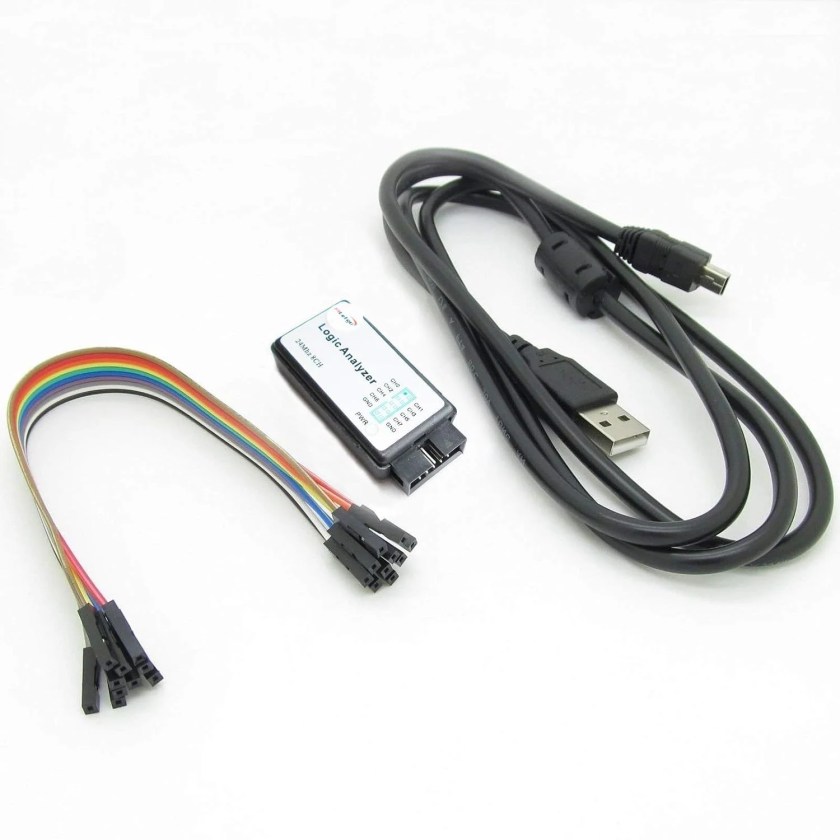
HiLetgo USB Logic Analyzer (24 MHz, 8 Channels)
⭐ 4.5/5 · See Every Bit on the Wire
UART · I2C · SPI
PROTOCOL DECODING
When an I2C sensor won’t respond, an SPI display shows garbage, or UART data looks corrupted, a logic analyzer shows exactly what’s on the wires. This tiny HiLetgo unit (about 4.5 stars from 592 ratings) samples 8 digital channels at up to 24 MHz, and with the free, open-source sigrok PulseView software it decodes UART, I2C, SPI, 1-Wire and dozens of other protocols into readable bytes. You’ll instantly see whether the sensor ACKs its address, whether your clock speed is right, or whether two devices are fighting over the bus. It’s also great for measuring GPIO timing, PWM duty cycles and how long the ESP32 takes to wake and transmit. It ships with an EMI ferrite USB cable and test leads. 24 MHz comfortably handles buses up to a few MHz; it’s a digital tool, so use an oscilloscope for analog and power problems.
✅ Pros- Decodes UART, I2C, SPI and more
- Free PulseView software
- Pocket sized
- Excellent value
❌ Cons- Digital only
- 24 MHz limit for fast SPI
- Basic input protection
🎯 Verdict: The single most useful debugging tool for ESP32 sensor and display problems.
👉 Check Price on Amazon →
🔵 BEST BUDGET ADAPTER · ⭐ 4.5/53. HiLetgo CP2102 USB-to-TTL Module
Silicon Labs CP2102 · USB-A plug · 3.3 V and 5 V pins · DTR broken out · jumper wires included
Buy Here →
The CP2102 is the same Silicon Labs chip found on many ESP32 dev boards, so if your board already works on your computer, this adapter will too. HiLetgo’s module (about 4.5 stars from 947 ratings) plugs straight into a USB-A port, uses 3.3 V logic, and includes jumper wires to connect TX, RX and GND. It’s cheaper than the FTDI adapter and perfectly reliable for flashing and serial monitoring. Install Silicon Labs’ VCP driver on Windows if it doesn’t appear automatically.
✅ Pros: Reliable chip; direct USB plug; cheap; jumper wires.
❌ Cons: No RTS pin on most versions; bulky in a laptop port.
🎯 Verdict: A dependable, low-cost adapter for everyday ESP32 flashing.
💰 BEST MULTI-PACK · ⭐ 4.4/54. HiLetgo CH340 USB-to-TTL Module (5-Pack)
WCH CH340 · USB-A plug · 3.3 V/5 V · five adapters
Buy Here →
A 5-pack of CH340 adapters (about 4.4 stars from 240 ratings) costs about the same as one premium adapter, which means you can leave one permanently attached to each project for serial logs, keep one in your laptop bag, and not worry if one gets damaged. The CH340 is the chip on many budget ESP32 boards and works fine for flashing at typical baud rates. Set the logic jumper to 3.3 V before connecting, and install WCH’s driver on older Windows or macOS versions if the port doesn’t appear.
✅ Pros: Five adapters; very cheap; widely supported.
❌ Cons: Driver needed on some systems; check the voltage jumper.
🎯 Verdict: The value pick when you want an adapter for every project.
⚙️ BEST AUTO-PROGRAMMER · ⭐ 4.0/55. wESP32-Prog USB Programming Adapter (CP2102N)
Silicon Labs CP2102N · ESP32 auto-programming transistors onboard · ESD protection on USB and UART · 5 V through Schottky diode
Buy Here →
Pressing BOOT and RESET by hand gets old fast. Silicognition’s wESP32-Prog includes the same auto-programming transistor circuit used on dev boards, so esptool, the Arduino IDE and idf.py put the ESP32 into download mode and reset it automatically. It uses the CP2102N for cross-platform compatibility, adds ESD protection on USB and UART, and passes 5 V through a Schottky diode to power your circuit. It was designed for the wESP32 Ethernet board’s programming header, but connecting its TX, RX, EN, IO0 and power lines to any custom ESP32 PCB gives you the same one-click flashing. It has about 4.0 stars from 25 ratings, with 16 in stock.
✅ Pros: Automatic download mode; ESD protection; CP2102N.
❌ Cons: Micro USB; connector made for wESP32; few reviews.
🎯 Verdict: The adapter for custom ESP32 boards that should flash with one click.
🐞 BEST JTAG DEBUGGER · ⭐ 5.0/56. ESP-Prog JTAG Debug and Program Downloader
JTAG debugging + UART auto-program download · USB connection · for the original ESP32
Buy Here →
The ESP-Prog design is Espressif’s two-in-one debugging tool: one channel works as a JTAG probe for OpenOCD and GDB, and the other is a serial programmer with auto-download. With it you can set breakpoints, step through code and inspect variables on the original ESP32 from VS Code’s ESP-IDF extension, which is invaluable for crashes, watchdog resets and race conditions that logging can’t explain. Connect its JTAG header to the ESP32’s GPIO 12 (TDI), 13 (TCK), 14 (TMS) and 15 (TDO), plus EN and ground. This listing has only one rating so far, so check the photos match Espressif’s ESP-Prog layout. If you’re using an ESP32-S3, C3 or C6, skip it: their built-in USB-JTAG does the same job over the USB cable.
✅ Pros: Real breakpoints and stepping; JTAG + UART in one.
❌ Cons: Uses four GPIOs; one review; unnecessary on S3/C3/C6.
🎯 Verdict: The JTAG debugger for serious ESP-IDF work on the original ESP32.
📷 BEST FOR ESP32-CAM · ⭐ 4.0/57. Aideepen ESP32-CAM-MB Programmer Base (2-Pack)
Plug-in base for ESP32-CAM · USB-to-serial with auto-download · Micro USB · includes ESP32-CAM boards
Buy Here →
The ESP32-CAM has no USB port, and wiring an FTDI adapter to it every time you flash is the number-one source of frustration with this board. The ESP32-CAM-MB base solves it: plug the camera board on top and you get a USB-to-serial chip with auto-download, so it flashes like a normal dev board. This Aideepen 2-pack (about 4.0 stars from 688 ratings) includes two ESP32-CAM boards with their MB bases. If uploads still fail, hold the IO0 button on the base while the upload starts. It’s also our top pick in the ESP32-CAM buying guide.
✅ Pros: No wiring; auto-download; cameras included.
❌ Cons: Micro USB; ESP32-CAM only.
🎯 Verdict: The easiest way to program ESP32-CAM boards.
🏭 BEST FOR BARE MODULES · ⭐ 3.9/58. HiLetgo ESP32 Module Burning Fixture (Test Socket Programmer)
Clamp socket for ESP32 modules · one-click firmware download · all IO broken out
Buy Here →
If you’re building your own PCBs, it’s often easier to flash ESP32 modules before soldering them. This HiLetgo burning fixture clamps a bare module into a spring-pin socket, connects it to USB with one-click download, and breaks out all IO pins so you can also test the module as a minimal dev board. It’s handy for small production runs, for flashing replacement modules, and for checking a batch before assembly. It has about 3.9 stars from 7 ratings, with 14 in stock. Confirm the socket matches your module footprint (such as ESP32-WROOM-32) before buying.
✅ Pros: Flash modules without soldering; IO broken out.
❌ Cons: Footprint-specific; few reviews.
🎯 Verdict: The tool for pre-flashing ESP32 modules for your own boards.
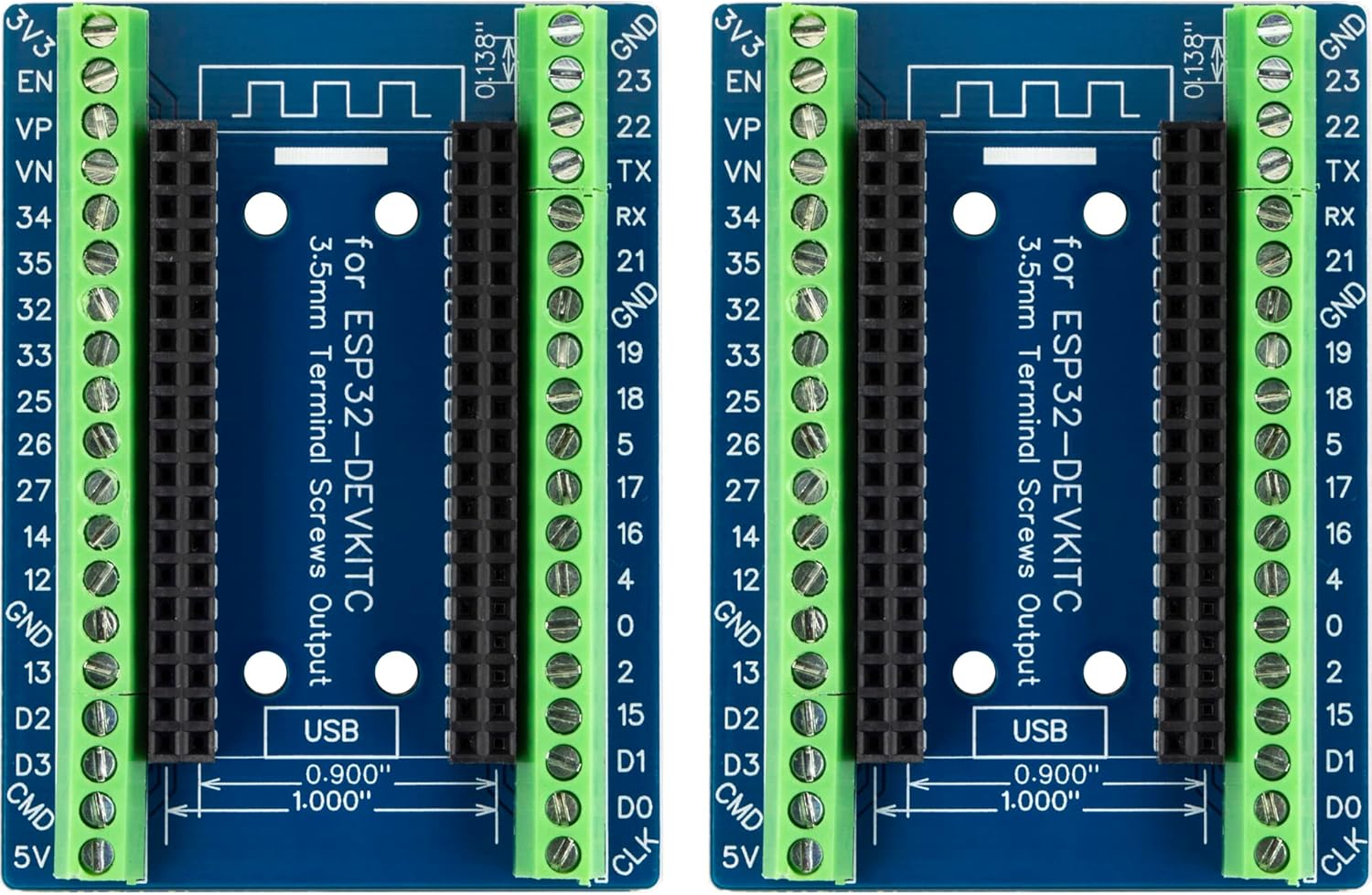
🔩 BEST FOR SOLID WIRING · ⭐ 4.4/59. ESP32 Screw-Terminal Breakout Board (2-Pack)
3.5 mm screw terminals · GPIO expansion · fits 0.9″ and 1.0″ wide ESP32-DevKitC / WROOM-32 boards
Buy Here →
Many “bugs” are really loose jumper wires. Full-size ESP32 DevKitC boards are also too wide for a standard breadboard, leaving only one row of holes on one side. This screw-terminal breakout (about 4.4 stars from 121 ratings, 2-pack) gives every GPIO a 3.5 mm screw terminal with labels, so sensor and relay wiring stays put on your bench or inside an enclosure. It fits 0.9″ and 1.0″ wide ESP32 DevKitC and WROOM-32 boards; measure the spacing between your board’s two pin rows to confirm.
✅ Pros: Secure screw terminals; labeled pins; 2-pack.
❌ Cons: Only fits DevKitC-style widths; ESP32 not included.
🎯 Verdict: The cure for loose wires on full-size ESP32 dev boards.
🧰 Detailed Reviews: Bench Tools
📟 BEST MULTIMETER · ⭐ 4.5/510. AstroAI Digital Multimeter (2000 Counts)
DC/AC voltage · current · resistance · continuity · diode test
Buy Here →
With over 56,000 ratings (about 4.5 stars), this AstroAI meter is the most popular multimeter on Amazon, and every ESP32 bench needs one. Use it to check that your 3.3 V rail is really 3.3 V under load, find a broken jumper wire with the continuity beeper, confirm a pull-up resistor’s value, check a battery’s charge, and measure your project’s current draw in series with the supply. It covers DC and AC voltage, current, resistance, continuity and diodes. For microamp deep-sleep measurements, check the meter’s lowest current range against what you need, or use a dedicated low-current tool.
✅ Pros: Huge review base; continuity beeper; affordable.
❌ Cons: 2000 counts; limited for µA sleep currents.
🎯 Verdict: The first tool to buy for any electronics bench.
📈 BEST POCKET OSCILLOSCOPE · ⭐ 4.3/511. FNIRSI 2C53T 3-in-1 Oscilloscope, Multimeter and Signal Generator
50 MHz, 2 channels · built-in multimeter · DDS signal generator · handheld
Buy Here →
Some ESP32 problems are analog: the 3.3 V rail dipping when Wi-Fi transmits (causing brownout resets), noisy power from a cheap adapter, slow I2C edges from weak pull-ups, or ringing on a long cable. A logic analyzer can’t see those, but an oscilloscope can. The FNIRSI 2C53T (about 4.3 stars from 911 ratings) combines a 50 MHz, 2-channel scope, a multimeter and a DDS signal generator in a handheld unit, which makes it a practical first scope for makers. Triggering on the supply rail during a Wi-Fi burst is the fastest way to diagnose mysterious resets. For serious bench work, a desktop scope offers more bandwidth and features.
✅ Pros: 3 tools in one; 2 channels; portable; affordable.
❌ Cons: Small screen; entry-level performance.
🎯 Verdict: An affordable first oscilloscope for chasing power and signal problems.
🔥 BEST SOLDERING STATION · ⭐ 4.4/512. YIHUA 926 III 60 W Digital Soldering Station Kit
60 W · digital temperature display · °C/°F · 6 extra tips · 2 helping hands · lead-free solder, solder sucker and tweezers · auto sleep
Buy Here →
Many ESP32 boards and modules ship with headers unsoldered, battery leads need attaching, and the TP4056 charger or MCP1700 regulator in your power circuit has to go somewhere. YIHUA’s 926 III kit (about 4.4 stars from 7,200+ ratings) is a complete starter setup: a 60 W temperature-controlled station with a digital display, six extra tips, two helping hands, lead-free solder, a solder sucker, tweezers and an auto-sleep function that protects the tip. Temperature control matters with small SMD parts and castellated module pads, which cheap unregulated irons can lift or overheat.
✅ Pros: Temperature control; complete kit; auto sleep; popular.
❌ Cons: Bench-bound; stock tips are basic.
🎯 Verdict: A complete, temperature-controlled soldering kit for ESP32 makers.
🔌 Flashing an ESP32 With a USB-to-Serial Adapter
| Adapter Pin | ESP32 Pin | Notes |
|---|
| TX | RX0 (GPIO3) | TX always goes to RX |
| RX | TX0 (GPIO1) | RX always goes to TX |
| GND | GND | Always connect ground |
| 5 V | 5 V / VIN | Feeds the board’s regulator ⚠️ |
| (none) / DTR via circuit | GPIO0 | Pull to GND while resetting to enter download mode |
| (none) / RTS via circuit | EN | Pulse low to reset; release GPIO0 after upload |
Set the adapter to 3.3 V logic first. The original ESP32 uses GPIO1/GPIO3 for UART0; newer chips use different pins, so check your module’s datasheet (for example, the ESP32-C3 uses GPIO21 and GPIO20). If an upload fails with “Failed to connect”, it almost always means GPIO0 wasn’t low during reset or TX/RX are swapped.
🛒 Which Tools Do You Need?
🎓
Just starting out?
An AstroAI multimeter and one CP2102 or FTDI adapter.
🧪
Sensor or display not working?
The logic analyzer with PulseView.
🐞
Crash you can’t explain?
ESP-Prog on the original ESP32, or built-in USB-JTAG on S3/C3/C6.
🧩
Designing your own PCB?
wESP32-Prog for one-click flashing, plus the burning fixture for modules.
📷
ESP32-CAM projects?
The ESP32-CAM-MB base.
⚡
Random resets?
The FNIRSI scope on the 3.3 V rail during Wi-Fi transmit.
❓ Frequently Asked Questions
Do I need an external programmer for the ESP32-S3 or C3?
Usually not. Their built-in USB Serial/JTAG controller lets you flash and debug over the native USB port. If a bad build crashes before USB starts, hold the BOOT button while plugging in to force download mode. You only need an adapter if your board doesn’t route the native USB pins to a connector.
Why does my upload fail with “Failed to connect to ESP32”?
The chip didn’t enter download mode. Hold BOOT (GPIO0) while the upload starts, check TX and RX aren’t swapped, try a different USB cable (many are charge-only), and lower the upload speed. On boards with weak auto-reset circuits, adding a 1–10 µF capacitor between EN and GND often fixes it.
CP2102, CH340 or FTDI: which chip is best?
All three work well with the ESP32. FTDI and CP2102 adapters are the most trouble-free across operating systems; the CH340 is the cheapest and sometimes needs a driver. More important than the chip is that the adapter runs at 3.3 V logic and, ideally, breaks out DTR and RTS.
How do I debug an ESP32 with JTAG in VS Code?
Install Espressif’s ESP-IDF extension, connect the board over its USB-JTAG port (S3, C3, C6) or through an ESP-Prog (original ESP32), select the matching OpenOCD configuration, and start a debug session. You can then set breakpoints and inspect variables. Start with our ESP-IDF and VS Code installation guide.
What does a “Brownout detector was triggered” message mean?
The ESP32’s supply voltage dipped below its safe threshold, usually during a Wi-Fi transmit burst. Common causes are a weak USB port or cable, a thin power wire, a too-small regulator or a nearly flat battery. Use a better supply, add a large capacitor near the board, and check the rail with an oscilloscope. Our ESP32 power guide covers supplies and regulators.
🏁 Final Verdict: Best ESP32 Programming and Debugging Tools
The tools worth having on your bench:
🥇 Best Programmer: DSD TECH SH-U09C (FTDI)
Buy Here →🏅 Best Debugging Tool: HiLetgo USB Logic Analyzer
Buy Here →📟 Best Multimeter: AstroAI Digital Multimeter
Buy Here →Every ESP32 maker should own a multimeter and a 3.3 V USB-to-serial adapter; the DSD TECH FTDI is the most dependable, and the CP2102 and CH340 packs are great value. Add a logic analyzer the first time a sensor refuses to talk, and an ESP-Prog if you do serious ESP-IDF work on the original ESP32. Newer chips like the S3, C3 and C6 can flash and debug over plain USB. Get set up with our ESP-IDF installation guide for Windows or Linux, follow our getting started tutorial, and compare chips in our ESP32 chip comparison hub.
💬 Stuck on a board that won’t flash or a sensor that won’t respond? Describe the error in the comments below, and we’ll suggest the right tool to track it down.
All Amazon links above use our affiliate tag (esp32tutorials-20). Purchasing through them supports esp32tutorials.com at no extra cost to you. Prices and availability change frequently, so always confirm the current price on Amazon before buying.
We are a team of experienced Embedded Software Developers with skills in developing Embedded Linux, RTOS, and IoT products from scratch to deployment with a demonstrated history of working in the embedded software industry. Contact us for your projects: admin@esp32tutorials.com